28-92 PN-0908073 Rev. 11
PS 164-2
THE ART OF WELDING
POLYSOUDE
PS 164
01
01 P
01 P
01 PA
(...)
01 PARIS
2
5
7
01 PARIS
01 PARIS
(...)
01 PARIS
01 NARIS
(...)
01 NANTE
01 NANTES
2
5
7
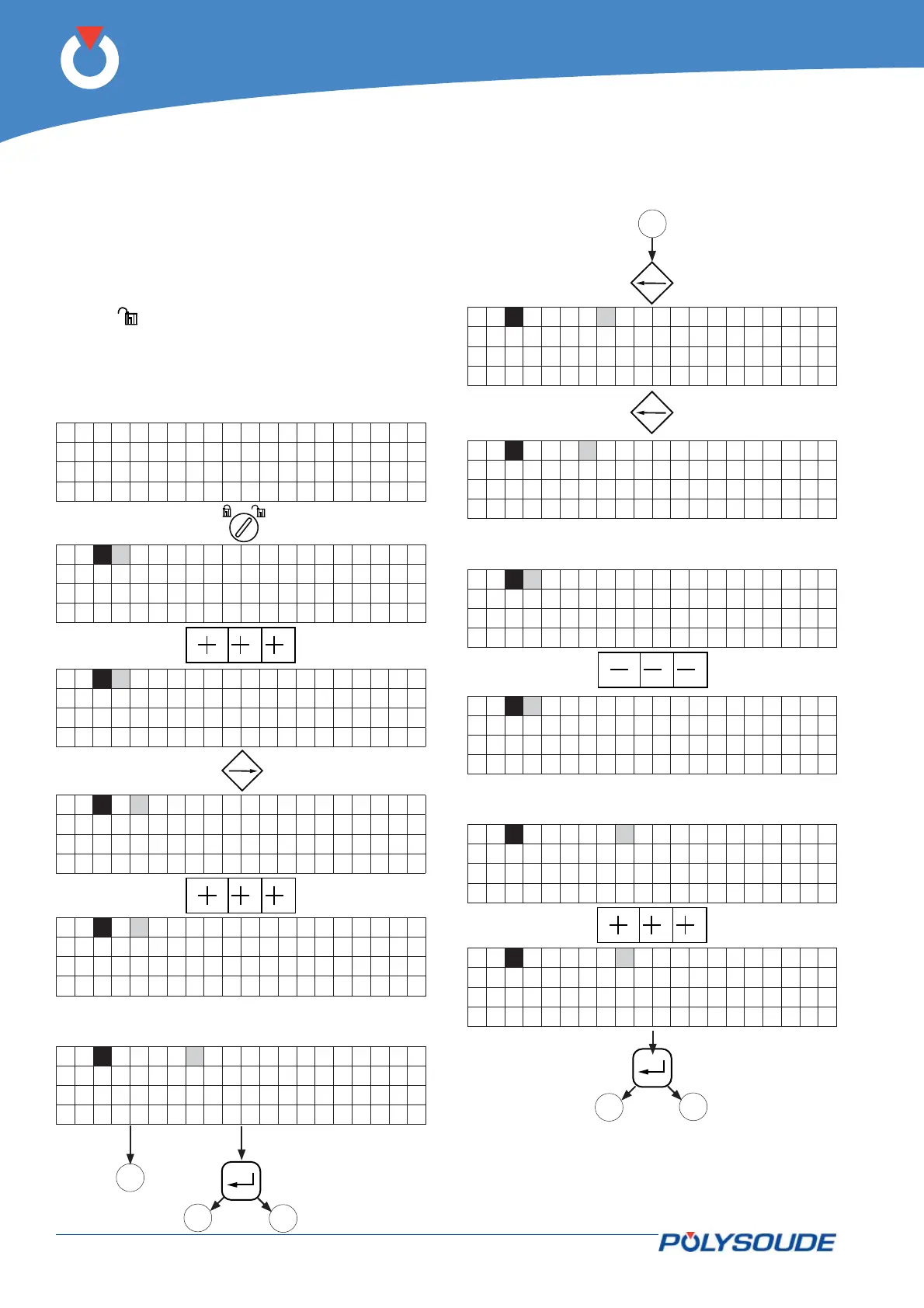
5. 3. 1. Entering the program name
To choose the number of the program, the switch of
the remote control pendant has to be used.
The current range (50A/160A) is set with the key
operated switch on the front panel of the power
source.
The key operated switch SY 26 for choosing the
"modifi cation permitted or not" mode of the machine
has to be in the "modifi cation permitted" position
(symbol
).
For program version L633 5.0 onwards, if the
last character (the eigth) of the program name
consists of a dollar symbol ($), no modifi ca-
tion of the welding parameters by the remote
control pendant is possible.
5. 3. 2. Modifying the program name



 To Next Page