A-6
A TMS-A-305 Calibration Set
A.4 Analyzing the Measurement Result
The measurement is analyzed using the CalibrationDataEvaluation add-in.
The add-in successively queries the standard used, the ambient temperature
as well as the instrument to be calibrated. You can avoid these queries by
specifying the information in the file name of the measurement file that is to
be analyzed. For example, the TMS-xxx_EN16_1_25°C.tms file contains all
required information.
Pay attention to the following information when you assign a file name:
•
The order of the information in the file name is arbitrary.
•
The names of the device and the standard have to be given in the same
way they have been entered in the dialog.
•
When entering the temperature, make sure that the characters °C follow
the temperature value directly without blanks.
Run Add-In
To analyze the measurement result, proceed as follows:
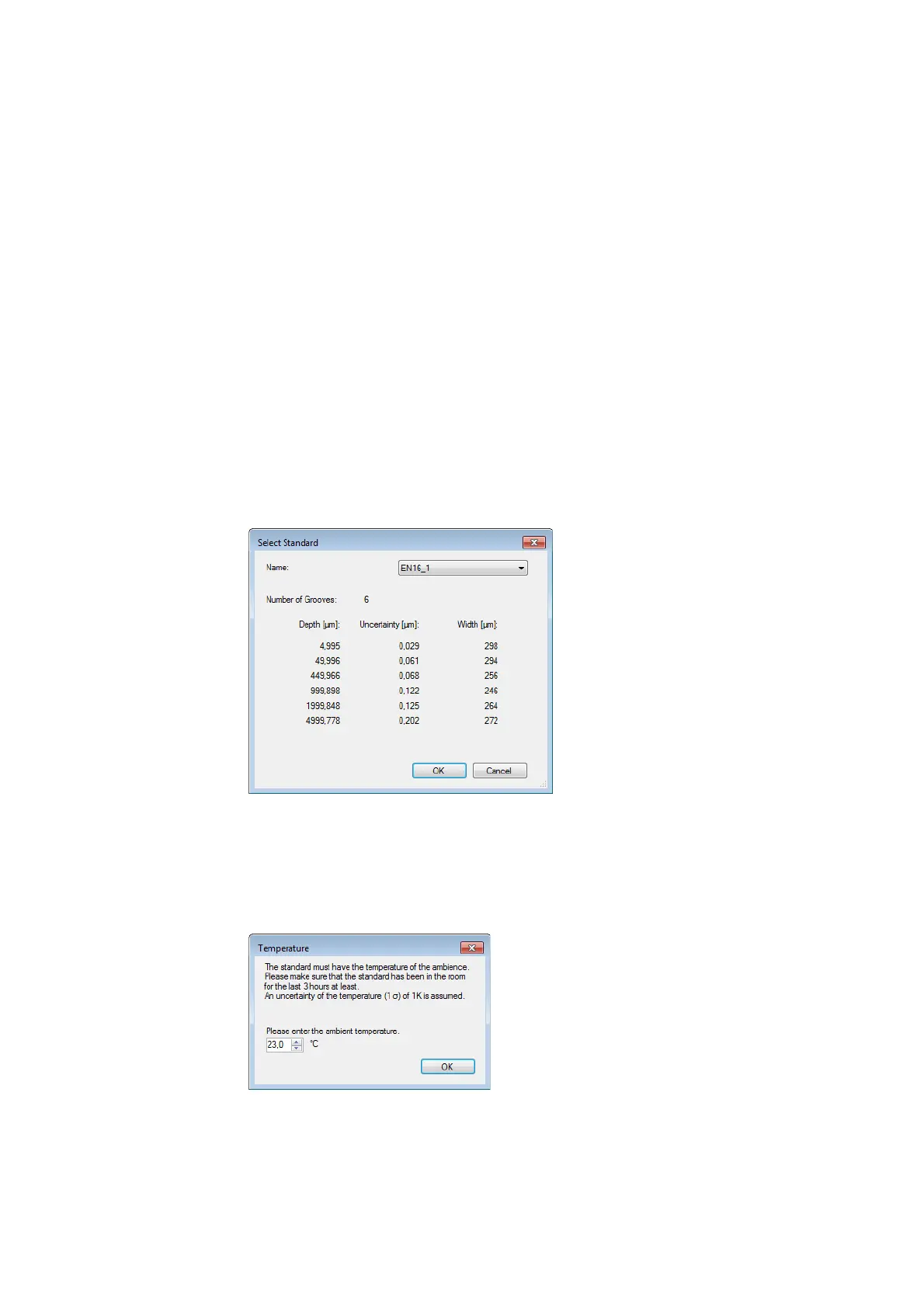
1. Select Tools > Evaluate Calibration Data.
The
Select Standard
dialog appears.
Figure A.5:
Select Standard
dialog
2. If you have defined several standards (refer to S
ECTION
A.2), select the
standard used and click OK. You will find the identification number of your
depth setting standard in the calibration certificate.
The
Temperature
dialog appears.
Figure A.6:
Temperature
dialog
3. Enter the measured ambient temperature.
4. Click OK.



 To Next Page