Chapter Four: How to Use the Printer and check
before/after Use
In this Chapter, you will learn how to master and use printer quickly, including inspection work before
and after use.
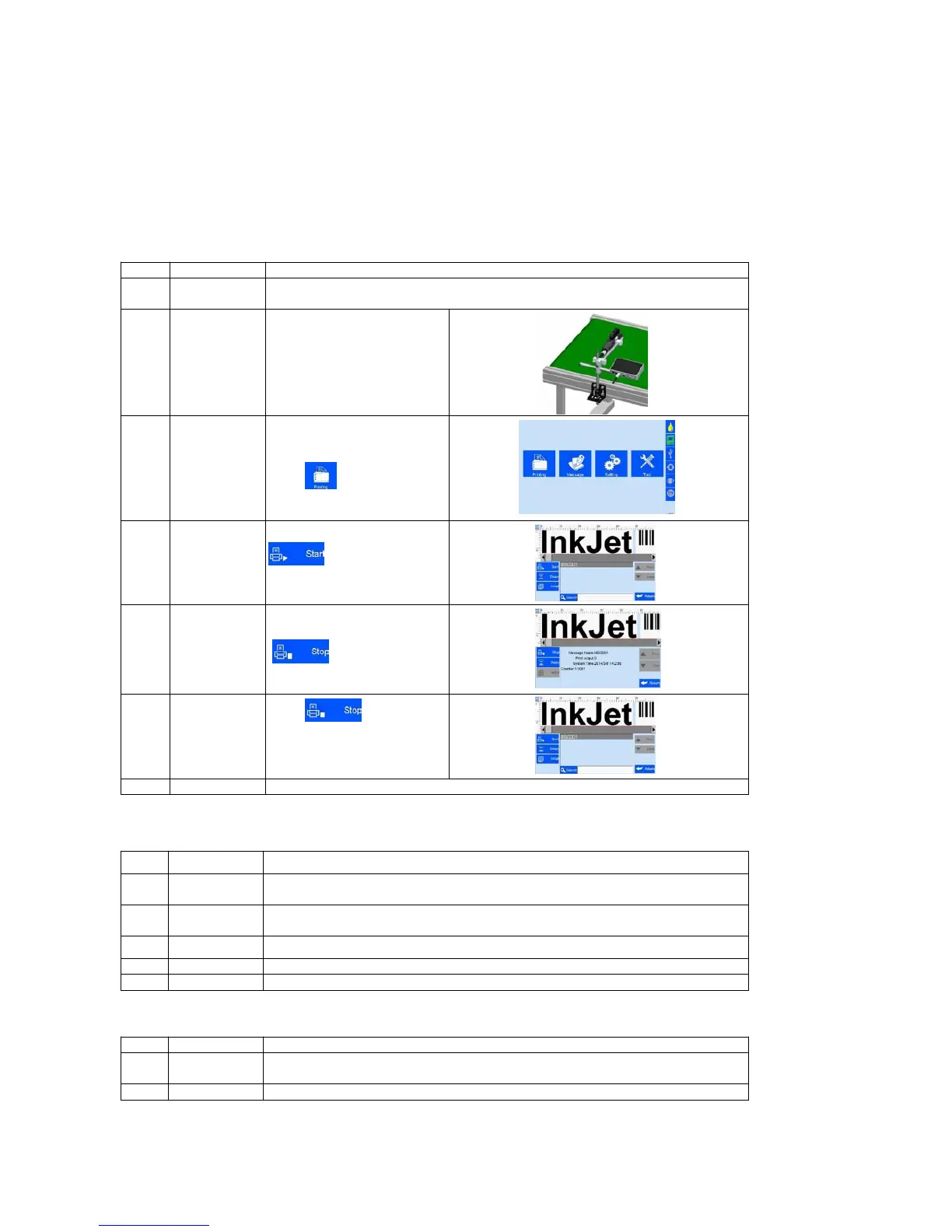
4.1 How to Use the Printer
Insert cartridge into the printer by an angle of 15 degree, lock cartridge clip to
secure. (see 2.3 Cartridge Installation)
to printer power input,
switch on power, printer
Main Interface
---
Printing
Management
“main interface” enter after
initialization (see Section 5.1).
Click to enter
“Printing Management” (see
Select data -
Start printing
Select data,and click
to Start printing.
When printing start, the
button change to the icon
for printing stop,
meanwhile a printing report
appear.
Click to stop
printing, then return to “Start
printing” status
Exit printing, and switch off power.
4.2 Check Work before Use
Make sure the bracket mounted tightly?
Make sure the printer position correct? Is the nozzle plate parallel to printing
object? Is the throw distance controlled within 0.5-2.5mm?
Is the cartridge wiped clean? is cartridge installed on printer?
Is the printer input voltage normal?
Check status bar, does the machine run normally?
Is the printer power switched off?
Make sure the cartridge removed from printer, then clean and cap the print head?



 To Next Page