17
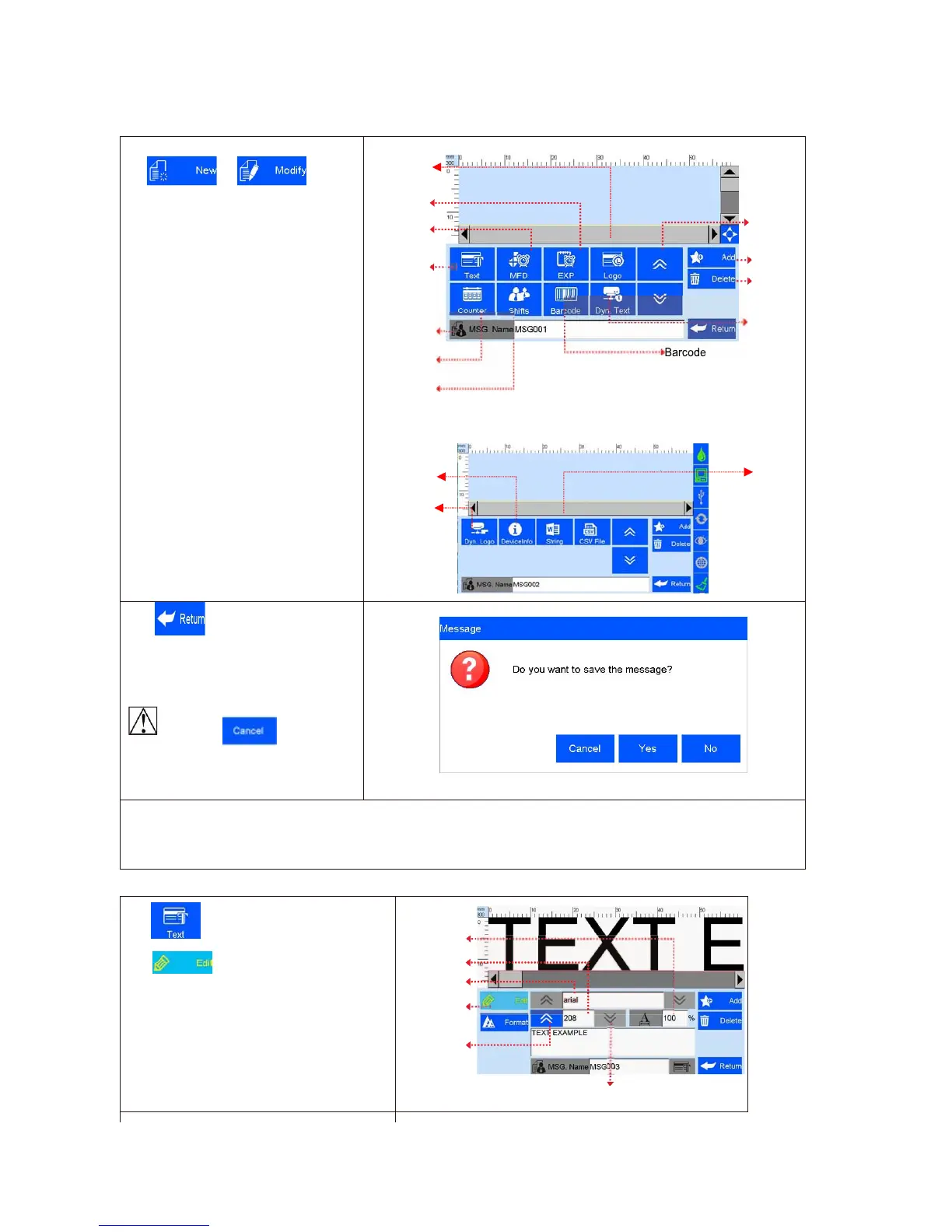
5.3.1 New/Edit Data
Clip or on data
management interface to enter data edit
interface.
A. New data: text, counter, shifts,
production date, expiration date, image
logo, barcode, dynamic text, dynamic
logo, device information, string, CSV;
B. Edit: data in printing process cannot
be edited;
C. File name: maximum 15 characters,
empty file name or repeated file name
are not allowed.
Image Logo
Click to save data when finish
edit, interface jump out to ask “Are you
sure you want to save the message?
Cancel, Yes, No”
If you click
the machine
will remain on editing interface.
Note: “MSG001” is default data in system. The system allows maximum 500 files or data (including default
“MSG001”); The system does not save empty or error messages.
5.3.2 Add Text Object
Click to add text object, see Image9.
Click
to enter text editing interface:
A. Font: including the default one, support
2 fonts, (the default one and another
alternative font).
B. 12-156mm height( adjust freely within
the scope of 1-12.7mm);
C. Text horizontal scale: 1-300%;
D. Text content , not exceed 78 words
Horizontal
scale
Height
Text



 To Next Page