15
POSEIDON M28 USER MANUAL
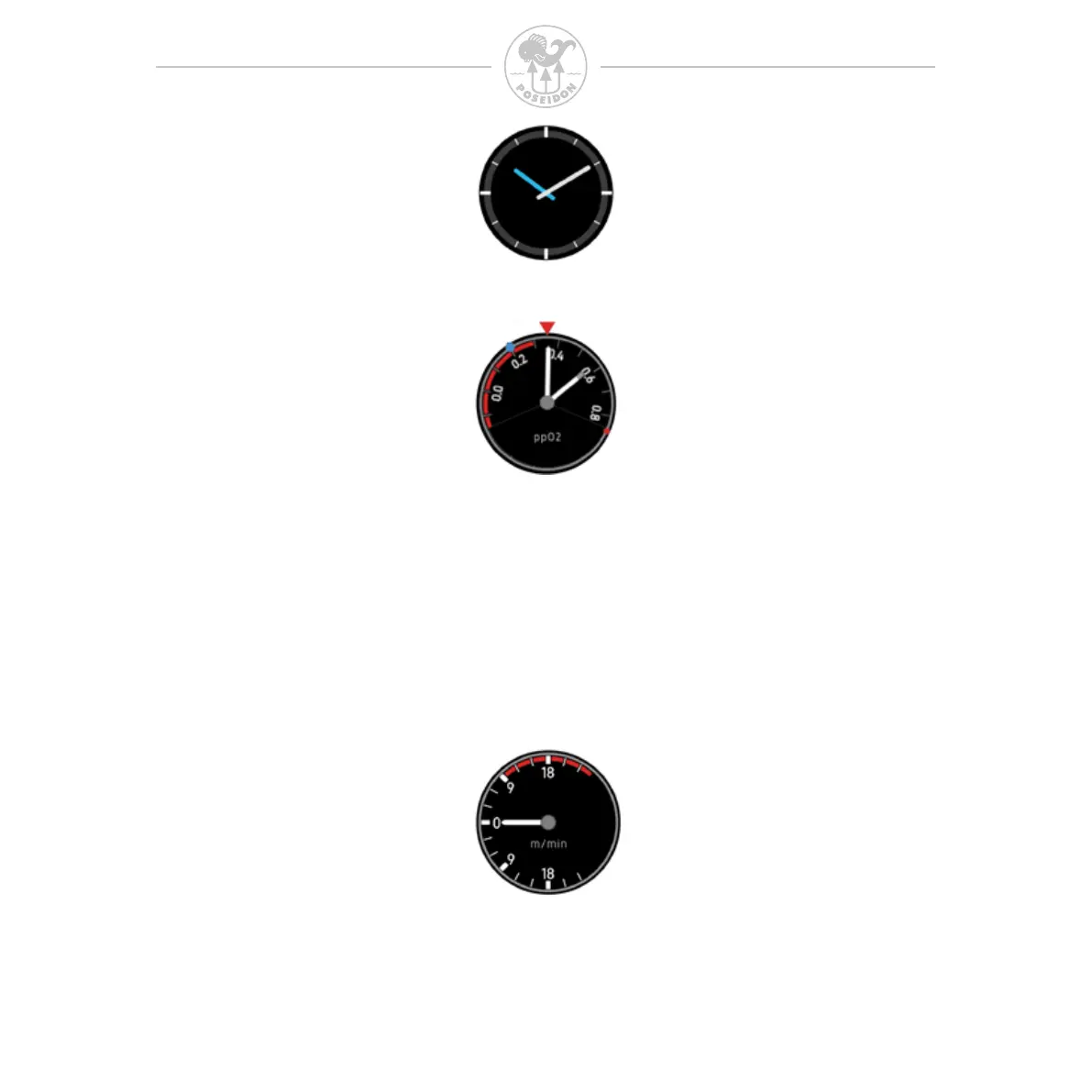
Clock. Displays the same time and time zone as the Top Bar. Adjustments of the
clock´s time are made in settings.
ppO
2
gauge. Shows one or more ppO
2
NEEDLES depending on the number of
oxygen sensors connected. Long white needle for the main sensor, gray tip for
secondary sensor, blue tip for the third sensor. The setpoint scale rotates such that
the current setpoint value is always below the red arrow marker at the top and always
pointing up towards the red arrow marker on the top. This means that when the
setpoint is changed the setpoint scale will rotate to reect the change. This will help
the diver to quickly understand if the pp
O
2
of the gas in the breathing loop is too high
or too low at the current depth. The BLUE DOT indicates the oxygen content of the
diluent gas tank, while the RED DOT indicates the content of the oxygen gas tank.
This information is useful to a technical diver when performing a loop ush.
Ascent/Descent rate. Shows Ascent and Descent rate per minute. Unit (m/min or ft/min)
is congured in Settings / Depth unit. Ascent rate alarm will start when Ascent speed
is higher than 9 meters/minute. There is no descent rate alarm, but remember that
ppO
2
in the gas will change when depth is changing.



 To Next Page