EasyManua.ls Logo

Postek G2000e - Page 30

Postek G2000e
50 pages
Print Icon
To Next Page IconTo Next Page
To Previous Page IconTo Previous Page
Loading...
G2000e/G3000e/G6000e User’s Manual Chapter 3: Operations and Settings
25
out
Main Menu
Description
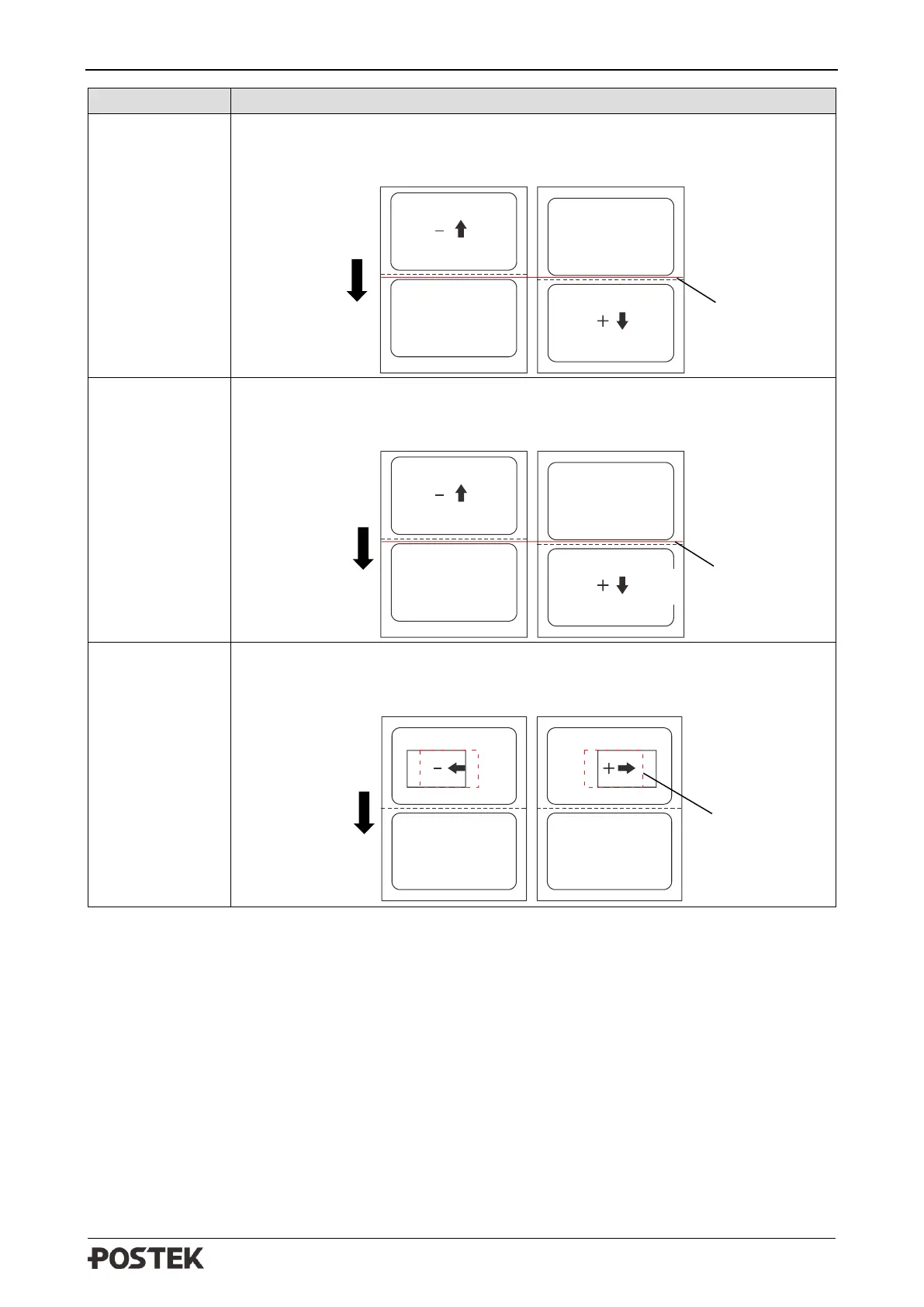
CUT OFFSET
Adjust the cut off position under cutter mode.
Set higher values to move the cut off position out.
Set lower values to move the cut off position in.
PEEL OFFSET
Adjust the peel off position under peeler mode.
Set higher values to move the peel off position out.
Set lower values to move the peel off position in.
H-OFFSET
H-OFFSET adjusts the horizontal position of the printout.
Set higher values to move the printout towards right.
Set lower values to move the printout towards left.
Default Cut
Off Position
Feeding
Direction
in
Feeding
Direction
Feeding
Direction
Original
Printout
Default Peel
Off Position
in
out

Related product manuals