Home
PQI
Portable Multimedia Player
mPack P600
Page 36
PQI mPack P600 - Page 36
122 pages
Manual
Save Page as PDF
To Next Page
To Next Page
To Previous Page
To Previous Page
Loading...
36
8
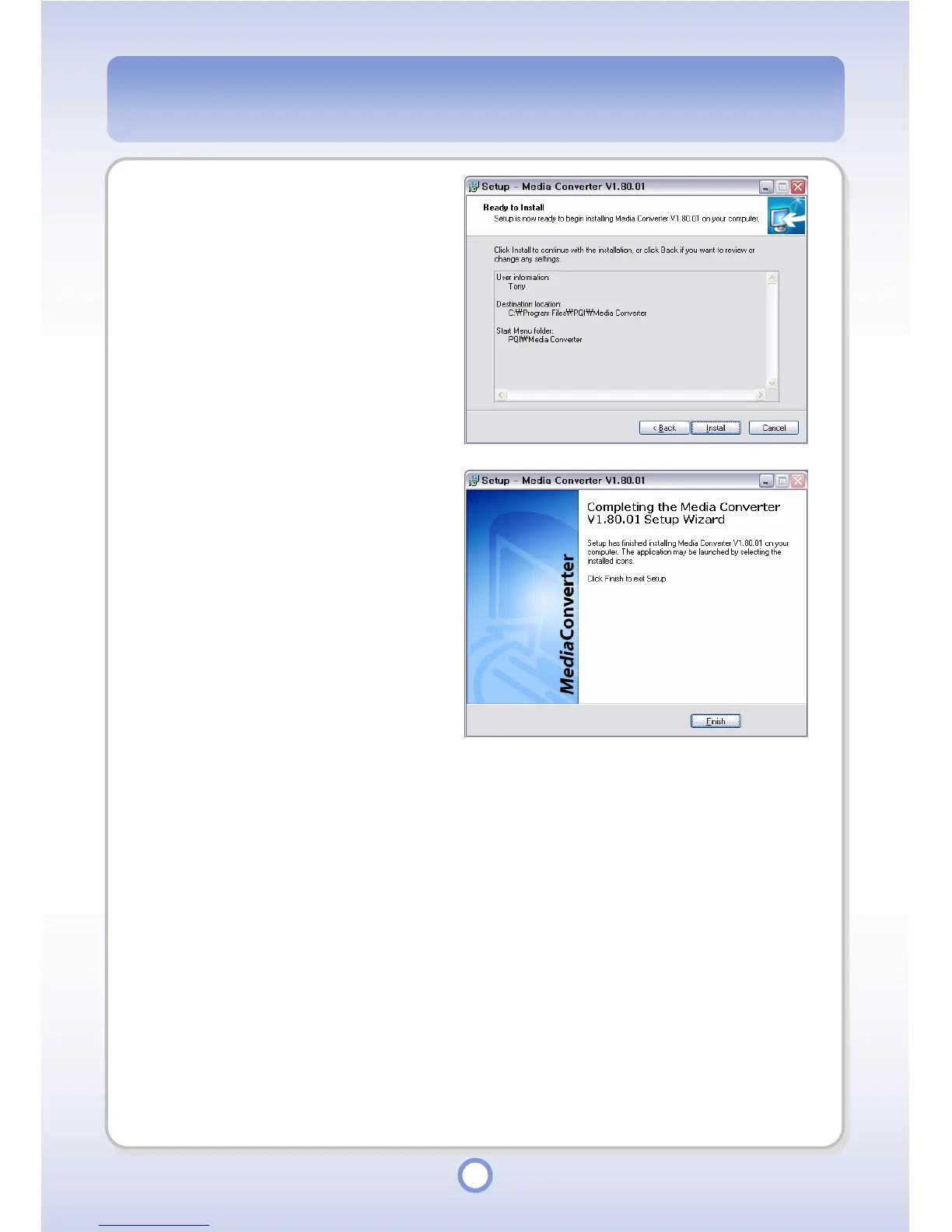
Confirm the settings made in
Step 5~7 and cl
ick the <Install>
button.
- The Media Converter is
automatically installed according
to the settings of S
tep 5~7.
9
When the program installation
is
completed, click <Finish>.
35
37
Table of Contents
Main Page
Table of Contents
2
Greetings
6
Copyright/Certifications/Trademarks/Exemptions
7
Copyright
7
Certifications
7
Trademarks
7
Exemptions
7
Precautions
8
Introduction
13
Features
14
Contents
16
Your Player
18
Player
18
Front View
18
Leds
19
Top View
19
Ports
19
Remote Control
20
Irda Remote Control
20
Connecting Power
21
Connecting the Adapter
21
Installing and Removing the Battery
22
Connecting the Remote Control/Earphones
23
Connecting the Remote Control and Earphones
23
Connecting the Earphone
23
Connecting an External Device
24
Video Port / Audio Port
24
Spdif
26
Connecting with OTG Cable
27
Connecting Mpack to a PC
28
Separating Mpack from a PC
30
Installing PC Program
31
Removing PC Program
32
Installing Device Driver
33
Installing Media Converter Program
34
Removing Media Converter Program
37
Running Media Converter Program
38
Converting a Video File
38
Converting an Audio File
40
Converting a Picture File
42
Running the PC Program
44
Audio Player DB Management
44
Audio DB Search
44
Playlist Management
45
DB Data Management
48
File Browser
55
Direct File Download to the Mpack
56
Address Book Management Module
57
Contact Address Management
57
Group Management
60
PC Program Update
63
Firmware Upgrade
64
Auto Upgrade Using the PC Program
64
Manual Upgrade through the Internet
65
Manual Upgrade Using the Installation CD
66
About/Company/Help
67
Play Functions
68
Play Using the Browser
68
Audio
70
Video
81
Photo
85
Text
92
Applications
95
Game
95
Address
96
Calculator
99
Calendar
100
Clock
101
Lesson
102
Setup
103
Audio Setup
103
Video Setup
105
Photo Setup
107
System Setup
109
Power Setup
111
Etc Setup
113
Troubleshooting
114
Specifications
117
Customer Support
119
Warranty
121
Warranty Policy
121
Warranty Period
121
Warranty Procedure
122
Disclaimers
122



 To Next Page