Overview Getting
Started
Controls and
Connections
Cascading
Units
Technical
Information
3 CONTROLS & CONNECTIONS PreSonus
™
FireStudio
™
Mobile
50
Overview Getting
Started
Controls and
Connections
Cascading
Units
Technical
Information
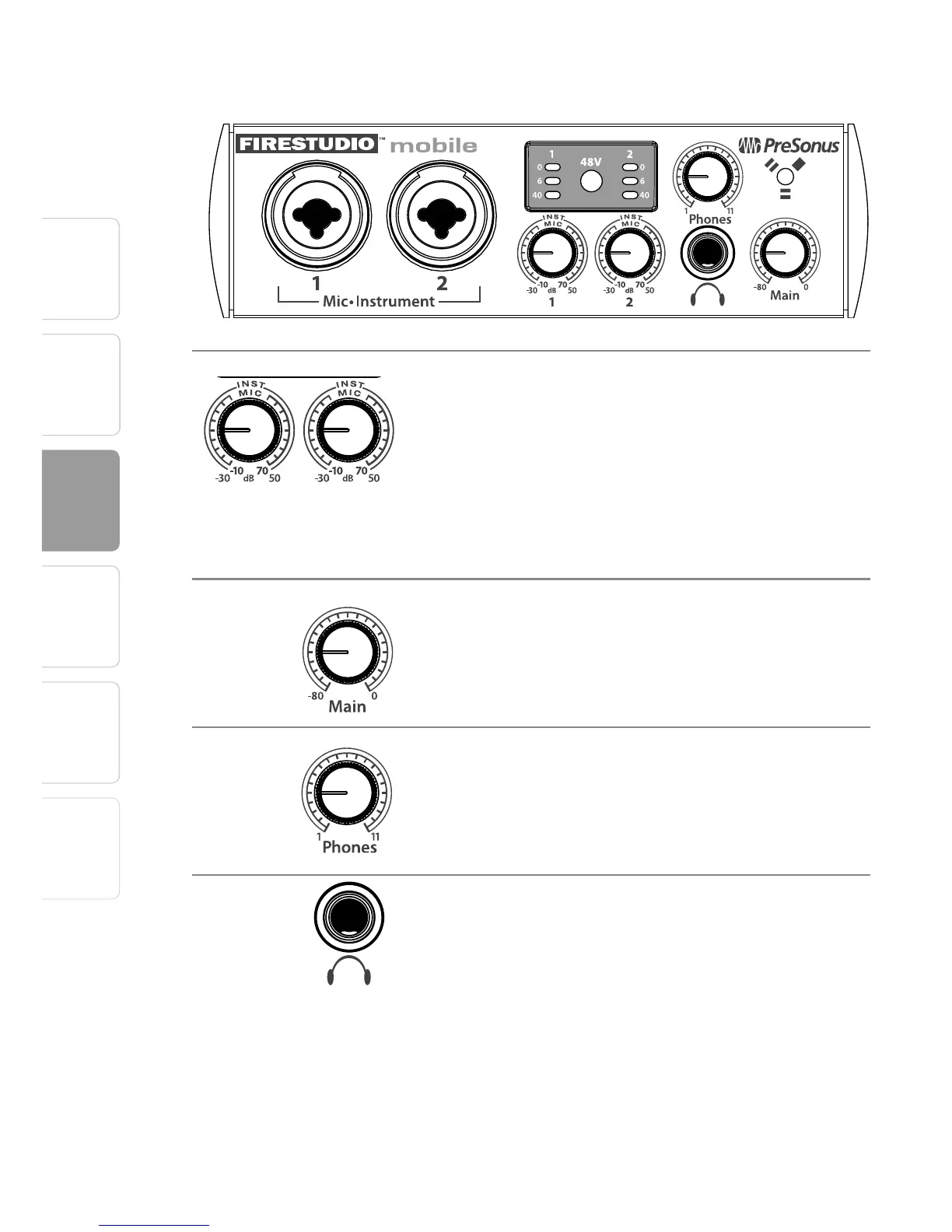
3.2 Front-Panel Layout
Input Gain/Trim Controls. These knobs provide the
following gain structure:
• XLR Microphone Inputs. 80 dB of variable gain (–10
dB to +70 dB)
• TS ¼" Instrument Instrument/Hi-Z Inputs. 80 dB of
variable gain (-30 dB to +50 dB)
Main. The Main knob controls the output level for
the main outputs on the back of the FireStudio
Mobile and have a range of –80 dB to 0 dB.
Phones. The Phones knob controls the output level
of the headphone output on the front of the unit.
Notice that the volume indicator goes to 11; use this
setting with extreme caution.
¼" Headphone Jack. This is where you connect your
headphones to the FireStudio Mobile.















 To Next Page