3.0 Installing the UC Surface Touch-Control Software
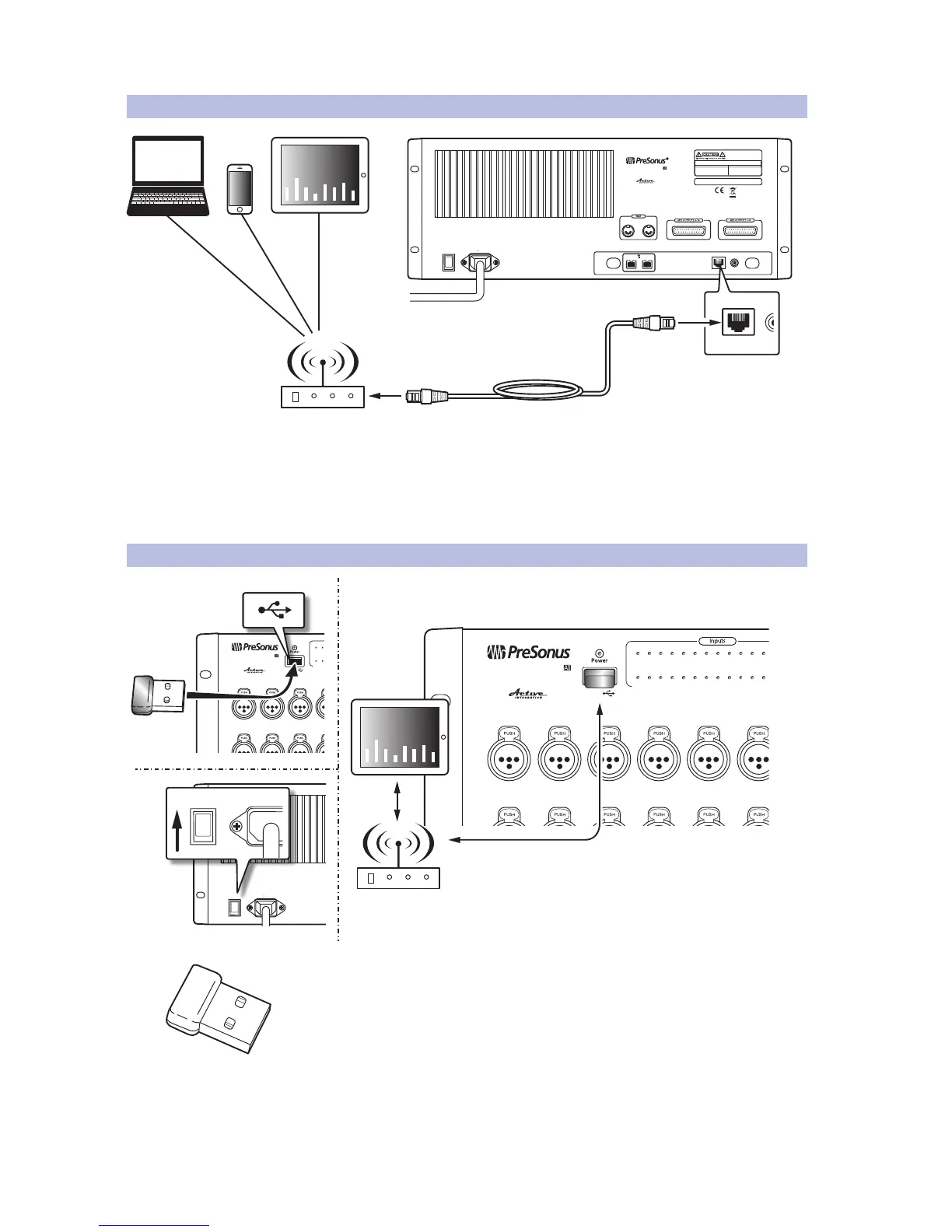
3.3 Wired Ethernet Control Setup
StudioLive™ RM-Series Mixers
Owner’s Manual
15
3.3 Wired Ethernet Control Setup
Your StudioLive RM32AI and RM16AI can be set up for control with a
wired Ethernet connection in seconds. Simply connect the included
Ethernet cable to the Ethernet control port on the back of the mixer and
to a network router that is also connected to your computer or iPad.
Power User Tip: When you launch UC Surface with the computer and StudioLive RM32AI
or RM16AI connected to the same network, the software will automatically see the mixer.
3.4 Wireless Control Setup
StudioLive AI mixers do not support hot-swapping the Wi-Fi LAN adapter so you
must have the adapter plugged into the front-panel USB port before turning on your
mixer.
By default, StudioLive mixers are configured to automatically connect to
a wireless network using the following username and password:
• Wireless network name: StudioLive
• Wireless network password: StudioLive
To connect to a custom wireless network, you first need to connect to the mixer
with a wired connection and configure the wireless network preferences.
POWER
100-230V , 50-60 Hz. 120W
MANUFACTURING DATE
SERIAL NUMBER
WARNING
:
TO REDUCE THE RISK OF FIRE OR ELECTR IC
SHOCK, DO NOT EX POSE THIS EQUIP MENT TO R AIN OR
MOISTURE. D O NOT REMOVE COV ER. NO USER S ERVICE ABLE
PARTS INSIDE. REFER SERVICIN G TO QU ALIFIE D PERS ONNEL.
AVIS
:
RISQUE DE C HOC EL ECTRIQUE — NE PAS OUVRIR
DESIGNED AND ENG INEERED BY P RESONU S • MANUFAC TURED IN C HINA • PA TENTS PEND ING
“PreSonus”,“STUD IOLIVE” A ND “ACTI VE INTE GRATION” ARE REGIS TERED TRADEMARKS OF PRESON US AUDIO ELECTRONI CS
This device complies with Part 15 of the FCC Rules a nd ICES-003 f or Canada. Operation is subjected to the
following two conditions: (1) this device may not cause h armful interferenc e, and (2 ) this device must
accept any interference received, includ ing interference that may cause undesired operation .
WARNING:
Power down unit before removing option card
32 channel x 25 bus digital mix core
with 32 remote XMAX preamps
R
STUDIOLIVE RM32
S800S800
S800S800
S800S800
S/PDIF
Control Output
S800S800
S800S800
S800S800
IN OUT
WER
100-230V , 50-60 Hz. 120W
follo wing two c onditions: ( 1) this device may no t cause ha rmful interference, a
accept a ny interference received, includi ng interference that may cause
WARNING:
Power down unit before removing option card
S800S800
S800S800
S800S800
S/PDIF
utput
S800S800
S800S800
S800S800
IN OUT











 To Next Page