EasyManua.ls Logo

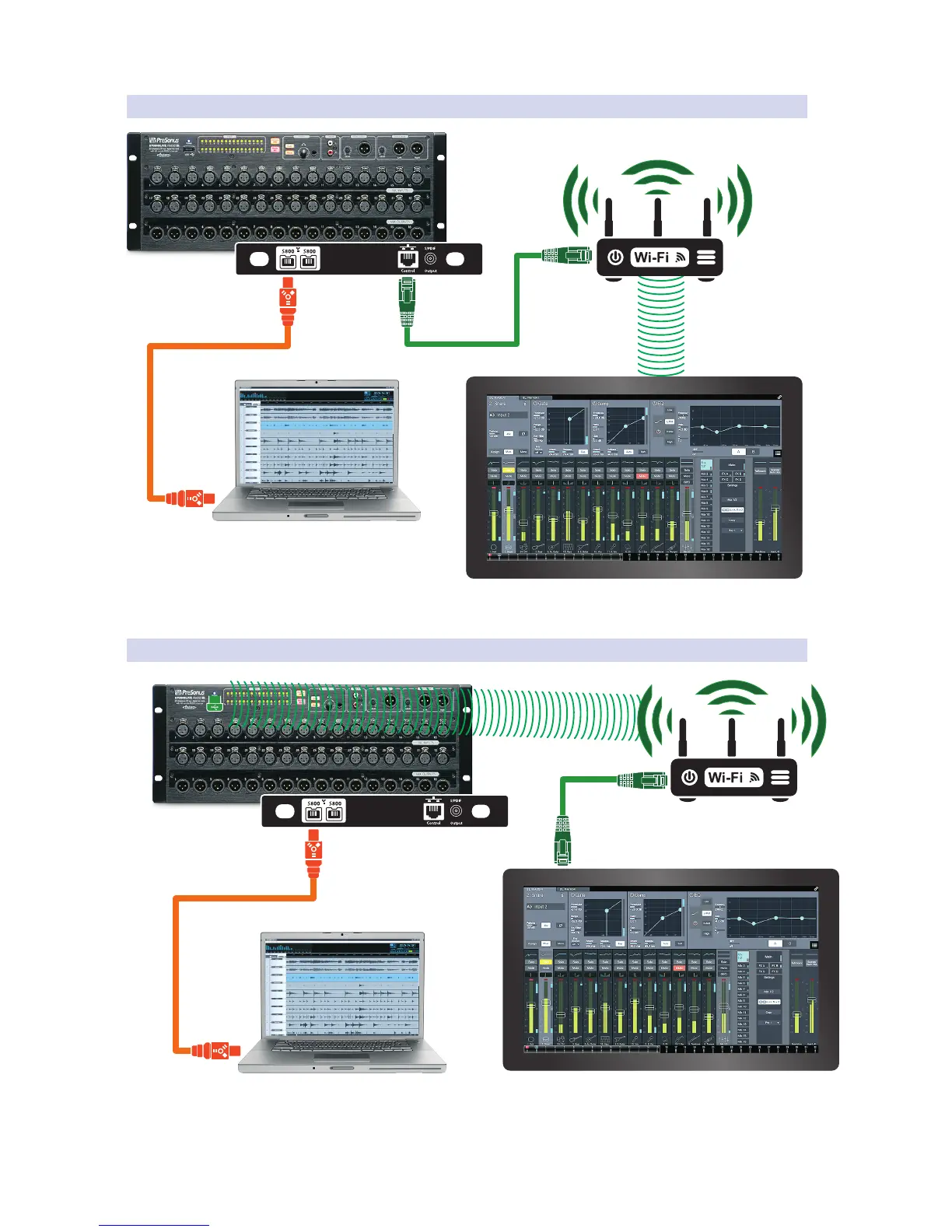
PRESONUS StudioLive RM32AI - Separate Touch Screen Command and Recording - Wireless Via Ethernet; Separate Touch Screen Command and Recording - Wireless Via Dongle

PRESONUS StudioLive RM32AI
70 pages
Print Icon
To Next Page IconTo Next Page
To Previous Page IconTo Previous Page
Loading...
3.0 Installing the UC Surface Touch-Control Software
3.6 Computer Hookups
StudioLive™ RM-Series Mixers
Owners Manual
21
3.6.7 Separate Touch Screen Command and Recording – Wireless via Ethernet
3.6.8 Separate Touch Screen Command and Recording – Wireless via Dongle
Control Touchscreen Computer
UC Surface
Control Touchscreen Computer
UC Surface
FireWire-equipped Recording Computer
Capture
or Studio One
®
FireWire-equipped Recording Computer
Capture
or Studio One
®
AI Mixer Option Card
FireWire-equipped Recording Computer
Capture
or Studio One
®
Control Touchscreen Computer
UC Surface
AI Mixer Option Card
FireWire-equipped
Control and
Recording Computer
UC Surface
+ Capture
or Studio One
®
AI Mixer Option Card

Table of Contents

Other manuals for PRESONUS StudioLive RM32AI

Related product manuals