4
2.0 Hookup
This section covers hardware connections and controls for both RM32AI
and RM16AI mixers. Whenever differences in certain features are called
out, the RM32AI will be mentioned first, followed by the RM16AI.
2.1 Front-Panel Connections and Controls
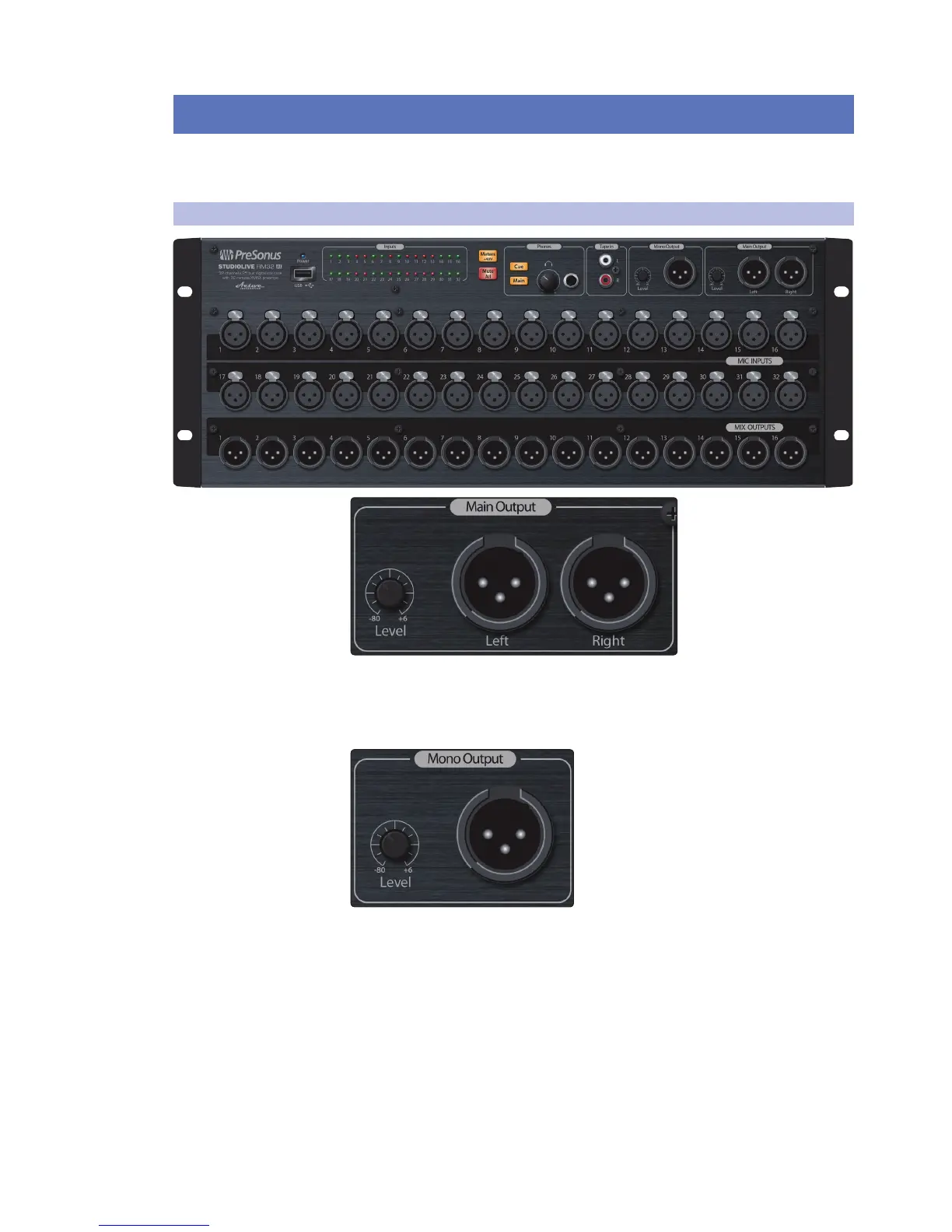
Main Outputs (Left and Right). The StudioLive RM features two XLR
main outputs that are parallel to each other and the mono output.
Main Output Level. This knob controls the maximum output level of the XLR
main outputs. The signal can be attenuated to -80 dB and boosted up to +6 dB.
Mono/Center Output. This balanced XLR output carries a mono bus
output for driving subwoofers or a center channel for LCR mixing.
Mono/Center Output Level. This knob controls the maximum
level of the Mono/Center Output signal. The signal can be
attenuated to -80 dB and boosted up to +6 dB.
Power User Tip: StudioLive RM-series main outputs (XLR stereo and XLR
mono) let you use Left/Center/Right panning (LCR). If you want to use LCR
panning, select LCR as the Pan mode in the settings in UC Surface, and bus
the channel to both the main L/R and Center outputs. If you want it to use
normal LR stereo panning on a channel, just route it to the L/R outputs.











 To Next Page