3.0 Installing the UC Surface Touch-Control Software
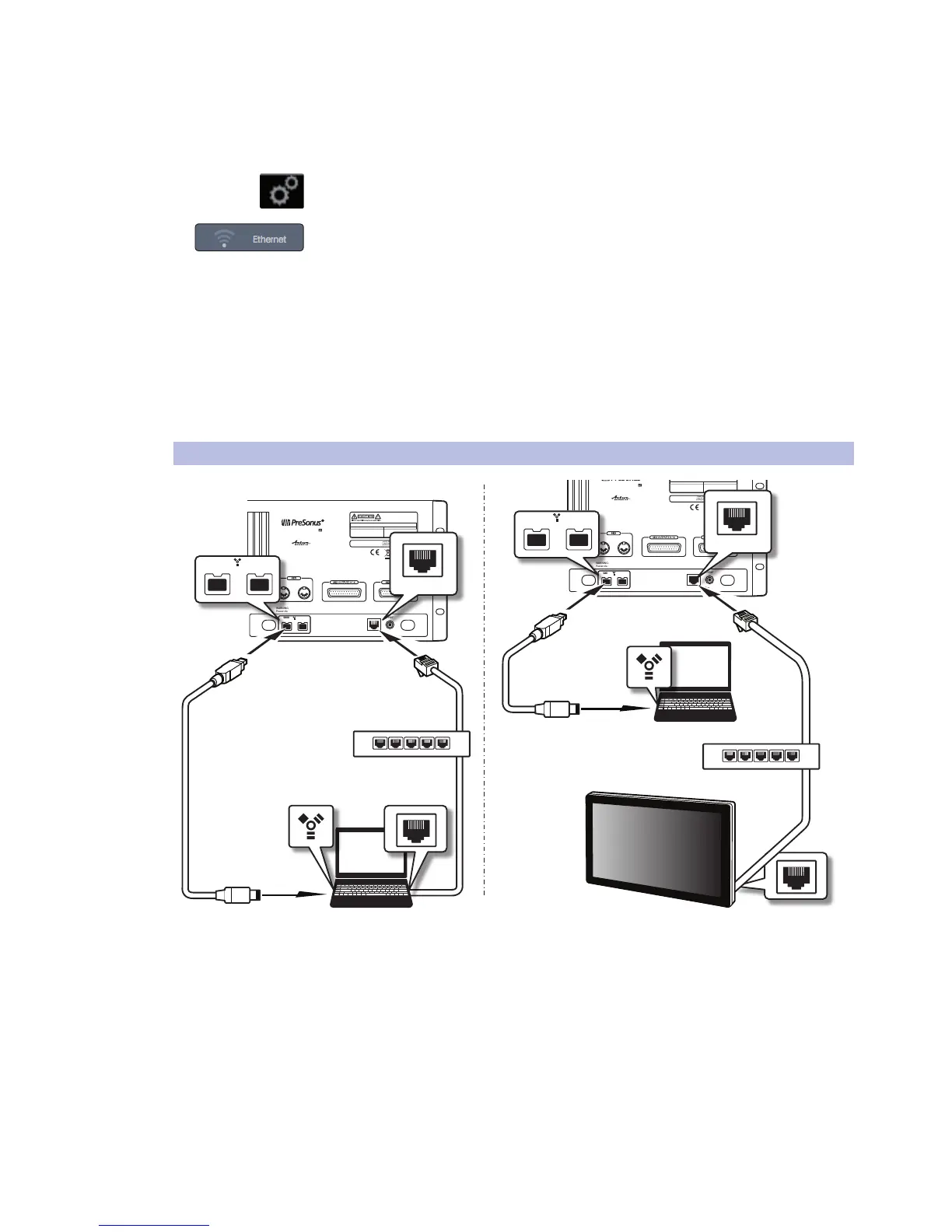
3.5 Computer Recording Setup
StudioLive™ RM-Series Mixers
Owner’s Manual
16
1. Connect to a wired control network, as described in Wired Ethernet control setup.
2. Launch UC Surface on a Mac or Windows computer or
iPad that’s connected to the same network.
3. Open the Settings page.
4. At the top of the settings page, select the wireless connection icon.
5. Choose the wireless network you would like to use from the list shown.
6. If a password is required you will be prompted to enter it.
7. You are now configured to connect to the new wireless network for control.
Every time you turn on your StudioLive AI mixer, if there is no wired
Ethernet connection, and the USB Wi-Fi dongle is plugged in, the
mixer will look for this network and attempt to connect to it.
Note: StudioLive AI only supports WPA and WPA2 security. Please be sure
that your router is configured using one of these security protocols.
3.5 Computer Recording Setup
StudioLive RM32AI and RM16AI have been designed for tight integration with the
included Capture and Studio One Artist software. You can record a live show quickly
and with confidence to Capture, save the StudioLive AI mixer scene with the Capture
Session, and then open that recording, complete with mixer scene, in Studio One.
The Studio One mixer will be set to match your StudioLive AI mixer scene,
including fader values, mutes, pan, and effects-send mixes. Fat Channel settings
will be loaded into Studio One’s Fat Channel Native Effects™ plug-in.
MANUFACTURING DATE
SERIAL NUMBER
DESIGNED AND ENG INEERED BY P RESONU S • MANUFAC TURED IN C HINA • PA TENTS PEND ING
“PreSonus”,“STUD IOLIVE” A ND “ACTI VE INTE GRATION” ARE REGIS TERED TRADEMARKS OF PRESON US AUDIO ELECTRONI CS
This device complies with Part 15 of the FCC Rules a nd ICES-003 f or Canada. Operation is subjected to the
following two conditions: (1) this device may not cause h armful interferenc e, and (2 ) this device must
accept any interference received, includ ing interference that may cause undesired operation .
WARNING:
Power down unit before removing option card
32 channel x 25 bus digital mix core
with 32 remote XMAX preamps
STUDIOLIVE RM32
S800S800
S800S800
S800S800
S/PDIF
Control Output
S800S800
S800S800
S800S800
IN OUT
S800S800
S800S800
S800S800
S800S800
S800S800
S800S800
MANUFACTURING DATE
SERIAL NUMBER
WARNING
:
TO REDUCE THE RISK OF FIRE OR ELECTR IC
SHOCK, DO NOT EX POSE THIS EQUIP MENT TO R AIN OR
MOISTURE. D O NOT REMOVE COV ER. NO USER S ERVICE ABLE
PARTS INSIDE. REFER SERVICIN G TO QU ALIFIE D PERS ONNEL.
AVIS
:
RISQUE DE C HOC EL ECTRIQUE — NE PAS OUVRIR
DESIGNED AND ENG INEERED BY P RESONU S • MANUFAC TURED IN C HINA • PA TENTS PEND ING
“PreSonus”,“STUD IOLIVE” A ND “ACTI VE INTE GRATION” ARE REGIS TERED TRADEMARKS OF PRESON US AUDIO ELECTRONI CS
This device complies with Part 15 of the FCC Rules a nd ICES-003 f or Canada. Operation is subjected to the
following two conditions: (1) this device may not cause h armful interferenc e, and (2 ) this device must
accept any interference received, includ ing interference that may cause undesired operation .
WARNING:
Power down unit before removing option card
32 channel x 25 bus digital mix core
with 32 remote XMAX preamps
R
STUDIOLIVE RM32
S800S800
S800S800
S800S800
S/PDIF
Control Output
S800S800
S800S800
S800S800
IN OUT
S800S800
S800S800
S800S800
S800S800
S800S800
S800S800
1
2
345
1
2
345
Ethernet
cable
Ethernet
cable
FireWire
cable
FireWire
cable
Network router
Network router
Touch screen
computer











 To Next Page