B-4
Access Point Port and Network Cables
Twisted-Pair Cable/Connector Pin-Outs
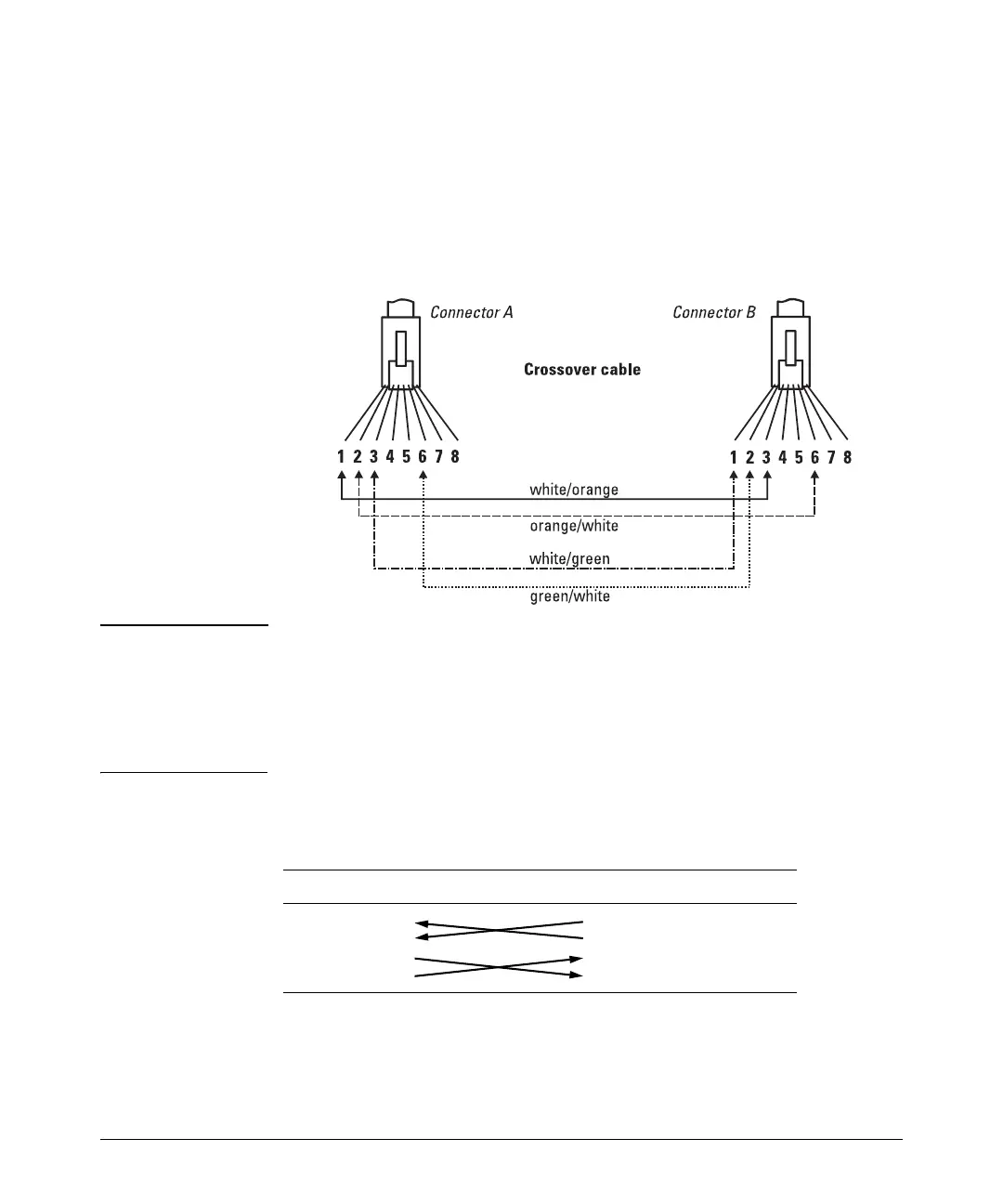
Crossover Twisted-Pair Cable for
10 Mbps or 100 Mbps Network Connection
Because the 10/100 port on the access point supports Auto-MDIX operation,
you can use either a “straight-through” or “crossover” cable for network
connections to PCs, servers, hubs, or switches.
Cable Diagram
Note Pins 1 and 2 on connector “A” must be wired as a twisted pair to pins 3 and 6
on connector “B”.
Pins 3 and 6 on connector “A” must be wired as a twisted pair to pins 1 and 2
on connector “B”.
Pins 4, 5, 7, and 8 are not used for transmitting or receiving data, although they
must be wired straight-through in the cable to support Power over Ethernet.
.
Pin Assignments
Access Point End (MDI) Computer, Transceiver, or
Other MDI Port End
Signal Pins Pins Signal
receive +
receive -
transmit +
transmit -
1
2
3
6
6
3
2
1
transmit -
transmit +
receive -
receive +



 To Next Page