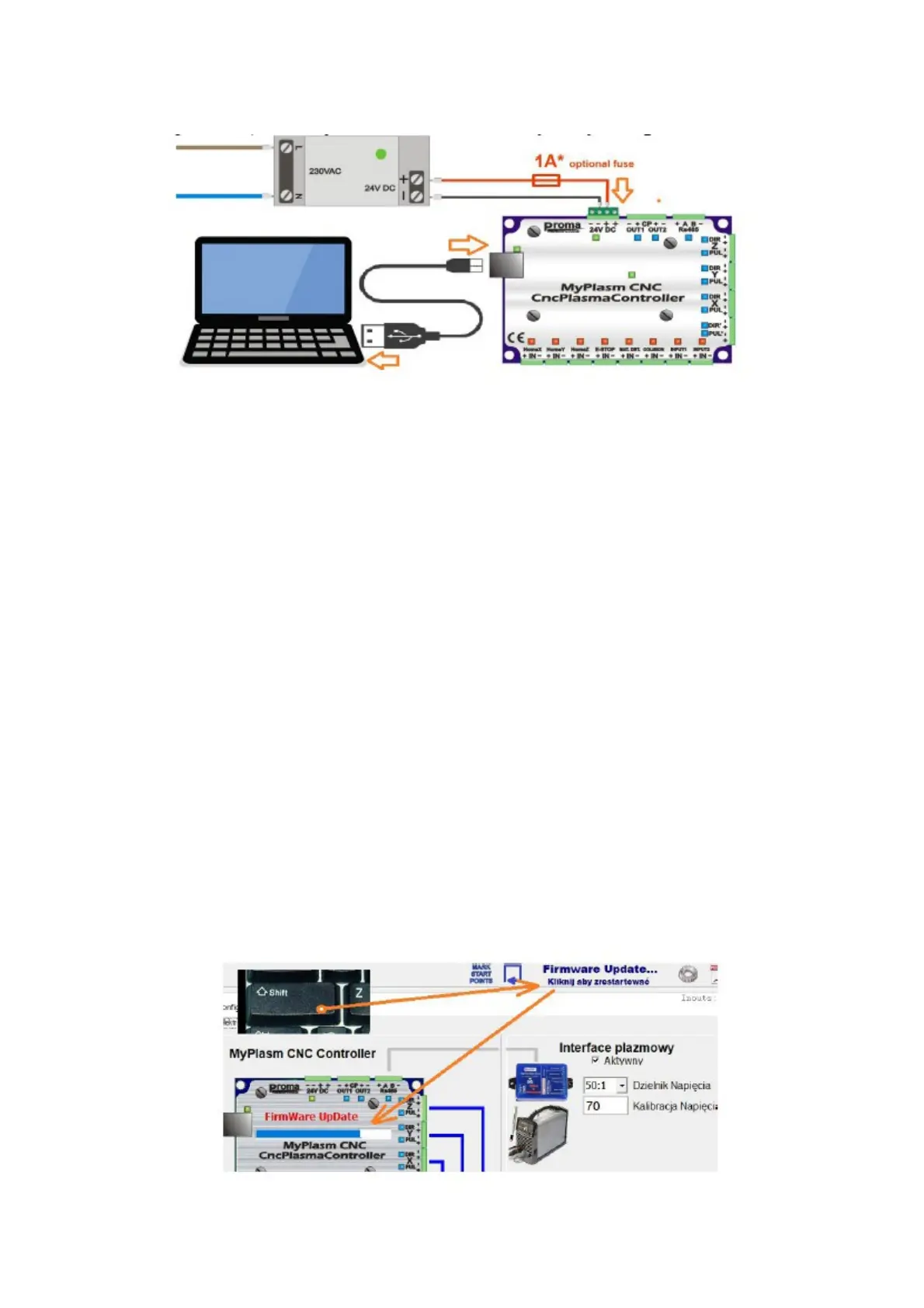
4.2 Power supply and initial start-up
IMPORTANT !!! Use the original USB cable supplied with the system
by the manufacturer !!! Do not use USB extensions.
The controller requires a 24V DC power supply to operate ( 1 - 2A
recommended ), the controller's current consumption does not exceed 0.6A
( 600mA ). If the power supply is more powerful ( more than 1.5A ), an
external 1A delay fuse should be used.
First connect only the power supply and the USB cable.
The top right corner of the screen displays the status of the connection to
the controller as below examples..
Communication OK - Communication correct, controller firmware
version compatible with the software installed on the computer.
No USB device : Device not connected to USB port or problem of driver
installation in Windows.
Communication error : Device installed and connected correctly but
communication error occurred. Problems with the 24V DC power supply
to the controller or incompatibility of the Firmware version with the
software version installed on the computer. If this is detected, the software
will attempt to automatically upload the correct Firmware version.
In the event of problems, it is possible to manually force a
Firmware update by holding down the SHIFT key and resetting the
communication.
8



 To Next Page