8 Basic set-up principles
–
Please also refer to all the overviews covering
"Operating/set-up overview for Sigma X Control
types" and "Operating menu for Sigma X Control
types, complete" in the appendix and the "Overview
of equipment and control elements" and "Control
elements” chapters.
–
The pump exits the menu and returns to a contin‐
uous display if
[Menu] is pressed or no key is
pressed for 60 seconds.
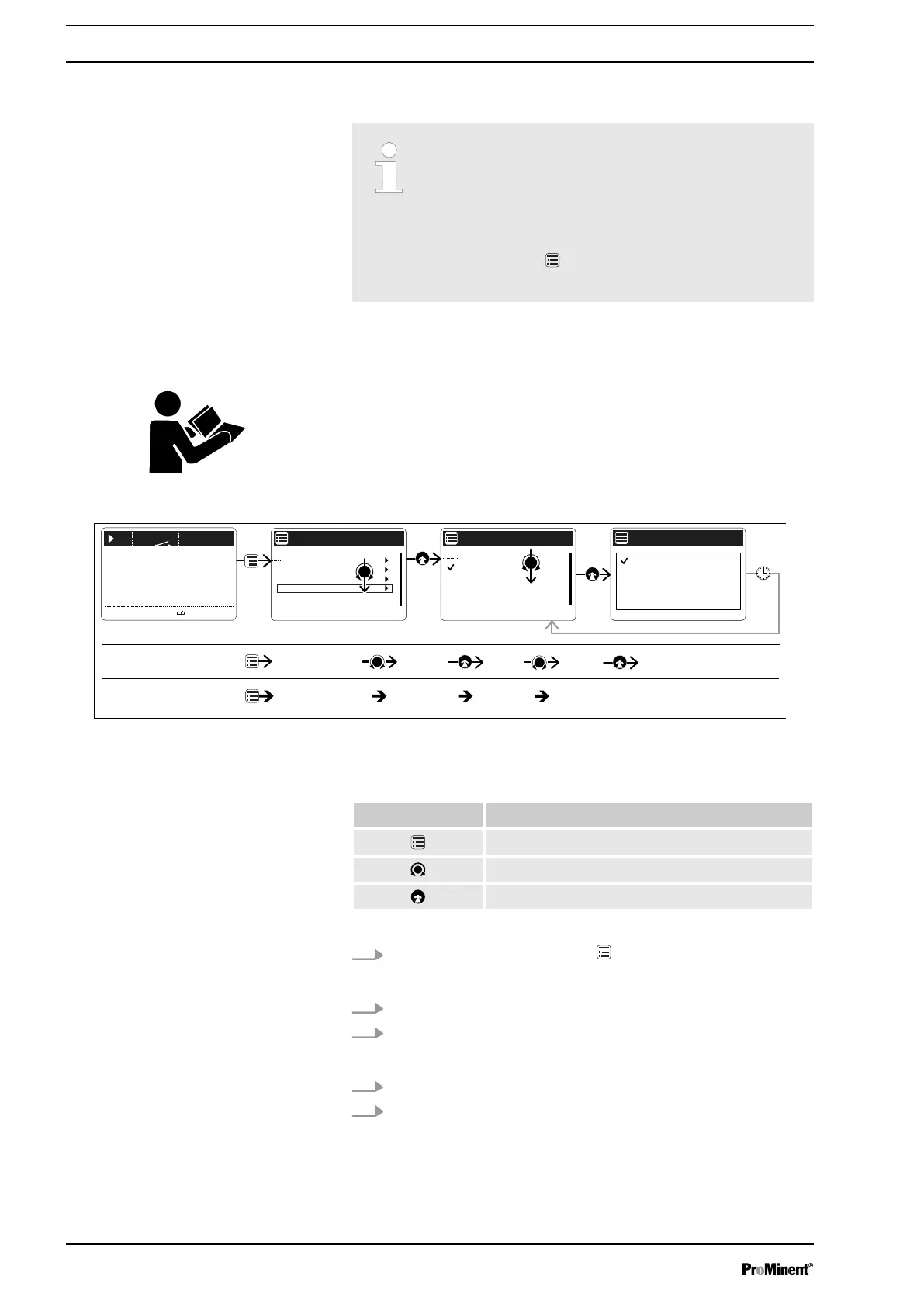
8.1 Basic principles for setting up the control
shows using the "Language" example how to set up something - in turn:
n Sequence of displays
n The path derived from this
n The path as presented in the operating instructions
12012
2315
7.0
CONTACT
bar
l/h
Settings
Service
Language
Makro operating mode
Information
Menu
German
English
...
〉Language
Language
German
Menu/Information
Path, derived:
...
〉Language
Language
English
German
Save
Menu/Information
Path, operating instructions:
Language
English
German
B1089
Fig. 31: "Setting up the language": As an example of set-up and path displays
Tab. 2: Legend:
Symbol Explanation
Press
[Menu]
Turn the
[Clickwheel]
Press the
[Clickwheel]
1.
To access the
‘Menu’
: press the
[Menu]
key.
ð
The cursor immediately points to
‘Information’
.
2. To switch from
‘Information’
to
‘Language’
: turn the
[Clickwheel]
.
3. To return to the
‘Language’
menu: press the
[Clickwheel]
.
ð
The cursor points to a language.
4. To switch to
‘Deutsch’
: turn the
[Clickwheel]
.
5. To save: press the
[Clickwheel]
.
ð
The software shows a display by way of confirmation.
After 2 seconds, it returns to the higher-level
‘Menu’
.
Fig. 30: Please read
"Setting up the language" in detail
Basic set-up principles
42







 To Next Page