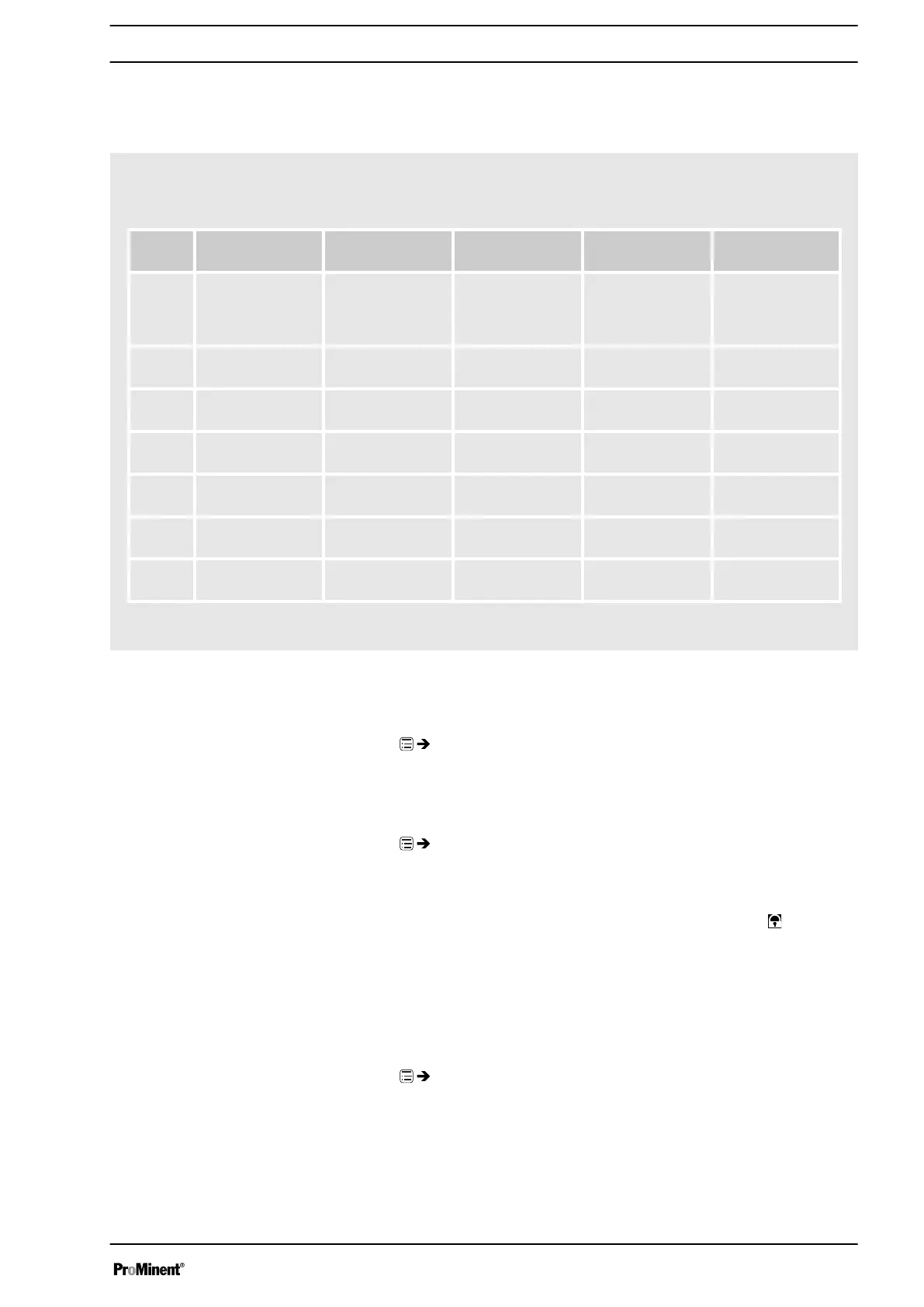
9.4.4 Example
The pump is to meter 2 litres every half hour every weekday (Mon-Fri)
between 8:00 and 11:00:
Com‐
mand
Time event Time of day Action Capacity Comment
01 Init - Stop - // Ensure that the
pump is at a
standstill at the
start.//
02 workdays 1 (Mo-
Fr)
08:30 Manual 12,000 l/h //Meter with
12,000 l/h//
03 workdays 1 (Mo-
Fr)
08:40 Stop - //Stop//
04 workdays 1 (Mo-
Fr)
09:30 Manual 12,000 l/h //Meter with
12,000 l/h//
05 workdays 1 (Mo-
Fr)
09:40 Stop - //Stop//
06 workdays 1 (Mo-
Fr)
10:30 Manual 12,000 l/h //Meter with
12,000 l/h//
07 workdays 1 (Mo-
Fr)
10:40 Stop - //Stop//
Explanation: At a capacity of 12 l/h, the pump has to work for 10 minutes
to meter 2 litres.
Example of "Weekday metering"
9.5
‘Service’
‘Menu / Information
è
Service
è
...’
9.5.1
‘Password’
‘Menu / Information
è
Service
è
Password
è
...’
You can lock the setting options here.
If you have set a
‘Password’
- see below, then the identifier
appears
after 1 minute in the top left and the setting options are locked - if no key
has been pressed in the meantime.
In the meantime, a key appears there and a small progress bar.
9.5.2
‘Clear counter’
‘Menu / Information
è
Service
è
Clear counter
è
...’
You can reset the counter to "0" in the
‘Clear counter’
menu:
n
‘All’
n
‘Stroke counter’
(total number of strokes)
n
‘Volume counter’
(total litres)
n
‘Contact memory’
Set up /
‘Menu’
59






 To Next Page