88
tHe alarM buzzer iS Sounding, wHat doeS tHiS Mean?
Whenyourstpower-uptheVessA6000systembeepstwicetoshownormaloperation.
The audible alarm sounds at other times to inform you that the system needs attention. But the buzzer alarm is
notspecic.CheckthedeviceLEDsandEventsdisplaysorlogsformoreinformation.
When the alarm sounds:
• Check the front and back of the enclosure for red or orange LEDs.
• Ifemailnoticationisenabled,checkfornewmessages.
• Check the event log.
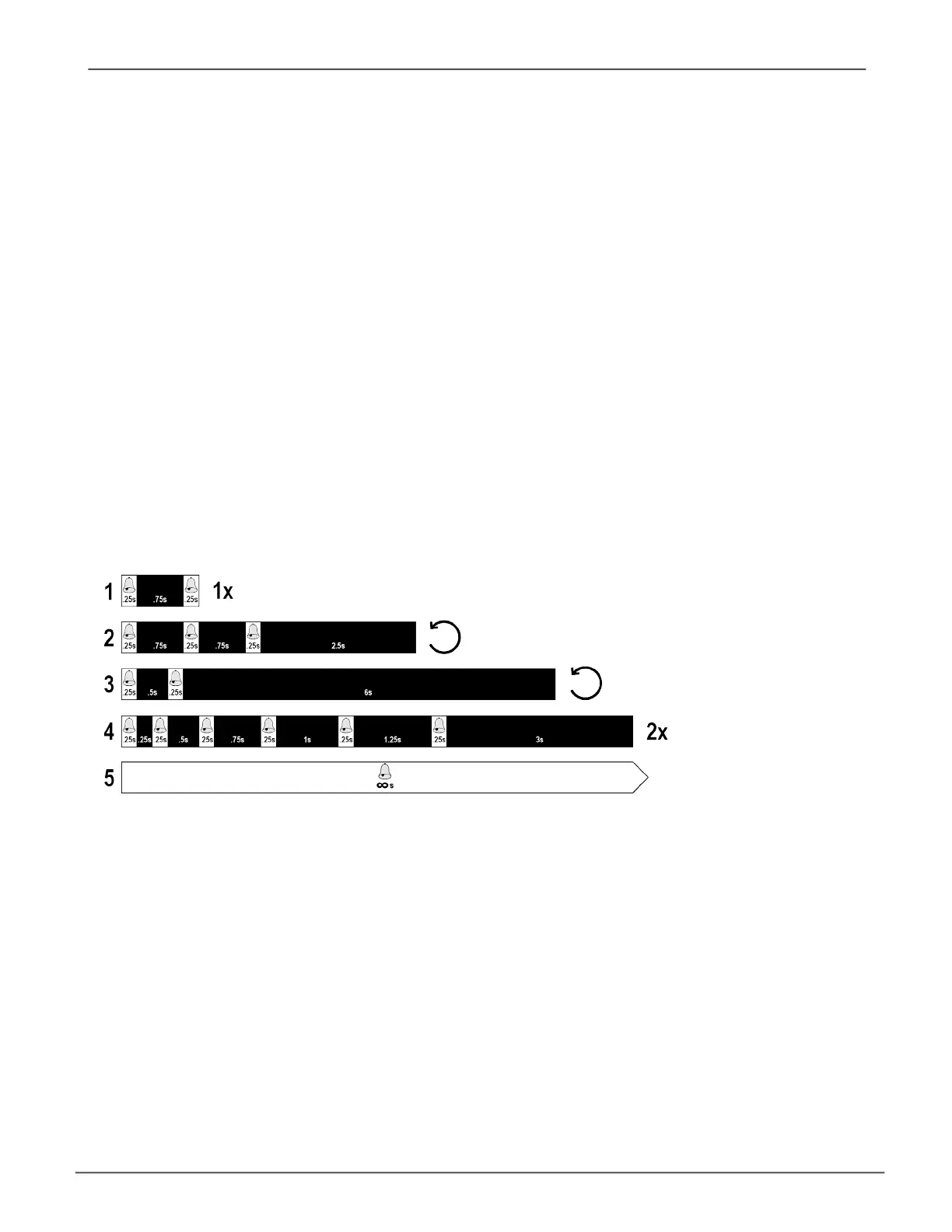
When a continuous tone sounds, there are multiple alarm patterns sounding at the same time (see example
number 1 illustrated below).
Alarm buzzer paerns
Other alarm patterns include three short buzzes followed by a longer silence, then repeated (example number 2
above). This can indicate a serious problem that requires immediate action such as high enclosure temperature or
the system fan is not installed. If you hear this, check the System Status LED. If these are normal, it might indicate
a physical drive problem, or a power supply problem. Check the event log for more information.
Patternnumber3abovemightindicateanLDofine.Patternnumber4mightbean
LD critical or bad sector on a physical disk.
TroubleshootingVess A6000 Series Storage Appliance for Video Surveillance



 To Next Page
 Loading...