PRS 500 E
Instructions for use
5069-0-8002
PROTEC GmbH & Co. KG, In den Dorfwiesen 14, 71720 Oberstenfeld, Germany 18 von 47
3
Control Elements and Displays
3.1 Main Switch of the X-ray system
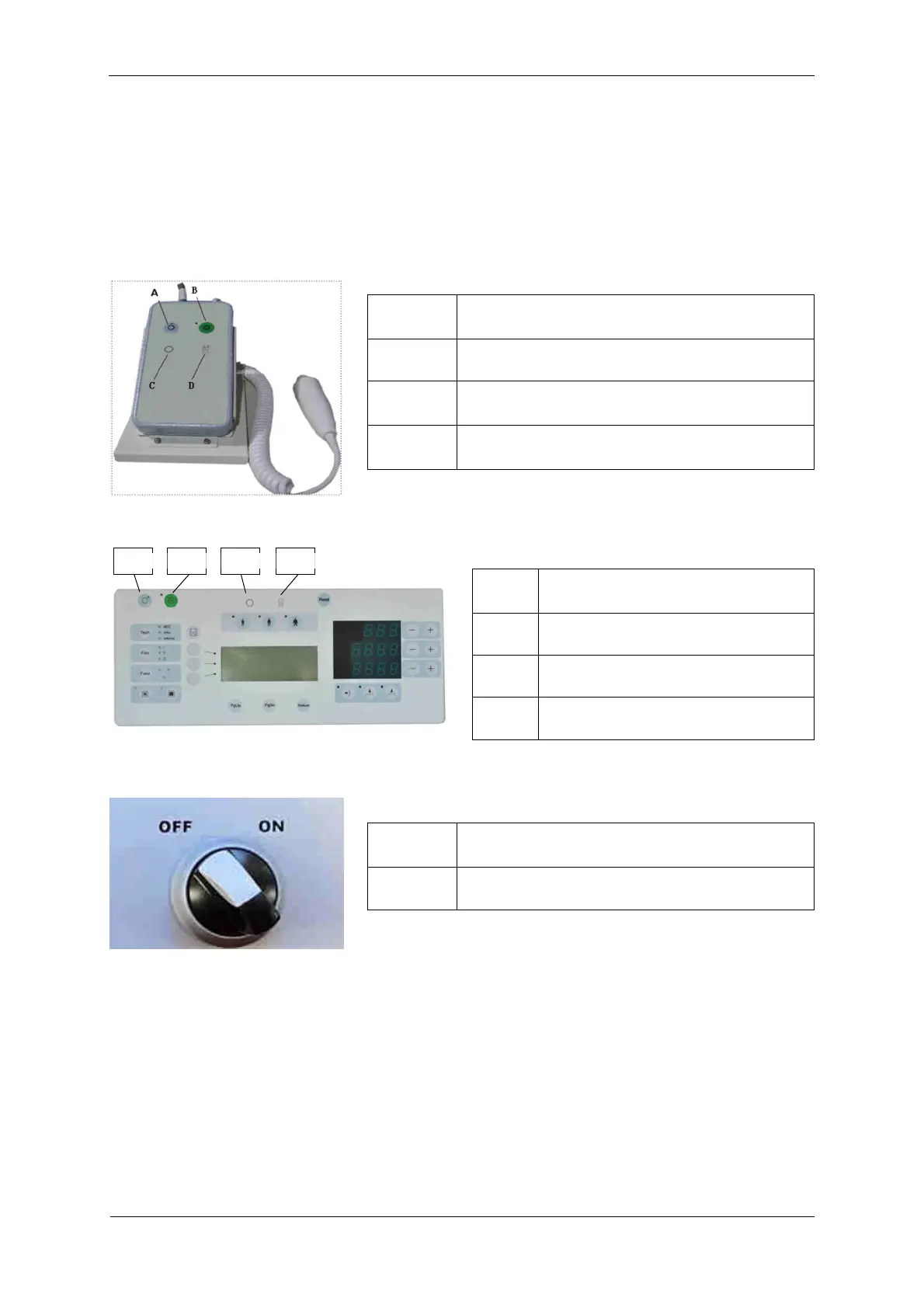
The PRS 500 E is switched on and off via a mini console (e.g. of the Venus-32/50-R, see Fig. 3.1a), a
normal control console (e.g. of the Venus-32/50-R, see Fig. 3.1b) of the X-ray generator or via the switch
on the Power Box (see Fig. 3.1c).
The illustrations of the mini and operating console may differ depending on the system configuration.
However, the symbols for switching on or off are identical.
A Switching off the PRS 500 E
B Switching on the PRS 500 E
C Ready for exposure
D Radiation indicator
A Switching off the PRS 500 E
B Switching on the PRS 500 E
C Ready for exposure
D Radiation indicator
OFF Switching off the PRS 500 E
ON Switching on the PRS 500 E
Fig. 3.1a Mini console Venus-32/50-R
Fig. 3.1c Power Box
Fig. 3.1b Control console Venus-32/50-R


 To Next Page