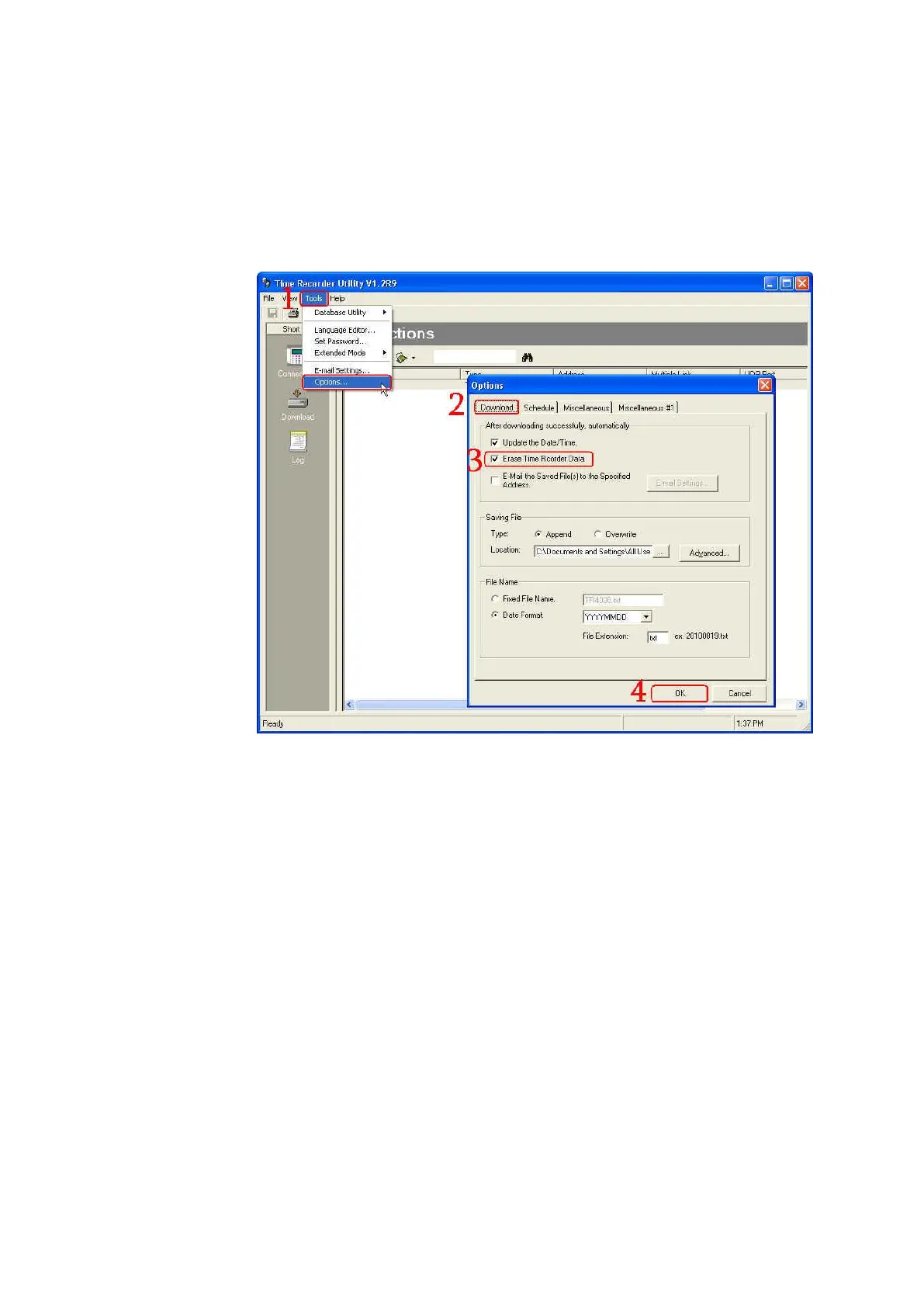
9. If you want the data in TR515/TR510 to be deleted automatically
whenever it is downloaded successfully
Under the normal mode, go to [Tools]\ [Options…]\ [Download]. Enable
[Erase Time Recorder Data] checkbox in [After downloading successfully,
automatically] section. Then click [OK]. The data will be deleted
automatically after it is downloaded successfully.
10. If you want to reset TR515/TR510
Use “Initialize the Terminal” function in the software Time Recorder
Utility to reset TR515/TR510 by the following steps. Under the normal
mode of software Time Recorder Utility, click [Download] inspection and
then double-click your TR515/TR510 on the terminal list to launch [TR51x
Properties] window. Click [Tools] and then click [Initialize the Terminal].
(See the picture as below.) Then power off TR515/TR510. Power on
TR515/TR510. The message “In It” will be shown on the display of
TR515/TR510 when processing the reset. OnceTR515/TR510 sounds a
long beep and two short beeps and its display shows the time, it indicates
the reset is completed.



 To Next Page