Page42of86
IMPORTANT:
ImportantInstructionsforQCDevicetests:
Dust,lint,fibersandothersmallparticlesmayinterferewiththeQCDevice.K eeptheQCDevicefreeof
contaminants.
TheQCDeviceislightͲsensitiveandshouldbestoredinitsblackopaquecasewhennotinuse.
Ifthe
QCDevicetestsfail,wipetheQCDevicecleanwithalintfreeclothtoremoveanyoils,dust,
fibers,orfingerprints.DonotapplyanyliquidtotheQCDevice.Aftercleaningthedevice,repeatthe
QCDevicetest.
IftheQCDevicetestfailsafteryouhavecleaned
thedevice,contactQuidel.
QCSample
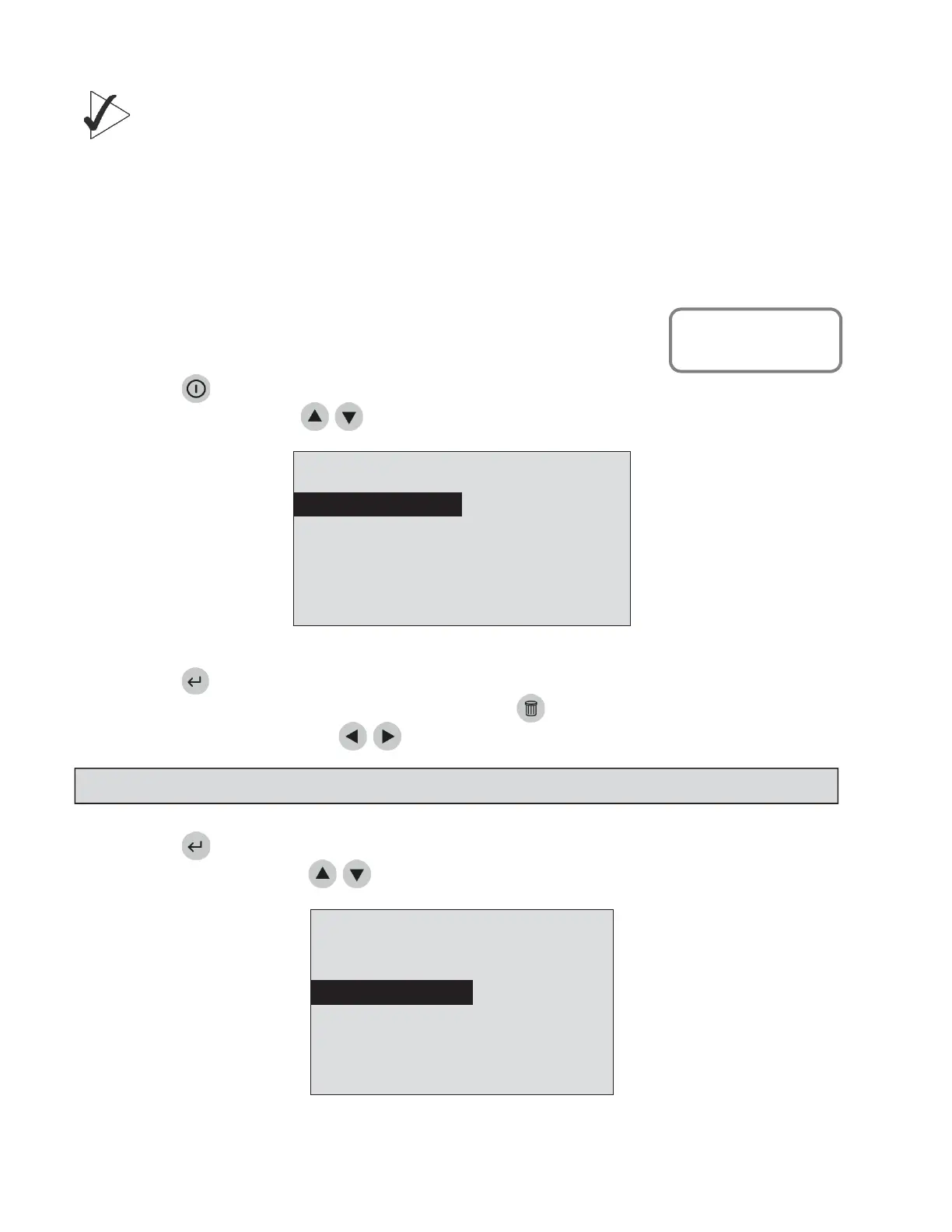
ToruntheQualityControl sample:
1. PressthekeytopowertheQuidelTriageMeterProon.
2. SelectRUNTESTusingthe
keys.
8:23AM01•20•18
RUNTEST
RECALLRESULTS
INSTALLNEWCODECHIP
SELECTWITHvOR^ANDPRESSENTER
PRESSEXITTOEJECTDEVICE
TheMainMenu
3. Pressthekey.
4. Typeinyouridentification(UserID).Tocorrect,pressthekeytocleartheentireID,orselectthe
incorrectcharacterbyusingthe
keys.ThentypeinthecorrectID.
5. Pressthekey.
6. SelectQCSampleusingthe
keys.
PATIENTSAMPLE
QCDEVICE
QCSAMPLE
MISC.TEST
SELECTWITHvOR^ANDPRESSENTER
ORPRESSEXIT TOEJECTDEVICE
MenuscreenasitlookswhenoperatorselectsQCSample.
NOTE:
IftheUserIDbypa ss isON,themeterwillnotaskyoutoenteraUserID.
MainMenu
Run Test


 To Next Page