32
IQ Network Communication Cartridge
Server Satellite Controllers
GPRS or WiFi
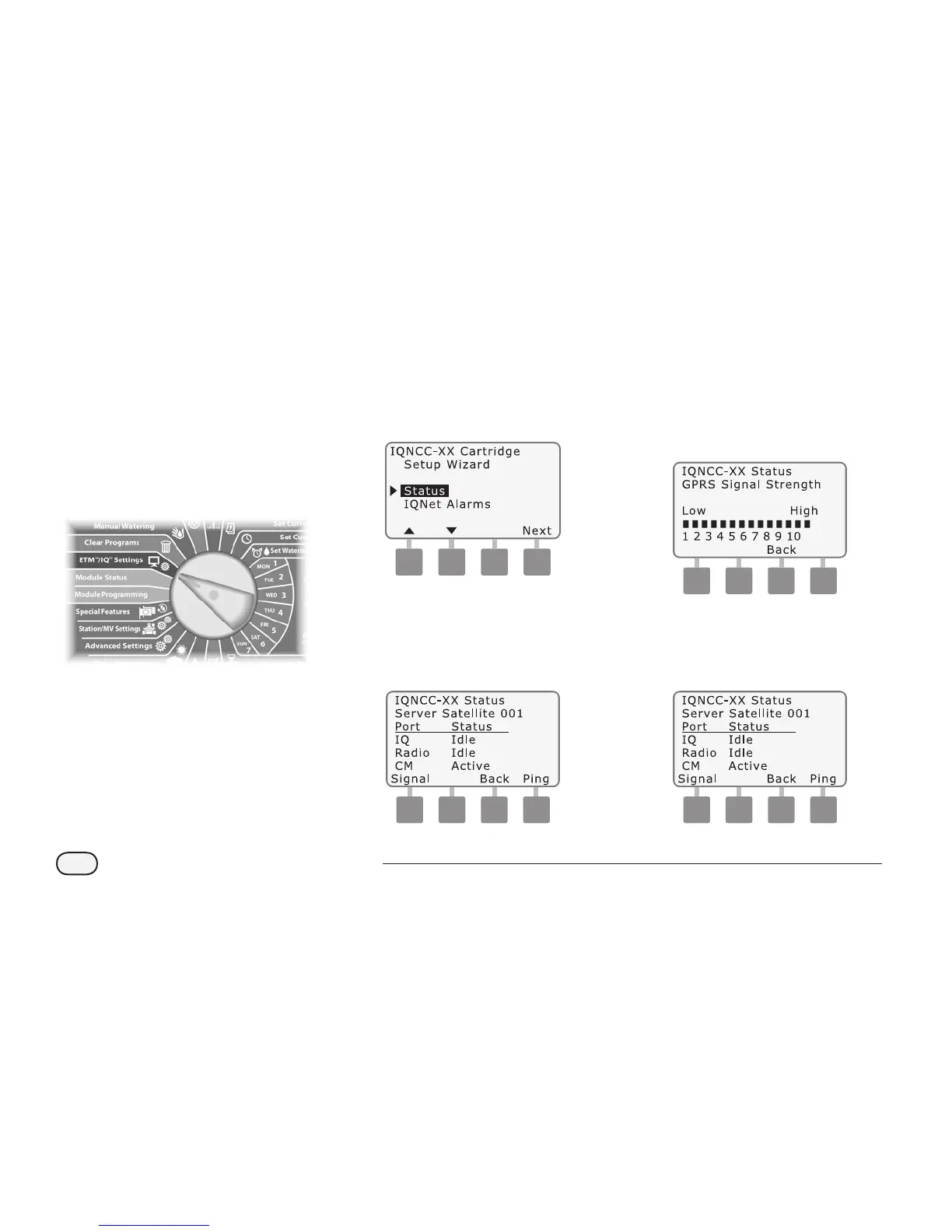
To display the status of Server
Satellites with IQ-NCC-GP or IQ-NCC-
WF cartridges installed:
g
Turn the controller dial to
ETM/IQ SETTINGS
A
The IQ Settings main menu is
displayed. Use the UP or DOWN
arrows to select Status; press
Next.
NCC Configurator
B
The Satellite Status screen is
displayed. Current status of IQ,
Radio, and CM ports are shown.
Press Signal to display GPRS or
WiFi signal strength.
C
The Signal Strength screen is
displayed. The signal strength
between the satellite and the
GPRS or LAN network is indicated
on a scale from 1-10.
D
The Satellite Status screen is
displayed. Press Ping to check
the communication status with
selected Clients.


 To Next Page