24
IQ Network Communication Cartridge
Client Satellite Setup Wizard
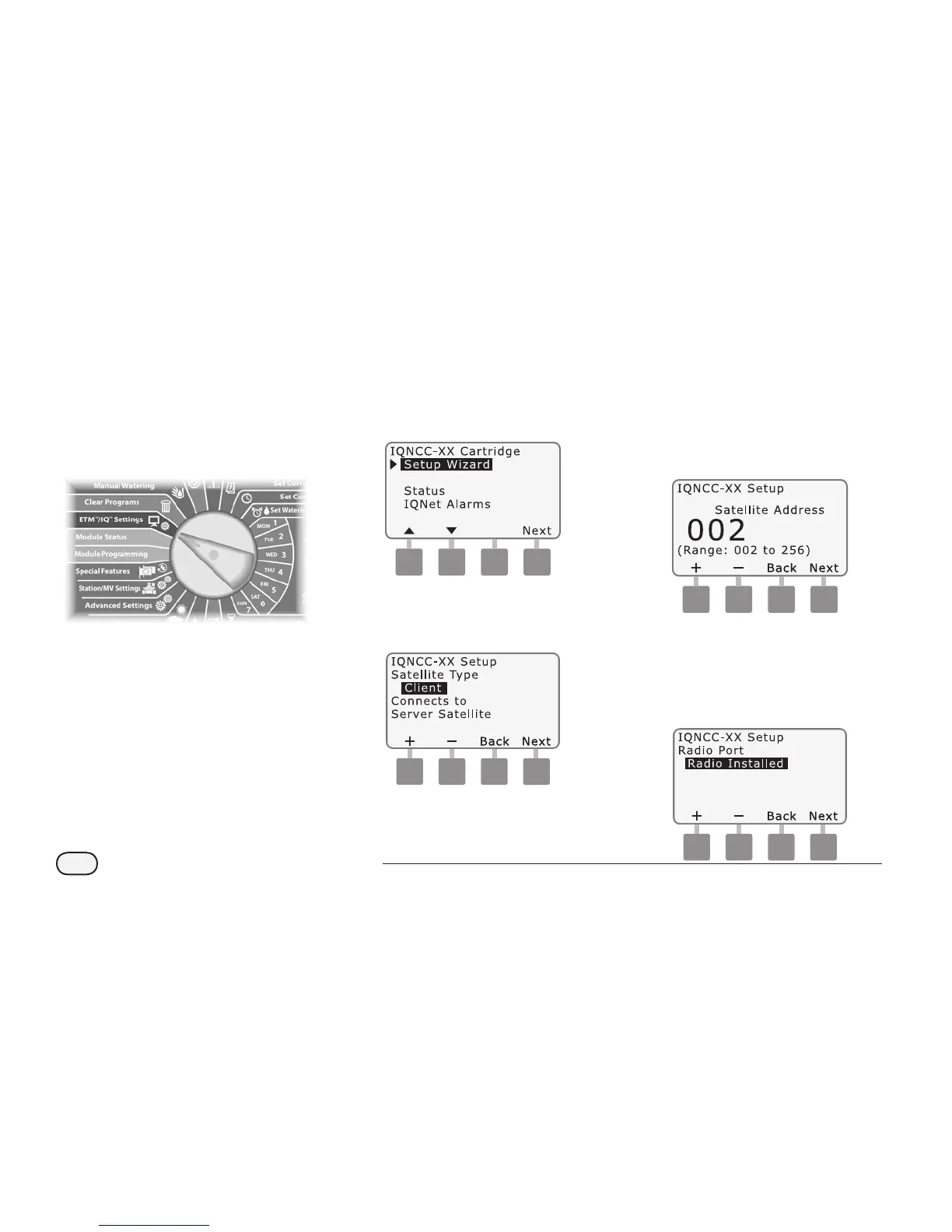
Follow these steps to congure a
controller as a Client Satellite:
g
Turn the controller dial to
ETM/IQ SETTINGS.
A
The IQ Settings main menu is
displayed. Use the UP or DOWN
arrows to select Setup Wizard;
press Next.
NCC Configurator
B
The Setup - Satellite Type screen
is displayed. Use + or - to select
Client; press Next.
C
The Setup – Satellite Address
screen is displayed. Use + or -
to select a unique address from
002-256 for this satellite (press
and HOLD buttons to accelerate
settings); press Next.
Client
D
The Setup – Satellite Radio Port
screen is displayed. Use + or - to
select a radio port option (No
Radio Installed, Radio Installed);
press Next.


 To Next Page