29
IQ Network Communication Cartridge
Status Menu
The Status Menu is used to display the
status of each communication port on
the front panel LCD.
For Direct and Server Satellites with a
NCC-GP or NCC-WF cartridge installed,
the signal strength between the IQ
computer and the controller can be
displayed.
Server Satellites can use the Ping
feature to verify communication with
any user-selected Client Satellite.
Direct Satellite Controllers
RS-232, Phone or Ethernet
To display the status of Direct
Satellites with IQ-NCC-RS, IQ-
NCC-PH, or IQ-NCC-EN cartridges
installed:
g
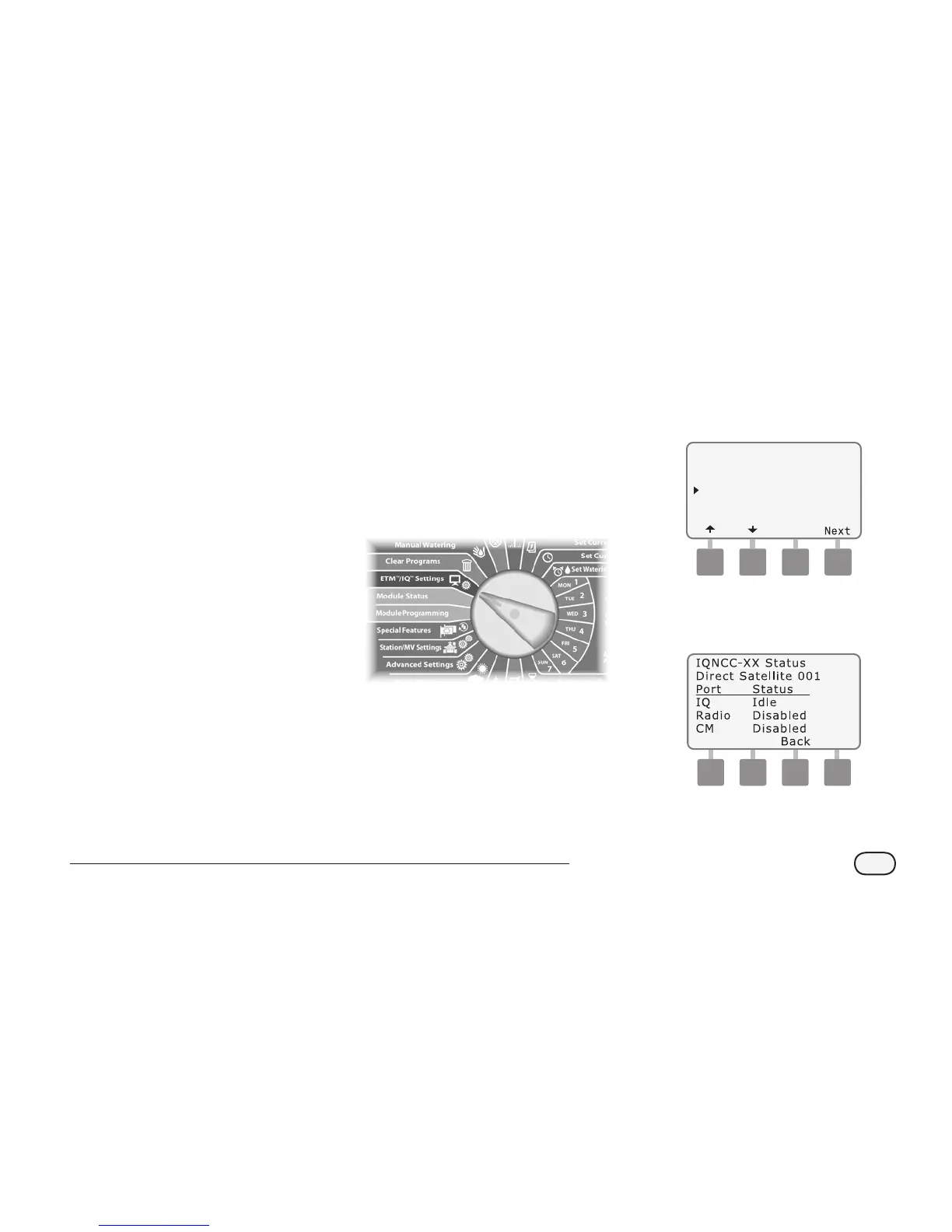
Turn the controller dial to
ETM/IQ SETTINGS
A
The IQ Settings main menu is
displayed. Use the UP or DOWN
arrows to select Status; press
Next.
IQNCC-XX Cartridge
Setup Wizard
NCC Configurator
Status
IQNet Alarms
B
The Satellite Status screen is
displayed. Current status of IQ,
Radio, and CM ports are shown.


 To Next Page