RT-7200 Auto Hematology Analyzer User’s Manual
6 History Data
After test of each sample, the system automatically saves test data; RT-7200 can save
parameter test values and histograms of at most 50000 samples. User can check parameter
test data and histograms of all samples, print, delete, modify and retrieve sample data of
designated condition.
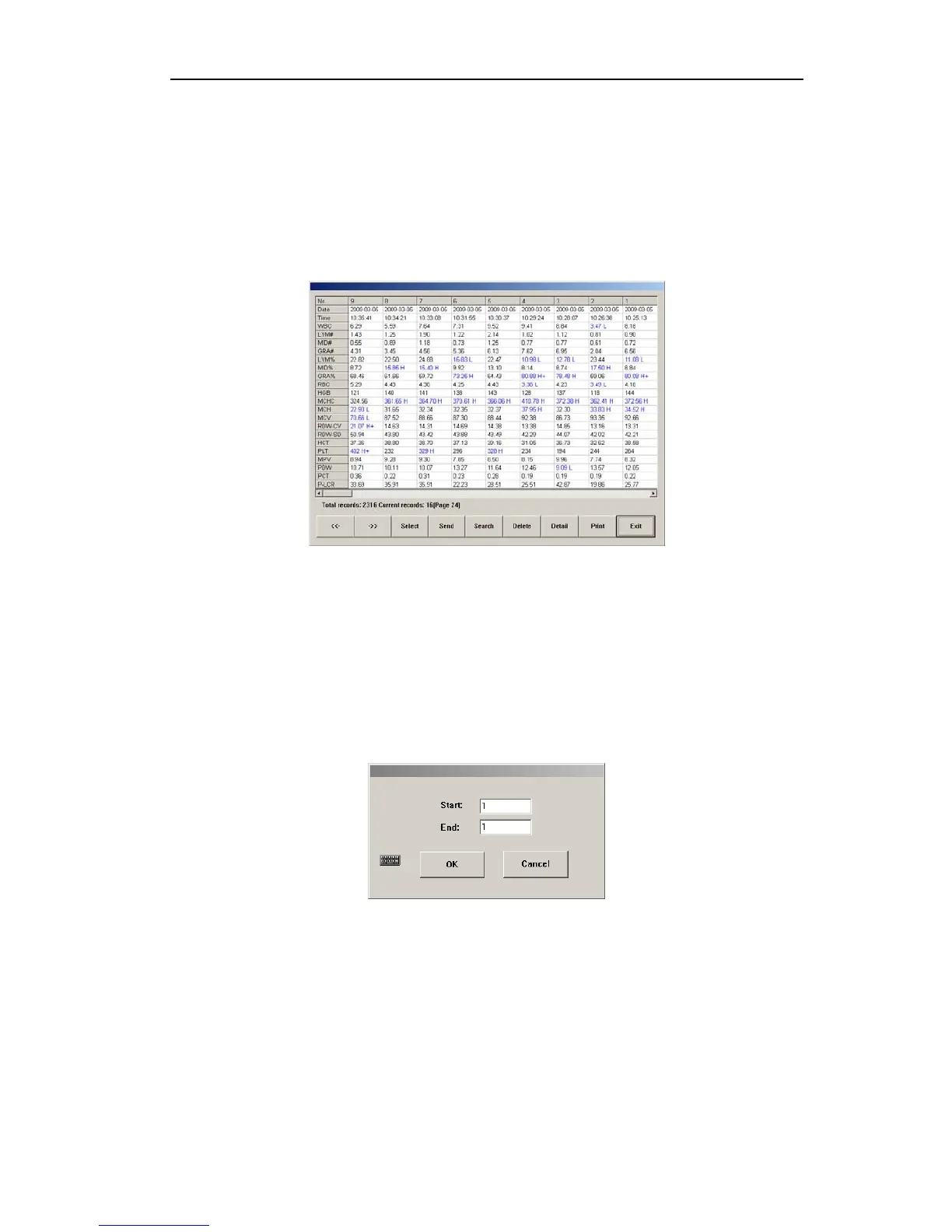
In main screen, click “RESULTS” button, open history data list menu, as shown below:
Fig.6-1 History record list
Home screen of system displays the latest 100 records, “H”, “L” or “H+”, “L-” after parameter
indicates that test result exceeds upper limit or lower limit of system setting parameter
pathogenic value or normal value.
Test result with “- - -”, indicates that result is beyond test range or fault occurs during test.
If history record number is greater than 500, you can click “<<-” and “->>” buttons to switch
between browsing data.
z Select
Click “select” button, open select dialog box as follows:
Fig.6-2 Select dialog box
Input record sequence numbers to choose in starting point and end point edit boxes,
click “OK”, if the same value is entered in starting point and ending point edit boxes,
then the record this value corresponds to is selected.
Click “Cancel” button, the system will not select any record.
z Send
It provides data transfer function, data selecting methods: a) use select function. b) Use
mouse to click list column, select one history data; using keyboard Ctrl key or Shift key,
you can select multiple columns. If no data are selected, all data can be sent. Click
33



 To Next Page