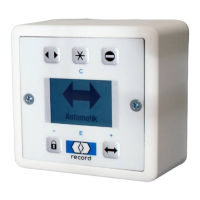
SERVICE STG
Configure System >
Learning System >
Parameter >
Maintenance >
Functions >
SERVICE STG
Configure System >
Learning System >
Parameter >
Maintenance >
Functions >
Operation Mode >
SERVICE STG
Configure System >
Learning System >
Parameter >
Maintenance >
Functions >
SERVICE STG
Configure System >
Learning System >
Parameter >
Maintenance >
Functions >
Operation Mode >
PARAMETER
Input / Output >
CAN-BUS >
Miscellaneous >
Manual control >
Control panel >
Locking >
INPUT / OUTPUT
STG >
FEM 1 >
FEM 1
FEM Type 0
Input >
Output >
INPUT
AUX10_IN 0
AUX11_IN 0
AUX12_IN 0
AUX13_IN 0
SERVICE STG
Configure System >
Learning System >
Parameter >
Maintenance >
Functions >
SERVICE STG
Configure System >
Learning System >
Parameter >
Maintenance >
Functions >
Operation Mode >
SERVICE STG
Configure System >
Learning System >
Parameter >
Maintenance >
Functions >
SERVICE STG
Configure System >
Learning System >
Parameter >
Maintenance >
Functions >
Operation Mode >
PARAMETER
Input / Output >
CAN-BUS >
Miscellaneous >
Manual control >
Control panel >
Locking >
INPUT / OUTPUT
STG >
FEM 1 >
FEM 1
FEM Type 0
Input >
Output >
OUTPUT
AUX10_OUT 0
AUX11_OUT 0
AUX12_OUT 0
AUX13_OUT 0
AUX14_OUT 0
AUX15_OUT 0
Various Input selections for
using an FEM1 Module that
would be enabled for added
functionality.
Various Output selections for
using an FEM1 Module that
would be enabled for added
functionality.
SERVICE STG
Configure System >
Learning System >
Parameter >
Maintenance >
Functions >
SERVICE STG
Configure System >
Learning System >
Parameter >
Maintenance >
Functions >
Operation Mode >
SERVICE STG
Configure System >
Learning System >
Parameter >
Maintenance >
Functions >
SERVICE STG
Configure System >
Learning System >
Parameter >
Maintenance >
Functions >
Operation Mode >
PARAMETER
Input / Output
CAN-BUS >
Miscellaneous >
Manual control >
Control panel >
Locking >
INPUT / OUTPUT
STG >
FEM 1 >
EMERG. STOP Reset
0 Disabled
1 Enabled
Emerge
Emerge
Emerge
Emerge
Unintentional unlocking of the door by
means of an EMERGENCY STOP or an
interrupted signal from a fire alarm
system is prevented. A normally closed
contact of the EMERGENCY STOP or
fire alarm system is connected to
terminals 14/15 of the STG 127. If
interrupted and if enabled, the controller
will be restarted and briefly unlock door.
If enabled, max. opening angle must be
re-taught after first operation.
SERVICE STG
Parameter >
Maintenance >
Functions >
Operation mode >
Learning System >
PARAMETER
Manual control >
Control panel >
Locking >
Input >
Output >
Miscellaneous >
MISCELLANEOUS
Push to actuate 0
Alarm display >
ALARM DISPLAY
Time activation 16
Time safety 16
Sets the length of time a continuous
actuate signal (terminal 2) will initiate
an alarm status (red LED blinking on
control panel or message on Display
Control Panel). Adjusts in 5 second
increments -
0 = Disables alarm
1 = 5 seconds before alarm
12 = 60 seconds before alarm
40 = 200 seconds before alarm
Configu
SERVICE STG
Parameter >
Maintenance >
Functions >
Operation mode >
Learning System >
PARAMETER
Manual control >
Control panel >
Locking >
Input >
Output >
Miscellaneous >
MISCELLANEOUS
Push to actuate 0
Alarm display >
PUSH TO ACTUATE
0 disabled
2 Normal
3 Slow
4 HB with sensors
“2 Normal” will cause the operator to
open at the adjusted “Open Speed”
parameter. “3 Slow” will cause the
operator to open in approximately
7.5 seconds. NOTE: When Push to
Actuate is enabled, the operator will
resist manually opening the door at a
speed greater than the Open Speed
the unit is adjusted to.
Configu
14


 To Next Page
 Loading...