54
b) Programming additional features
By default, the speed controller is preprogrammed with the optimal settings.
When using LiPo rechargeable batteries to operate the vehicle, check whether low voltage protection is
enabled in the default setting of the speed controller (normally 3.0 V per cell). When low voltage detection
is disabled, LiPo rechargeable batteries are subject to a deep discharge that destroys them.
The setup button can be used to program the settings.
Proceed as follows:
• Switch on the remote control.
• Switch off the speed controller (move the switch to the
"OFF" position).
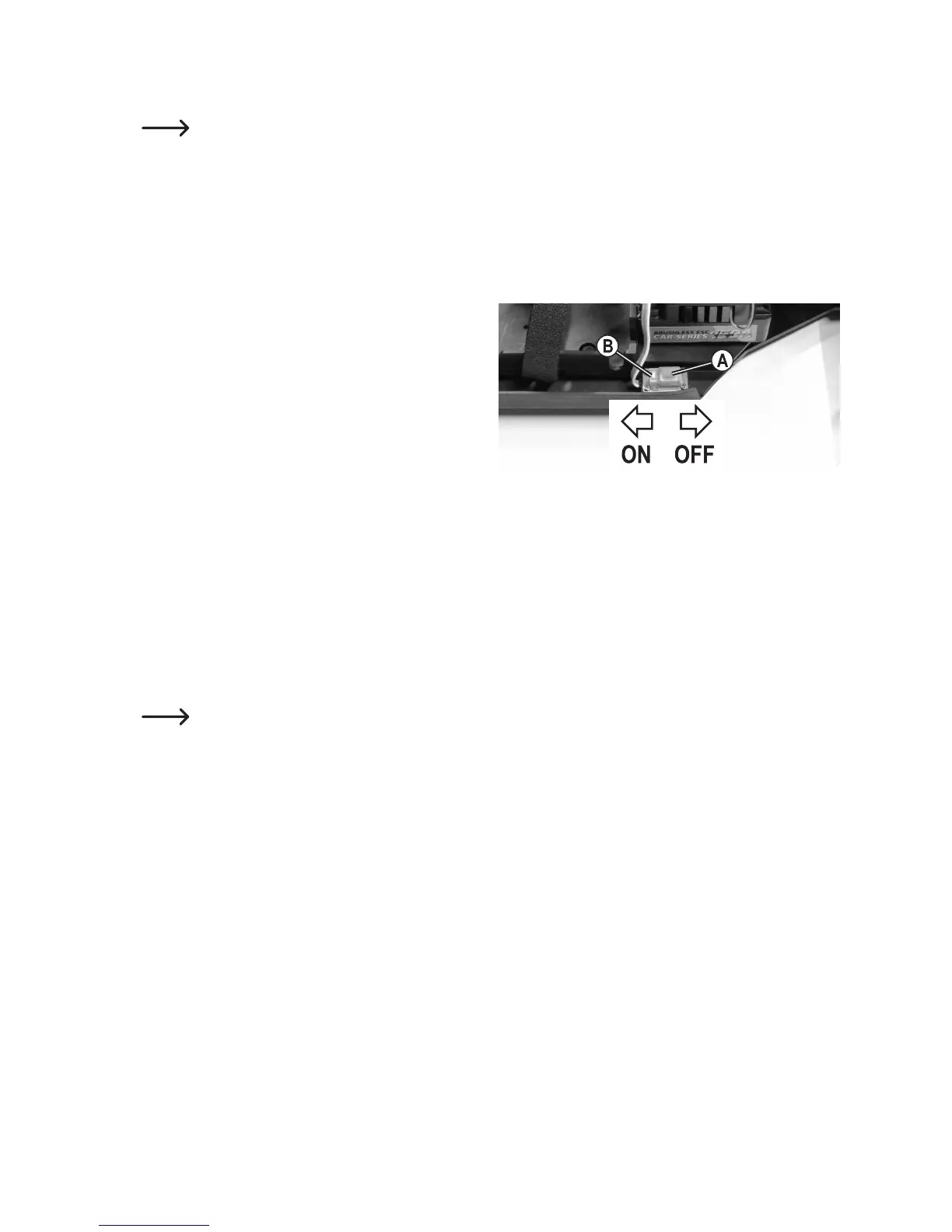
• Holddownthesetupbutton(B)nexttotheon/offswitch
(A) and turn on the speed controller (move the switch to
the "ON" position).
Keep holding down the setup button (B).
• TheredLEDonthespeedcontrollerwillashandthe
motor will emit beeps (keep pressing down the setup
button).
• Afterawhile,thegreenLEDwillash(keeppressingdownthesetupbutton)andthemotorwillemitbeeps.This
indicates which setup function is currently selected.
GreenLEDashesoncebrieyand1shortbeep: Forward/reversethrottleorforwardthrottleonly
GreenLEDashestwicebrieyand2shortbeeps: Brake
GreenLEDashesbrieythreetimesand3shortbeeps: LowvoltagedetectionfortheLiPobattery
GreenLEDashesbrieyfourtimesand4shortbeeps: Startupmode
GreenLEDashesonceforalongtimeand1longbeep: Brakingpower
Beeps are generated by a brief activation of the brushless motor. This beep can be very quiet depending
on the motor. If this is the case, note the LED indication on the speed controller.
• Whenthesetupfunctionyouwanttochangeisdisplayed(forexample,forlowvoltageprotection,thegreenLED
ashesbrieythreetimesandthemotoremits3shortbeeps),releasethesetupbutton.
• NowtheredLEDwillash.Thenumberofredashingsignalsindicateswhichsettingvalueisactive(forexample,
forlowvoltageprotection3.0Vpercell,redLEDashesbrieyfourtimesandthemotoremits4shortbeeps).
• Brieypressthesetupbuttontochangethesettingvalue;thenumberofashingsignalsfromtheredLED(and
motorbeeps)willchangeaccordingly(seetableonthenextpage).
• Turnoffthespeedcontrollertoexitsettingsmodeandsavetheprogramming.Ifyouthenturnonthespeed
controller, it will be ready for operation with the new settings.
• Follow the above steps to change the other settings.




 To Next Page