63
f) Changing the motor pinion
The vehicle is equipped with a motor pinion with 12 teeth. Another motor pinion with 14 teeth is included.
Usingthemotorpinionwith12teethresultsinbetteracceleration,butlowerendspeed(uptoapprox.90km/hwith
two 3-cell LiPo drive rechargeable batteries).
Usingthemotorpinionwith14teethresultsinslightlyworseacceleration,buthigherendspeed(uptoapprox.100
km/h with two 3-cell LiPo drive rechargeable batteries).
Important:
We recommend that you only use the motor pinion with 14 teeth if you can safely handle such powerful
vehicles. The high speed requires prompt responses when steering the vehicle. In addition, there must be
enoughspaceforoperatingthevehicle,becausethebrakingdistanceissignicantlylonger.
Proceed as follows:
• Turn off the speed controller and disconnect the two
drive rechargeable batteries from it.
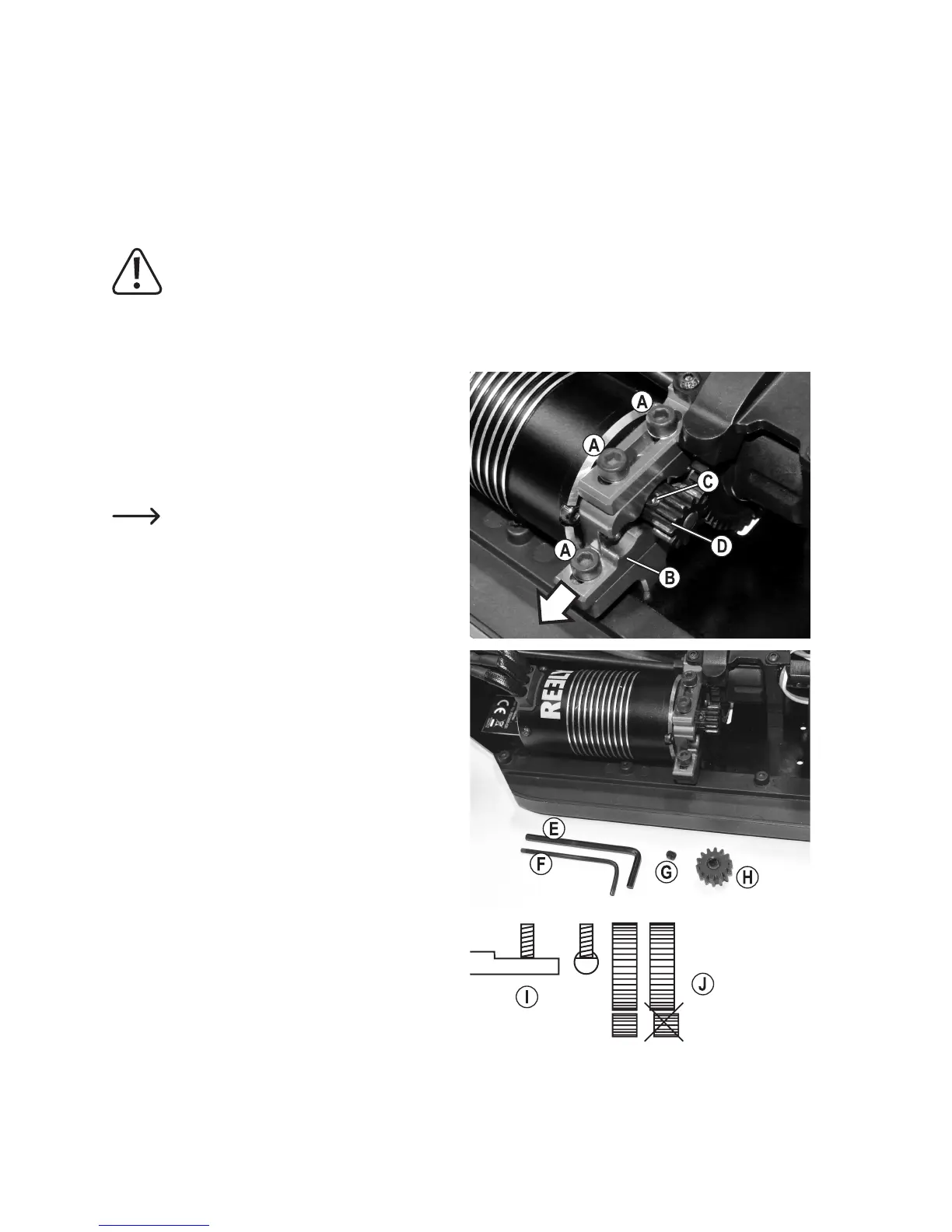
• Loosen the three socket head screws (A) with a suitable
3 mm hex key so that the motor bracket (B) can be
pulled out forwards a little bit, as shown by the arrow
intherightgure.
Do not fully unscrew the three screws, only
unscrew them far enough for the motor bracket
to be moved.
• Loosen the set screw (C) of the motor pinion (D) with a
2mm hex key (F),then pull the motorpinionoffthe
motoraxle(notetheorientation).
• Putthemotorpinionwith14teeth(H)onthemotoraxle
inthe same orientationso that theat side isfacing
away from the motor.
• Applya drop ofthread-locking uid to the set screw.
Thenxthemotorpiniononthemotoraxlewiththeset
screw (G).
Makesurethatthesetscrewisexactlyontheatside
ofthemotordriveaxleandsecurelytightenedthere,as
shown in sketch (I).
Furthermore, make sure that the motor pinion rests
exactlyonthedrivegearandisnotoffsetlaterally,as
shown in sketch (J).
• Now adjust the backlash, as described in chapter 11. g)
below. It also details when and how to screw the motor
bracket.




 To Next Page