voice message(s) ......................................
(current page)
dialling a number .......................................
(current page)
4.14
ENG_UD52501_1
Composer un numéro (XNX - Renault)
Dial number
DIAL NUMBER
For safety reasons, carry
out these operations when
the vehicle is stationary.
“Dial number”
menu
Making a call by dialling a
number
From the main menu, press “Phone” or
press the shortcut A found on most
menus, then “Dial” to open the keypad
used to enter a number.
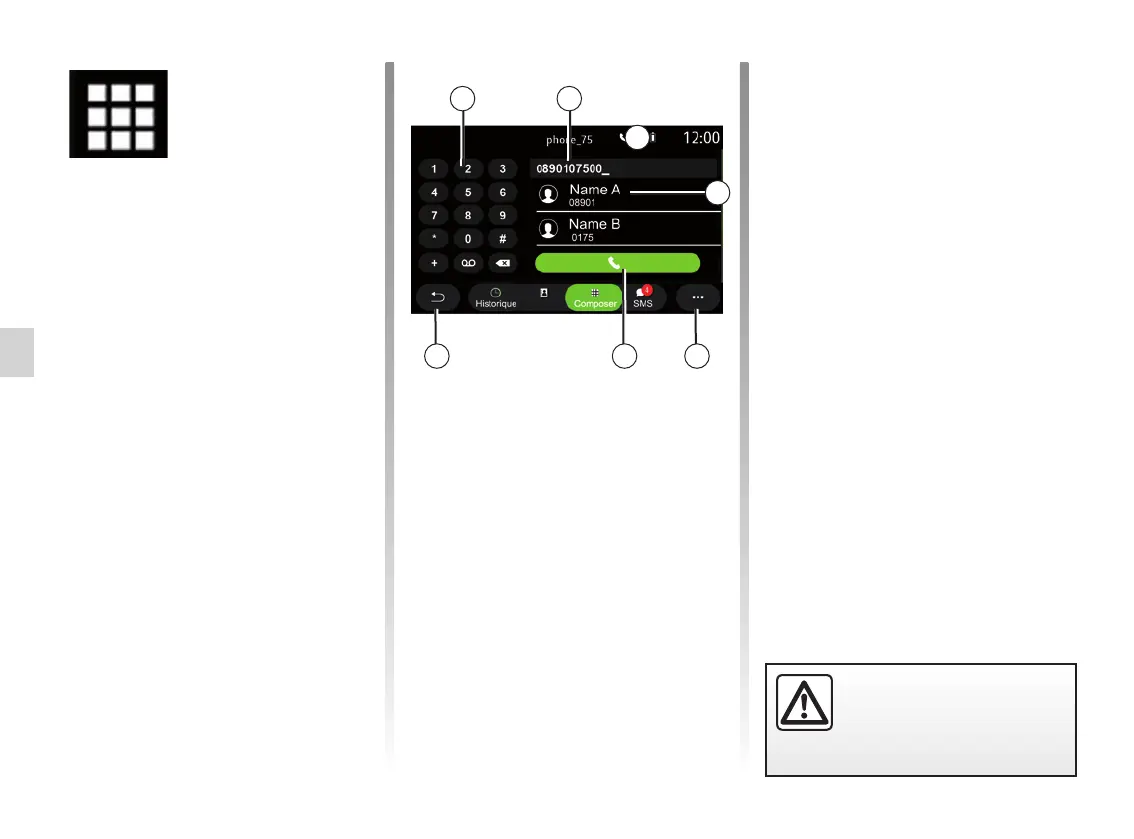
Dial number
Enter the desired number using the
keypad 1, then press “Call” to make the
call.
From the moment the first entry is
made, the multimedia system suggests
a list of your contacts with the same
series of numbers.
Select the contact that you wish to call,
then press the “Phone 5” button to
make the call.
“Dial” mode
1 Digital keypad.
2 Number dialled.
3 Suggested contacts.
4 Pop-up menu.
5 Call.
6 Return to the previous menu.
Enter a number using voice
control
It is possible to dial a number using the
voice control incorporated in your mul-
timedia system. To do this, press the
voice control button to display the main
voice control menu. After the beep, say:
– “Call” then dictate the telephone
number that you wish to call.
– or “Call” followed by the name of the
contact you wish to call.
The multimedia system displays and
begins to call the number you pro-
vided.
Note: if your contact has several phone
numbers (work, home, mobile, etc.)
you can specify which you require. e.g.
“Call” - Stéphane - home.
456
1 2
3
A



 To Next Page