ambient vehicle
customisation .......................................
(current page)
6.20
ENG_UD60856_2
Ambiance lumineuse (XNX - Renault)
Area in the passenger compartment
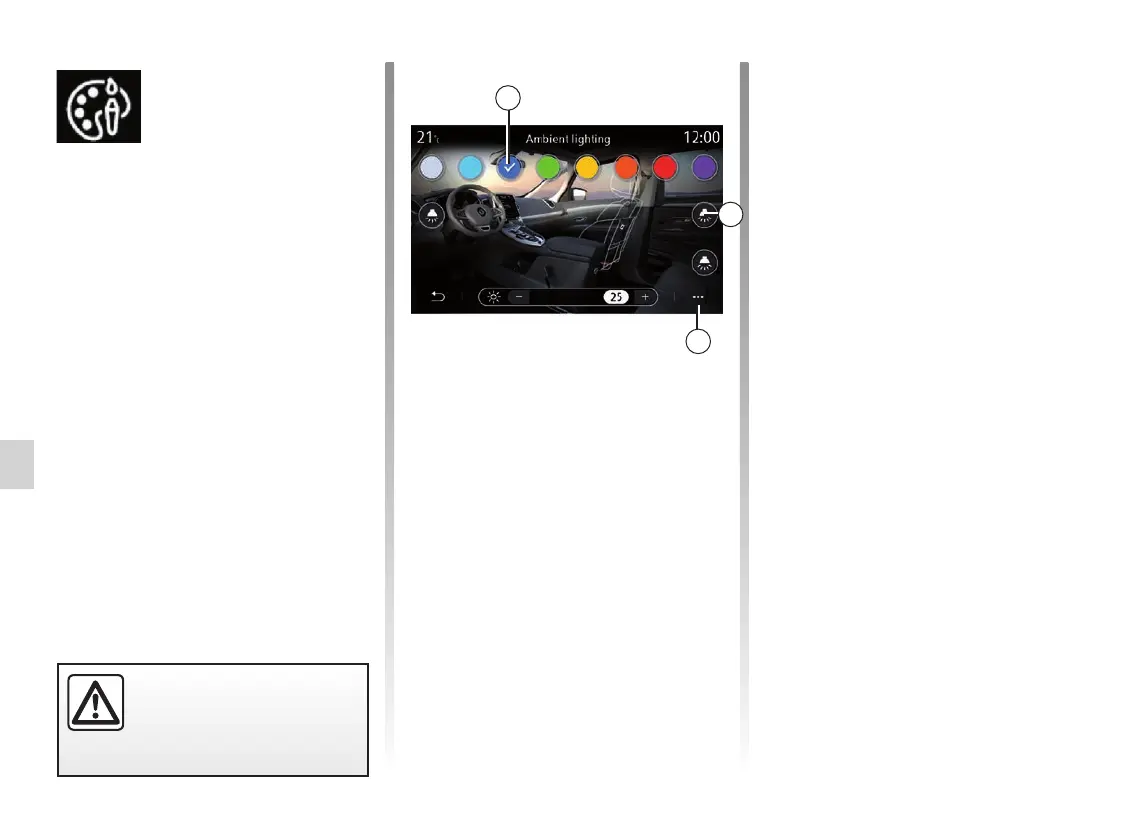
The selected colour and intensity can
be applied to the following areas:
– dashboard;
– front passenger compartment;
– rear passenger compartment.
Press one of the “Lighting” buttons 2 to
switch ambient lighting ON or OFF in
the area selected.
Note: to set the display and screen
layouts, access the “Settings” menu,
“System” tab, then the “Screen” sec-
tion.
Pop-up menu
To reset the settings and return to de-
fault settings, press the 3 pop-up menu
button, then “Reset”.
Ambient lighting
AMBIENT LIGHTING
Choice of colour
To change the ambient colour in your
vehicle, select a 1 colour from those
available.
“Intensity”
You can control the intensity of the am-
bient lighting. To do this, press buttons
“+” or “–”.
For safety reasons, carry
out these operations when
the vehicle is stationary.
“Ambient lighting”
menu
From the main menu, select “Settings”,
then in the “Vehicle” tab press “MULTI-
SENSE”.
Press Configure mode then select the
“Lighting” tab.
Use this menu to set the light environ-
ment in the passenger compartment.
1
2
3



 To Next Page