parking distance control.............................
(up to the end of the DU)
warning
parking exit...........................................
(up to the end of the DU)
rear view camera .......................................
(up to the end of the DU)
hands-free parking.....................................
(up to the end of the DU)
6.6
ENG_UD69084_5
Aides au parking (XNX - Renault)
Parking aids
PARK ASSIST (1/2)
“Parking
assistance”
menu
From the main menu, press “Settings”,
then press the “Vehicle” tab. Use this
menu to access the park assist set-
tings. For more information, please see
the section entitled "Park Assist" in your
vehicle user manual.
For safety reasons, carry
out these operations when
the vehicle is stationary.
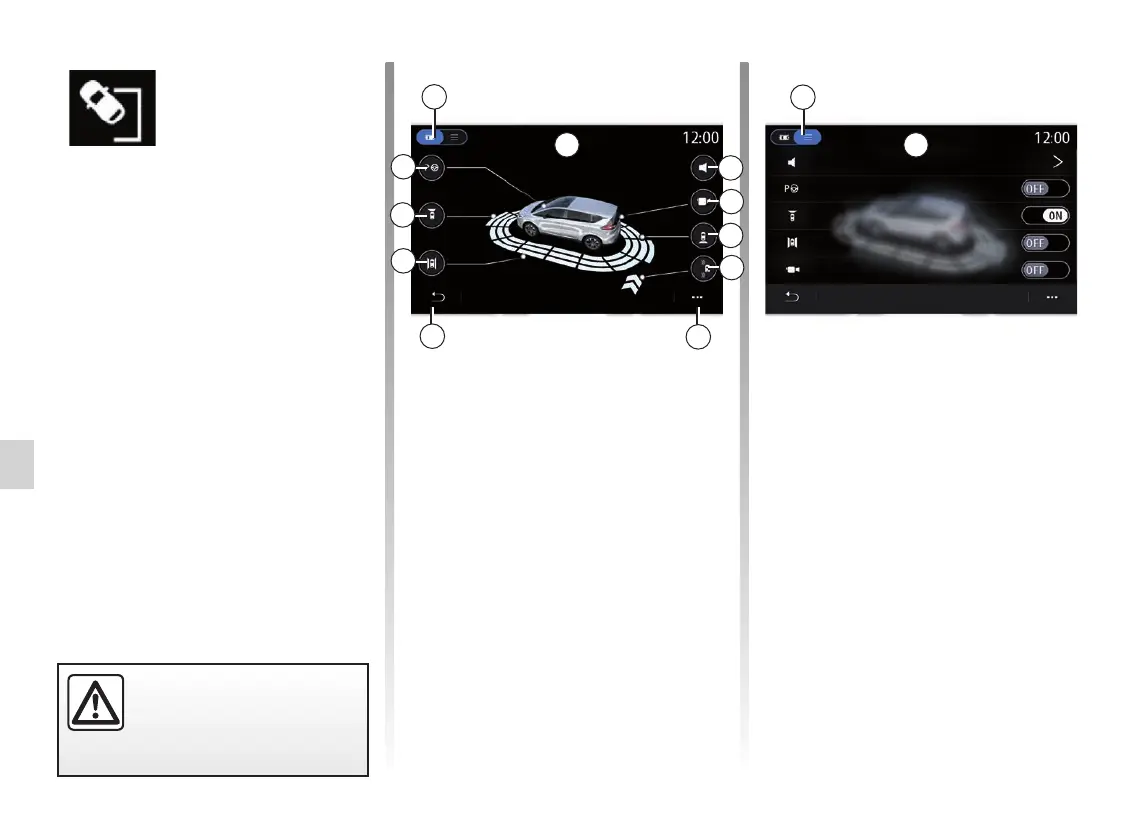
“Parking assistance” screen
1 “Display mode";
2 “Sound”;
3 “Camera”;
4 “Rear obstacle detection”;
5 “Parking exit warning”;
6 “Pop-up menu”;
7 “Return to the previous menu”;
8 “Side obstacle detection”;
9 “Front obstacle detection”;
10”Hands-free parking”.
1
1
2
3
4
6
7
8
9
10
11 12
Pop-up menu
From the 5 pop-up menu, you can reset
the default settings for each menu and
access the multimedia system instruc-
tions.
When selecting a 1 display mode, you
can select an interactive mode 11 or list
mode 12 to view the available parking
aids.
Select the button for the option you
would like to activate or deactivate.
Sound
Front obstacle detection
Side obstacle detection
Camera
Hands-free parking
Side
Front
Hands-free parking
Sound
Camera
Rear
RCTA
5



 To Next Page