call history..................................................
(up to the end of the DU)
4.13
ENG_UD60835_2
Historique des appels (XNX - Renault)
Call log
CALL LOG
“Call in progress” mode
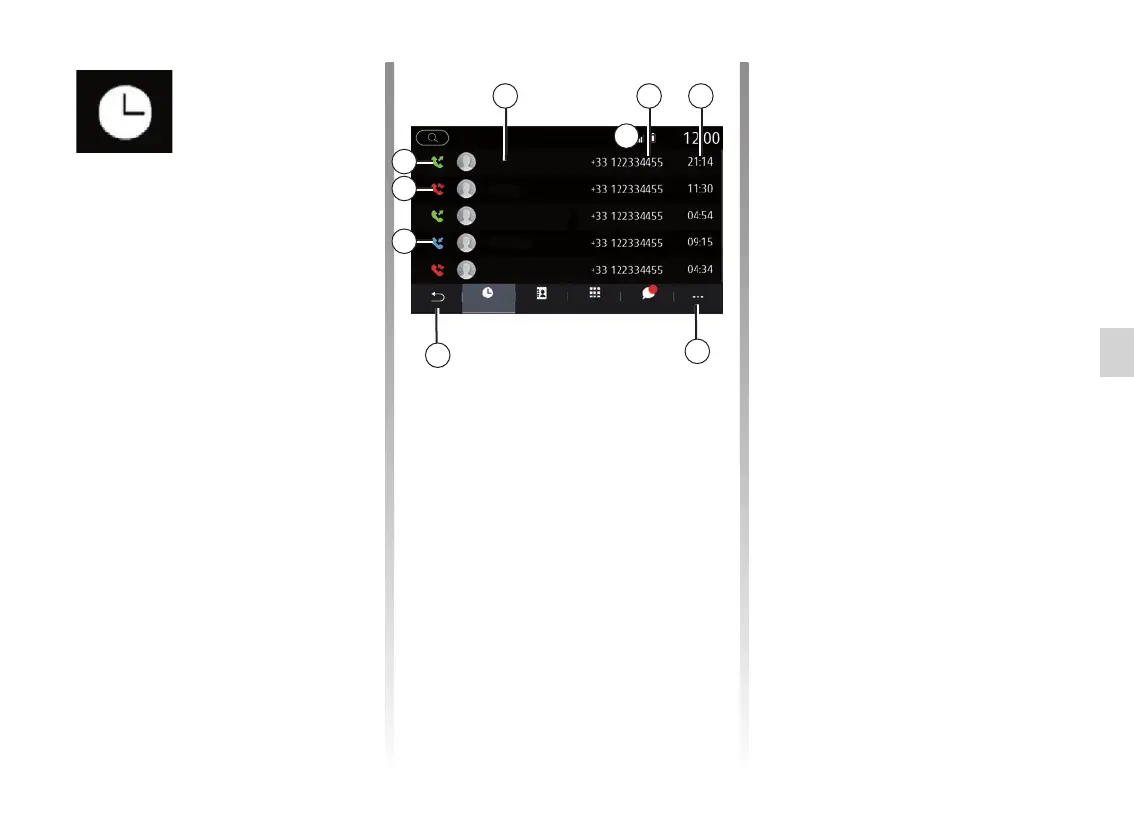
1 Contact names.
2 Contact numbers.
3 Call time/date.
4 Pop-up menu.
5 Back to previous menu.
6 Incoming call.
7 Missed call.
8 Outgoing call.
Note: depending on the multimedia
screen, some information is not avail-
able.
Browsing the call log
Swipe up and down to scroll through
the list of calls.
Updating the call log
Press 4 and select “Update list”. A mes-
sage will notify you that the data has
been updated.
Making a call from the call
log
Press one of the contacts or numbers
to dial. The call will be started automati-
cally.
“Call log”
menu
Accessing the call log
From the main menu, press “Phone” or
press the shortcut A from most menus,
then “History” to access the log of all
your calls.
The call log is displayed from the most
recent to the oldest.
4
5
2 31
8
6
7
A
SMSDialContacts listCall Logs
Enorah
My
Evan
Elijah
Kerlyne



 To Next Page