soft button ..................................................
(up to the end of the DU)
screen
menu ....................................................
(up to the end of the DU)
multimedia (equipment) .............................
(up to the end of the DU)
screens
multimedia screen ................................
(up to the end of the DU)
1.2
ENG_UD63561_4
Description générale (XNX - Renault)
General description
GENERAL DESCRIPTION (1/2)
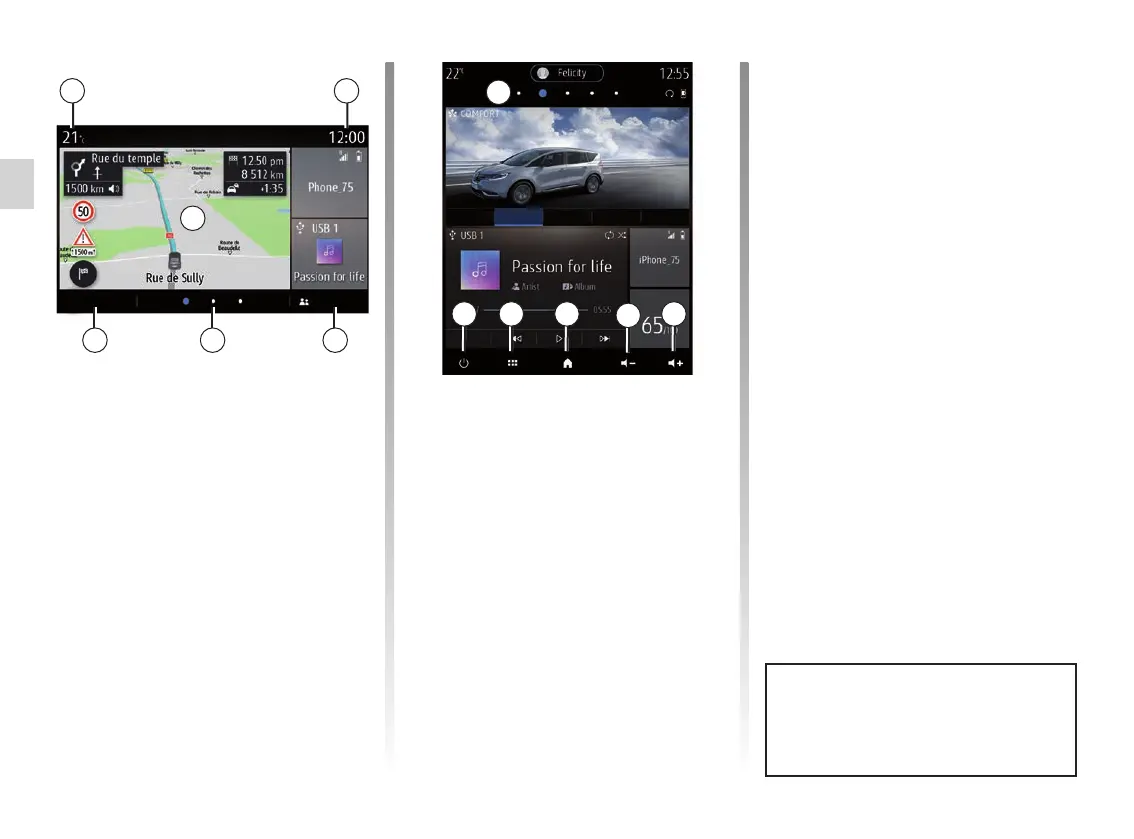
Home screens
A Exterior temperature.
B Time.
C Selected user profile. To configure
the user profile, refer to the section
headed “Settings”.
D Page indicator: quickly swipe the
content area to change page.
E Access to main menu.
F Home page/Accessing functions.
A
E
E D C
B
F
D
G Increase the volume of the source
currently in use.
H Decrease the volume of the source
currently in use.
J Access the first page of the home
page.
J
H
G
For more information, open the user
manual from the pop-up menu.
ElodieMenu
Driving Eco
ComfortEco Regular Sport My Sense
Sources
K
K Accessing the functions:
– Press and hold: restart the
system;
– Short Press: Radio/Music OFF,
minimum display, standby.
Note: You can change the configura-
tion of the home page. Please refer to
the “Add and manage widgets” section
for further information.



 To Next Page