6.10
ENG_UD69138_5
Caméra 360° (XNX - Renault)
Look in all directions
Camera choice
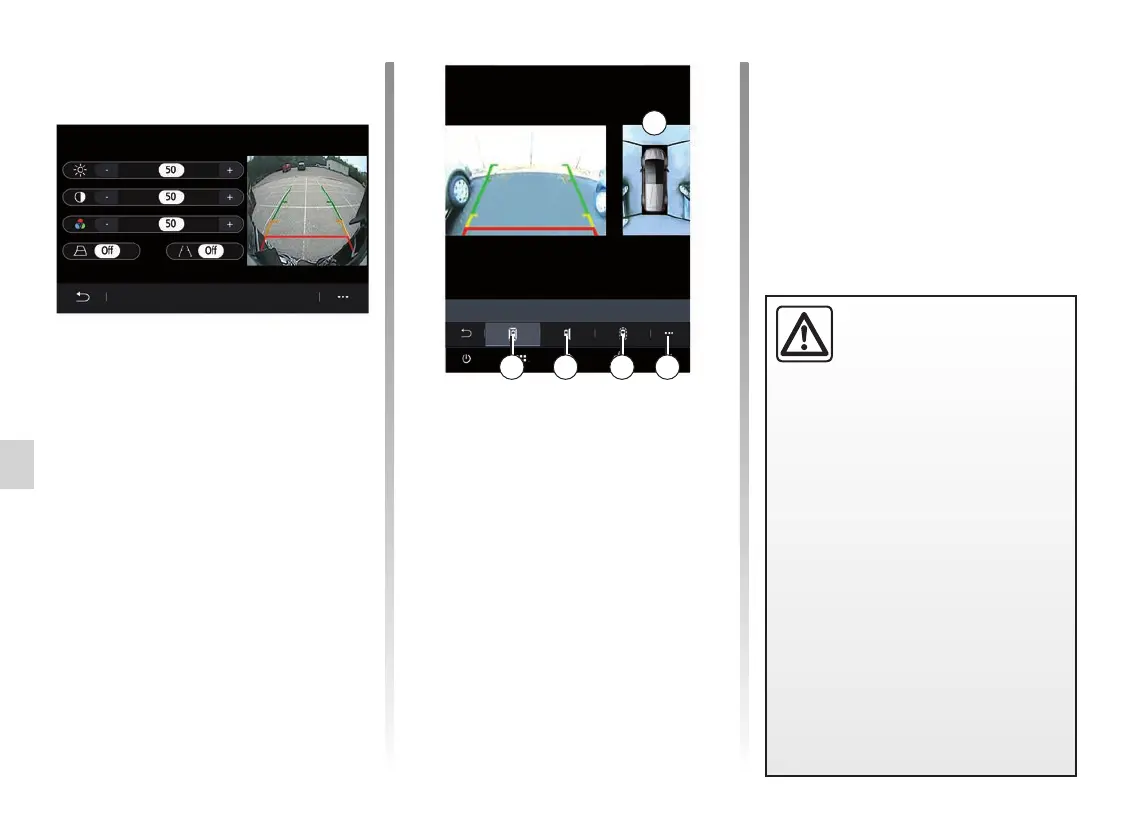
You can also select the view of zone B
displayed on the multimedia screen by
selecting a view type:
– 360° view of the surroundings 2;
– passenger side 3;
– obstacle detection 4.
From the pop-up menu 5, you can
return to the default settings.
360° CAMERA (2/2)
This function is an addi-
tional aid which indicates
other vehicles in the blind
spot area. It can never in
any case be a substitute for care nor
for the driver’s responsibility while in
charge of his vehicle.
The driver should always be ready
for sudden incidents while driv-
ing: always ensure that there are
no small, narrow moving obstacles
(such as a child, animal, pushchair,
bicycle, stone, post, etc.) in the blind
spot when manoeuvring.
B
2 3 4 5
Settings
From the main menu, select “Settings”
then the “Vehicle” tab, then “Parking
assistance” followed by “Camera”. Use
this menu to configure the 360° camera:
– press “ONˮ or “OFFˮ to activate or
deactivate the guiding lines;
– press “+ˮor“-ˮtoadjustthebright-
ness, contrast and colours of the
image.



 To Next Page