6.27
ENG_UD58595_3
Driving Eco (XNX - Renault)
“Details”
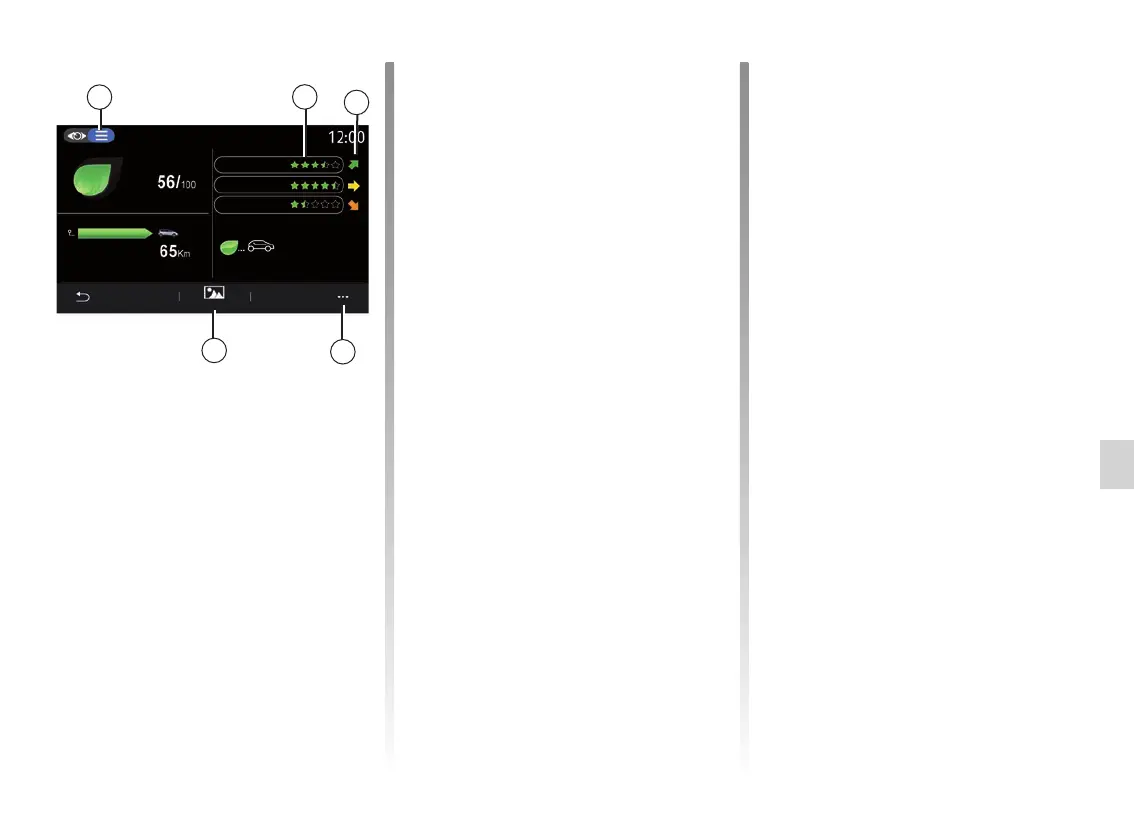
From the “Details” view mode 2, you
can view the data related to your cur-
rent journey:
– “General score”;
– “Breakdown of scores”;
– “Distance without fuel
consumption”/“Distance w/o acceler-
ation” (depending on configuration);
– “Eco Trip” data.
Journey data
The information displayed is calculated
based on the last journey reset:
– distance travelled;
– average speed;
– average fuel consumption.
Calculation of scores 3
The number of stars (5 levels) is given
in real-time according to scores based
on:
– acceleration;
– gear changing;
– anticipation.
Score trend 4
The arrows are positioned according to
the data in real time as follows:
– if the new score is higher than the
previously stored journey score: the
arrow points upwards;
– if the new score is lower than the
previously stored journey score: the
arrow points downwards;
– if the new score is the same as the
previously stored journey score: the
arrow points horizontally.
“Coaching”
This menu monitors your driving style
and gives general advice on Eco-
Driving to optimise your fuel or electric-
ity consumption (energy efficient and
consuming actions, how to load the ve-
hicle, tyre pressures, how to plan the
trip etc).
To access this menu, press “Coaching” 6
and read the instructions carefully
Scroll through the pages by press-
ing “General”, “Acceleration”, “Change
gear” and “Anticipation”.
Note: “Coaching” is deactivated if the
vehicle speed is over the “Coaching”
threshold.
The default “Coaching” threshold value
is approximately 7 mph (12 km/h).
The “Coaching” content is restricted if
the distance driven since the last reset
is insufficient.
DRIVING ECO (2/4)
2
4
3
5
6
Coaching
Acceleration
Gear change
Anticipation
Distance w/o acceleration
Driving Eco
0.0 km
- - km/h
- - L/100 km



 To Next Page