linking a telephone.....................................
(up to the end of the DU)
unpairing a telephone ................................
(up to the end of the DU)
personal data
save .....................................................
(current page)
4.2
ENG_UD63792_4
Appairer/désappairer un téléphone (XNX - Renault)
Add a new device
XL-0910
Emmanuel phone
Phone 3.16
Pairing, unpairing a telephone
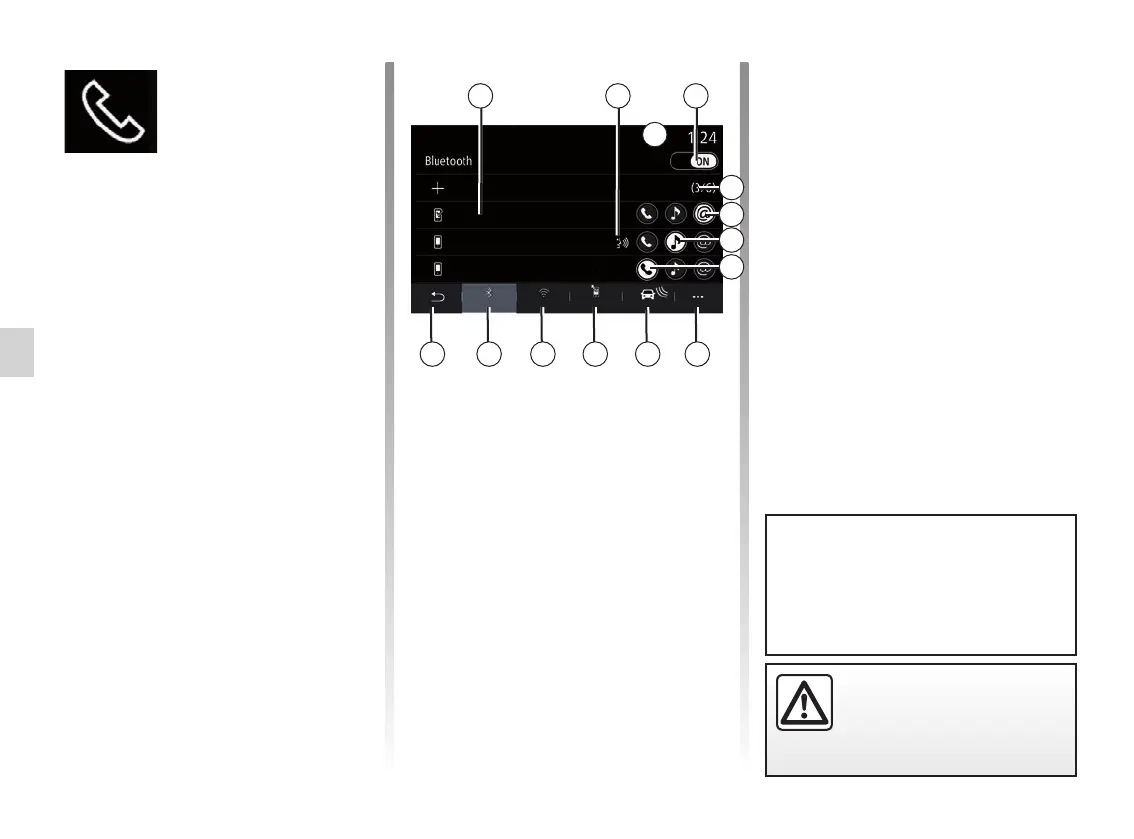
PAIRING AND UNPAIRING A TELEPHONE (1/3)
8 Pop-up menu.
9 Access the “Data” menu
10 Access the “Services” menu.
11 Access the WIFI menu.
12 Access the Bluetooth® menu.
13 Return to previous screen.
Note: the availability of the phone inter-
net connection 5 depends on the equip-
ment in the vehicle and it can be turned
on only for compatible models.
Pair, connect screen
1 Connected device list.
2 Phone voice recognition.
3 Activate/deactivate the Bluetooth
connection.
4 Add a new device.
5 Activate/deactivate the Hotspot
function.
6 Activate/deactivate the “Music”
function.
7 Activate/deactivate the “Phone”
function.
Telephone
menu
From the home screen, press “Phone”
or (if a telephone is already connected)
press the shortcut A if the “Phone”
menu appears. This function enables
your phone to be paired with the multi-
media system.
Note: if no telephone is connected to
the multimedia system, some menus
will be disabled.
Pairing your telephone will enable the
multimedia system to access your tele-
phone functions. No copies of your con-
tacts or personal data will be saved in
the multimedia system.
The multimedia system does not
manage telephones equipped with
“dual SIM”. Adjust the settings on your
telephone to enable the multimedia
system to pair correctly.
For a list of compatible telephones,
consult the https://easyconnect.
renault.com site.
8910111213
1 32
4
5
6
7
A
For safety reasons, carry
out these operations when
the vehicle is stationary.
Devices
Bluetooth
WIFI Services Data



 To Next Page