4.6
ENG_UD60828_3
Connecter/déconnecter un téléphone (XNX - Renault)
CONNECTING, DISCONNECTING A TELEPHONE (2/3)
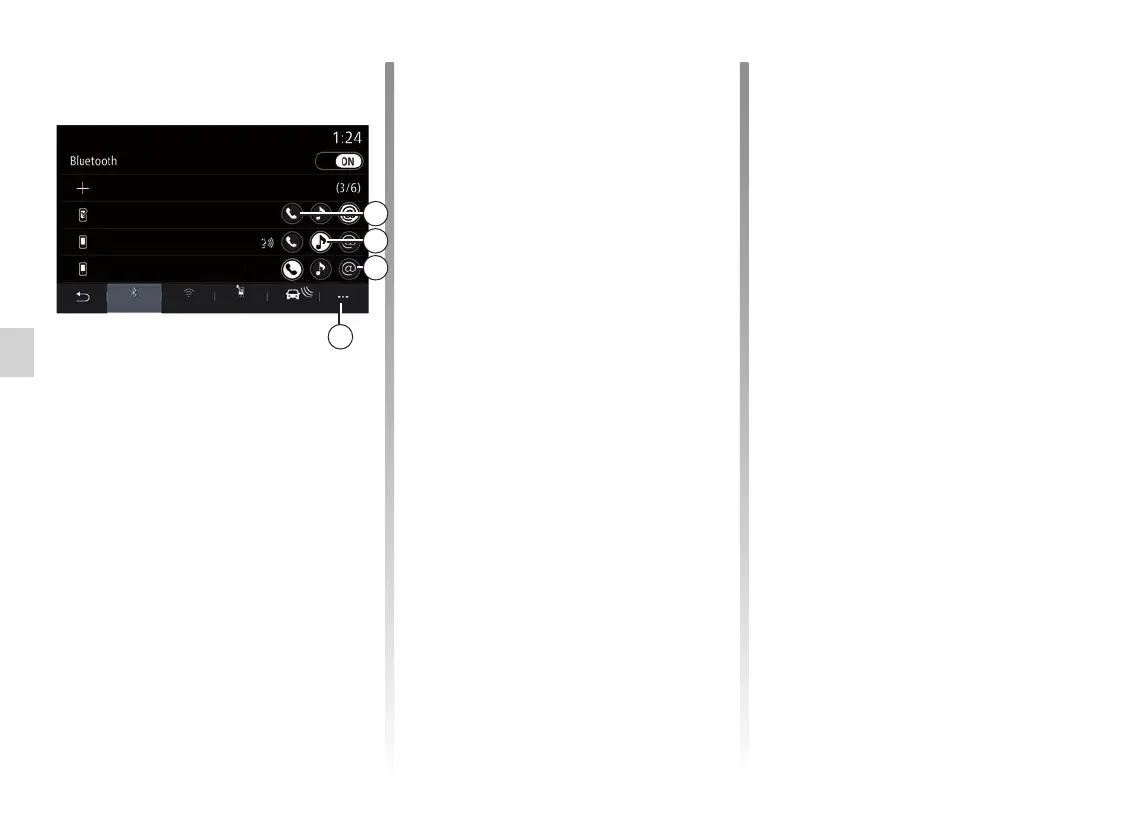
Select your telephone from the list
shown then select the phone functions
to be connected:
– “Phone” 1;
– “Music” 2;
– Hotspot 3.
Note:
– the availability of the hotspot 3 de-
pends on the equipment in the vehi-
cle and it can be turned on only for
compatible models;
– if the function icon is highlighted, this
indicates that it is activated;
– some phones may allow automatic
data transfer;
– some telephones only activate the
“Music” function if they contain at
least one music file.
Changing a connected telephone
From the “Phone” menu, pop up menu 4
then “Paired devices list”:
– de-select the functions to be discon-
nected from the telephone currently
in use;
– select the functions to be connected
to another telephone that is already
paired and shown in the device list.
From the “Settings” menu, select
System > Device Manager > phone
function to be connected.
Note: to change the connected tele-
phone, you will first have to pair more
than one telephone.
3
2
1
4
Connect the functions
To access your phone’s music, phone-
book and internet connection directly
via the multimedia system, you will
need to authorise data sharing from
the “Phone” menu, then pop-up menu
“Paired devices list” Bluetooth®.
The list of connected phones is dis-
played.
Ajouter un nouvel appareil
XL-0910
Emmanuel phone
Phone 3.16
Devices
Bluetooth
Wi-Fi Services Data



 To Next Page