FADER................................................................... (current page)
BASS .....................................................................(current page)
BALANCE .............................................................. (current page)
treble......................................................................(current page)
BASS .....................................................................(current page)
setting ....................................................................(current page)
settings
audio ................................................................(current page)
settings
fader .................................................................(current page)
settings
balance ............................................................ (current page)
BALANCE .............................................................. (current page)
GB.20
ENG_UD29578_2
ULC/Régler le son (ULC - Renault)ENG_NX_1023-3_NX_Dacia_0
Audio setting
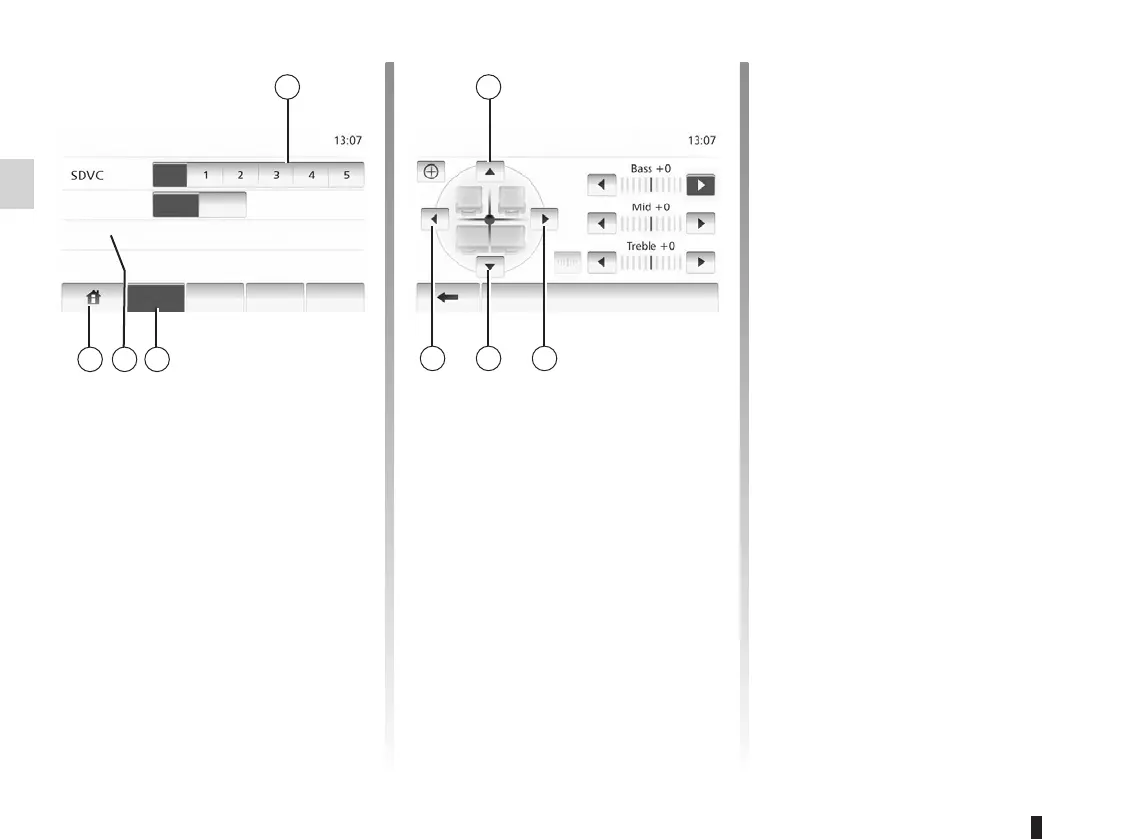
Display the settings menu by pressing
“Home” > “SETTING”. Tap 2.
You can leave the settings menu by
pressing 4.
When the speed of your vehicle is more
than 40km/h, the volume level outputs
higher than original volume level.
Adjust the volume/speed ratio by press-
ing zone 1.
Tap “On” or “Off” to turn off or on the
loudness.
Display the sound menu by pressing 3.
Tap 6 or 8 to adjust the sound the left/
right balance.
Tap 5 or 7 to adjust the sound the front/
rear balance.
After setting balance, tap “OK”.
Tap left arrow or right arrow to adjust
the Bass, Mid or Treble.
After setting Bass, Mid or Treble, tap
“OK”.
Audio Display
SystemBluetooth
Loudness
Sound
Off
Off
On
Audio Setting Sound
OK



 To Next Page