GB.54
VIDEO PLAYBACK
Playback
You can choose between playing all the
videos or playing a single video.
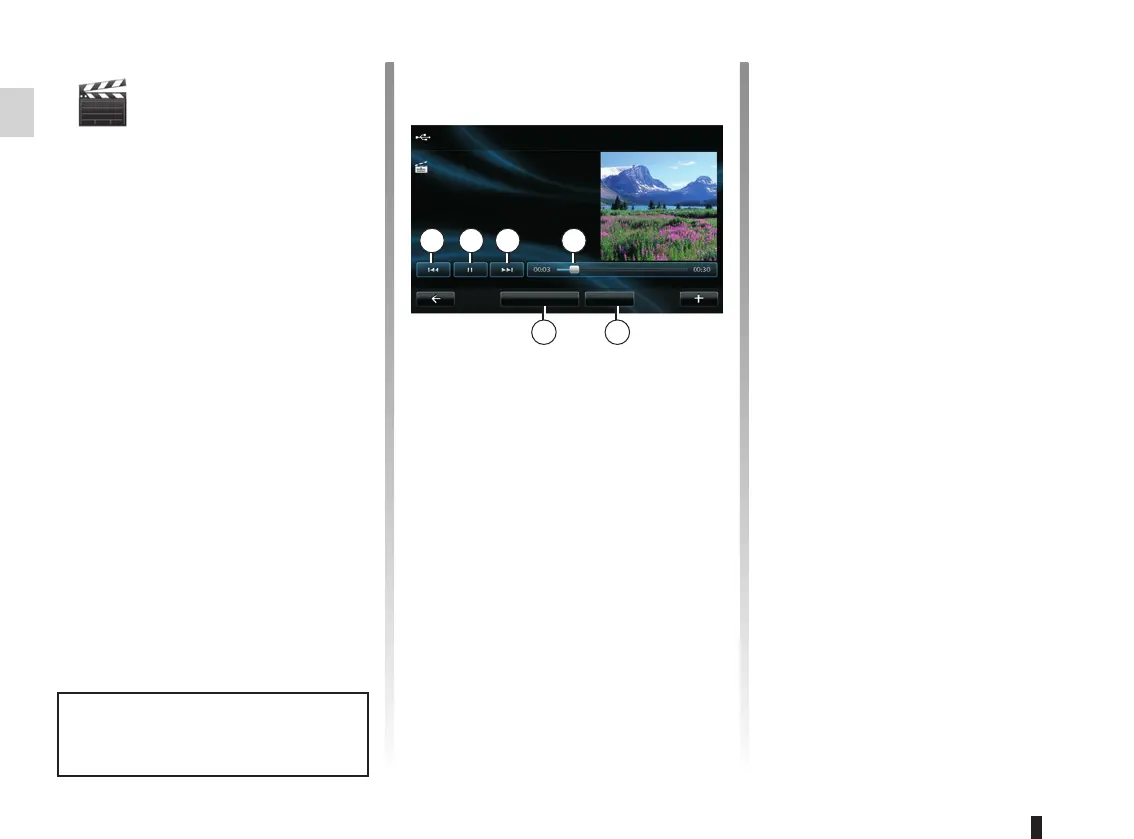
When playing a video, you can:
– access the previous video by press-
ing 1;
– pause by pressing 2;
– access the following video by press-
ing 3;
– view the scroll bar 4;
– view the video in fullscreen 5;
– select a new videos by pressing 6.
Pop-up menu “+”
During video playback, press “+” to:
– change the source;
– access the settings.
Settings
From the settings, you can choose the
type of display, normal (half-screen) or
fullscreen.
Press “Done” to confirm.
Note: the display is in normal mode by
default.
Video playback is only possible
when the vehicle is stationary.
1 32 4
56
USB key
New selection Full screen
Landscapes
Accessing videos
From the “Multimedia” menu, press
“Video” then select the source con-
nected (SD card, USB, etc.) to access
videos. The system offers you two op-
tions:
– “play all videos”;
– “play a video”.
Note: The source video formats can be
MPEG4, WMA, WMV, etc. Some video
formats cannot be read by the system.
Options from folders
From the list of folders/videos, press “+”
to:
– change the source;
– access the settings.



 To Next Page