GB.4
GENERAL DESCRIPTION
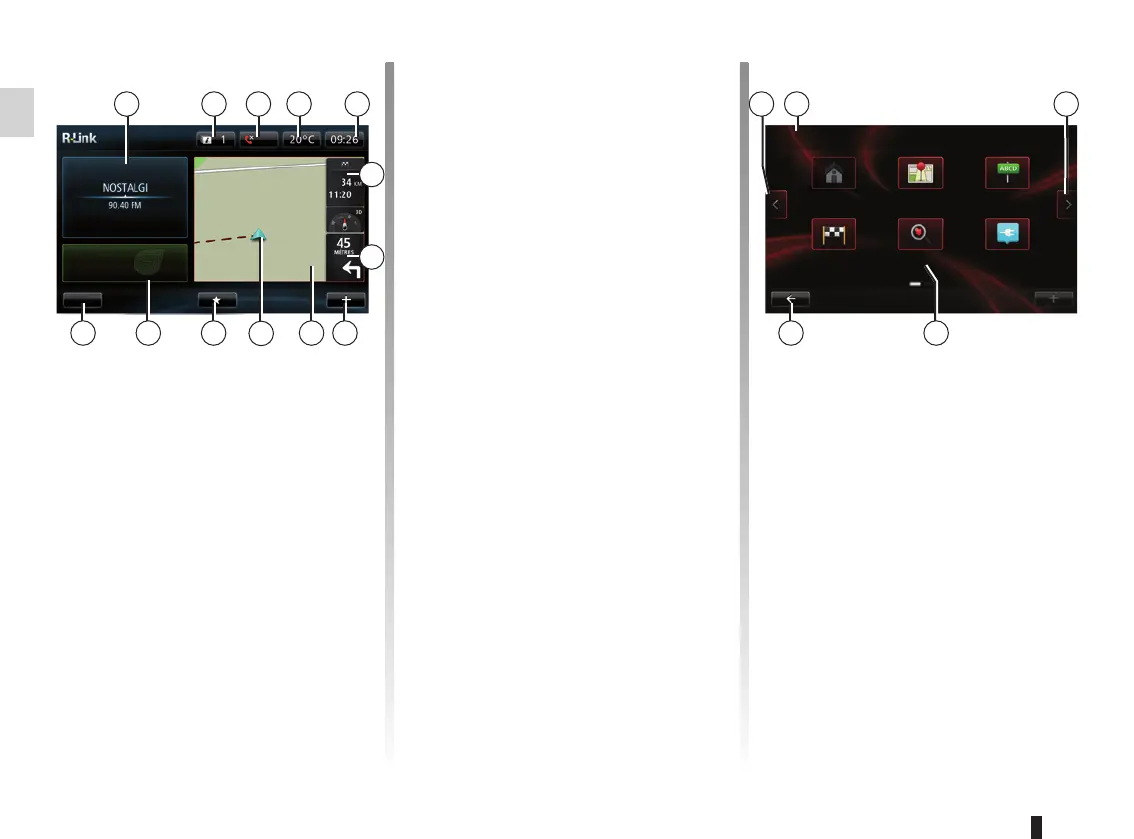
Menu screen
O Go to previous page.
P Name of menu.
Q Go to next page.
R Name of function or of sub-menu.
S Return to previous menu.
Welcome screen
(depending on the vehicle, the dis-
played information varies)
A Audio information.
B System notifications.
C Phone menu access/State of con-
nected phone
D Exterior temperature.
E Time.
F Traffic information.
G Instructions for navigation and dis-
tance to next change of direction.
Drive to...
Home Saved loca-
tions
Address
Recent desti-
nations
TomTom
Places
Charging
station
FM1
flow
Menu
Preset 3
A O QC
R
B PD E
F
G
HIKLM
H Pop-up menu.
I Navigation map.
J Current vehicle position.
K Favourites.
L Driving Eco² / Energy for electric ve-
hicles.
M Main menu.
Note: You can change the configura-
tion of the welcome screen. Please see
the information on “Welcome screen” in
the “System settings” section.
S
J



 To Next Page