GB.52
MEDIA
Playback
You can choose between playing all the
tracks or playing a single track.
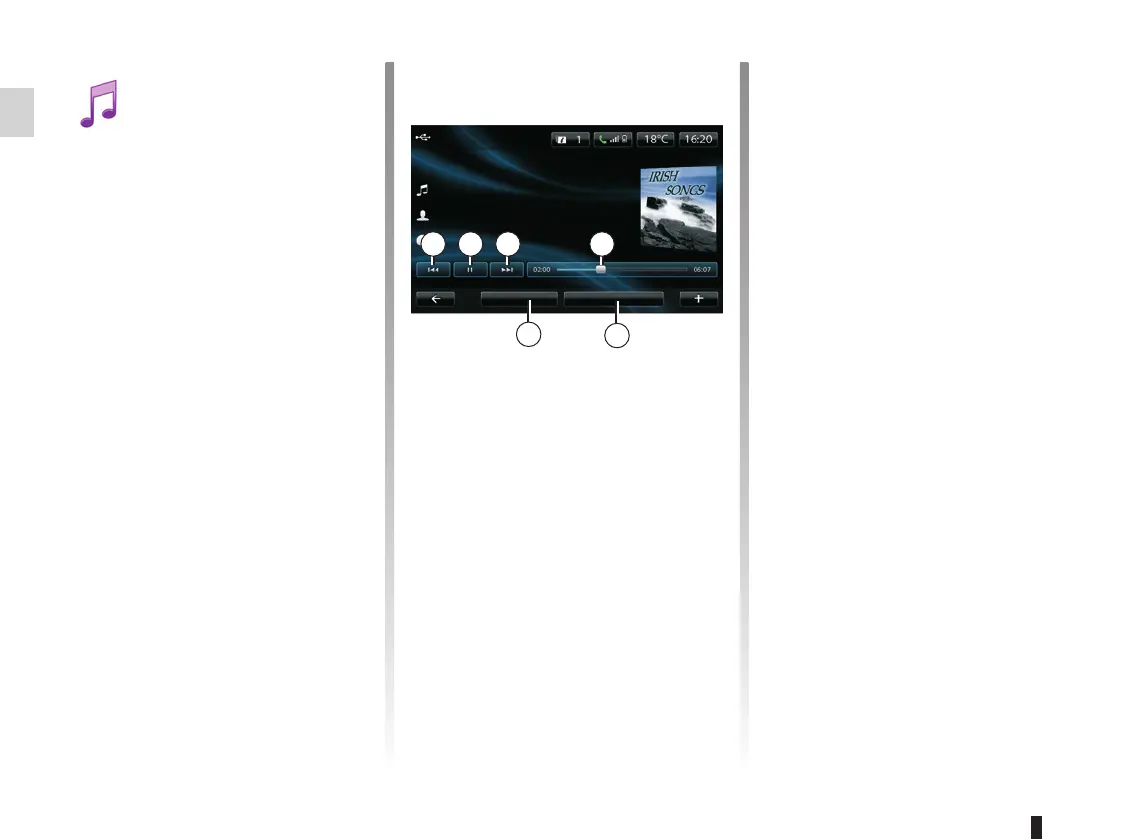
When playing a track, you can:
– access the previous track by press-
ing 1;
– pause by pressing 2;
– access the next track by pressing 3;
– view the scroll bar 4;
– access the current playback list 5;
– make a new music selection 6.
Pop-up menu “+”
During playback, the pop-up menu “+”
enables you to:
– change source;
– activate the shuffle function;
– activate repeat playback;
– give the track details for the current
track;
– access sound settings.
From the main menu, you can:
– access the audio files directly;
– access files, music, genres, artists,
albums and reading lists;
– access files and/or audio files.
Note: only available sources can be
selected. Unavailable sources will be
greyed out.
3 4
New selection
USB key
Summer in Dublin
Highland Poets
Current playlist
Irish Songs
21
5
6
Accessing media
This menu enables you to listen to
music from an external source (audio
CD, USB, SD card, etc).
From the main menu, press
“Multimedia”, then “Media”.
Select an input source connected to the
system to access the audio files from
the following list:
– Audio CD (depending on the vehi-
cle);
– USB;
– SD card;
– auxiliary socket;
– Bluetooth® connection.



 To Next Page