call ......................................................................... (current page)
dialling ................................................................... (current page)
GB.47
ENG_UD29587_2
ULC/Emettre un appel (ULC - Renault)ENG_NX_1023-3_NX_Dacia_0
Refer to the information on “Calling a
number in the phonebook” in the sec-
tion on “Phonebook”.
You can use the calling list stored on
the memory of phone.
After connecting your unit and
Bluetooth® phone via Bluetooth®
wireless technology, the numbers in
your phone’s All Calls, Outgoing Calls,
Incoming Calls, and Missed Calls list
is transferred automatically into calling
list.
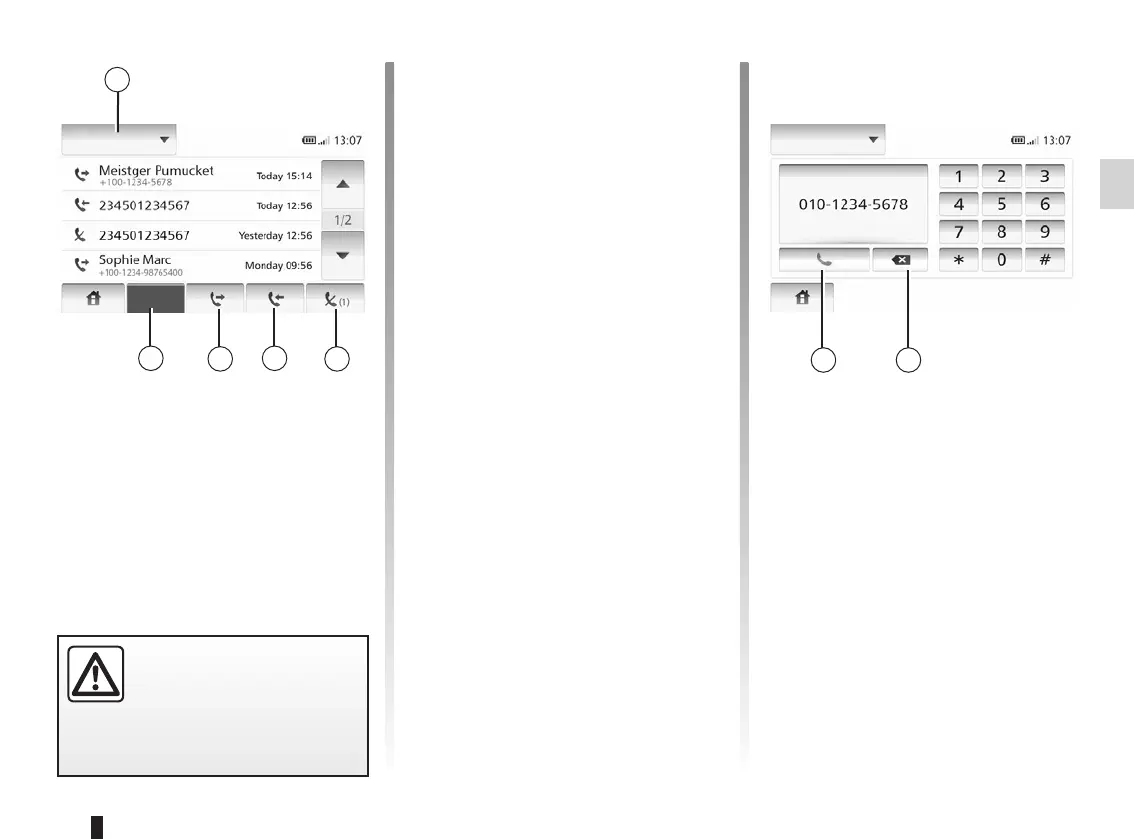
Press 1 to scroll through the list, then
“List of calls”.
Tap 5 to access to the list of All Calls.
Tap 4 to access the list of Outgoing
Calls.
Tap 3 to access the list of Incoming
Calls.
Tap 2 to access the list of Missed Calls.
For each list, the contacts are listed
from the most recent to the oldest.
Select a contact to make the call.
Tap 1 to scroll the list and then tap
“Dial” to make a call entering a number.
Tap the number buttons to make a call
and then tap 7
To correct a number tap 6. Press and
hold 6 to delete all the numbers at once.
It is recommended that you
stop your vehicle before en-
tering a number or search-
ing for a contact.
Lists of calls
All
Dial



 To Next Page