GB.29
READING A MAP
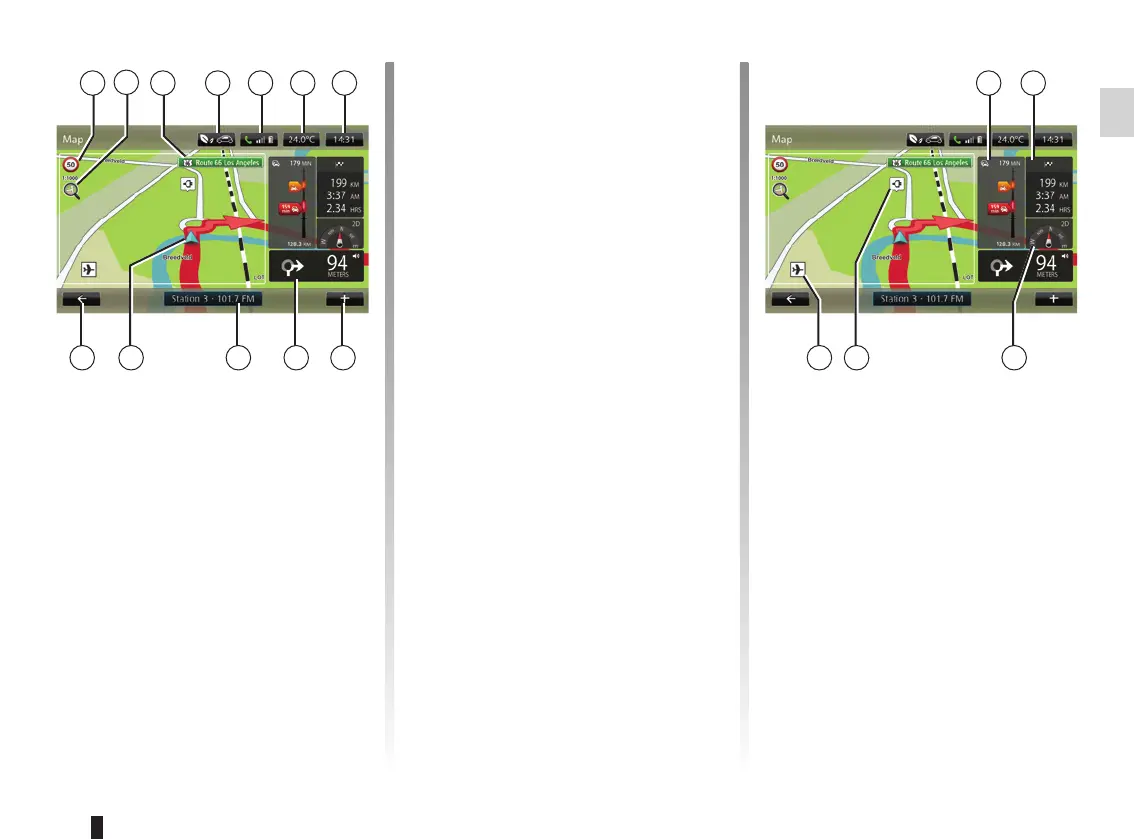
Map key
A Sign giving the speed limit (the speed
given depends on the unit chosen).
Please refer to the “System settings”
section for more information on the
choice of units.
Note: the sign turns red and flashes
if you drive faster than the speed limit
B Zoom, touch the magnifying glass to
display the zoom in and out buttons.
C Name of the next main road or road
sign information, if applicable.
A
HJK
Map colours
You can change the colours on the
map: from the main menu select
“Navigation”, “Settings” then “Change
map colours”.
Map icons
The navigation system uses Q symbols
to display points of interest (POI).
Recharging stations
(electric vehicle)
The navigation system uses the P
symbol to display recharging stations.
D F G
IL
E
D Outside air quality (depending on the
vehicle).
E Telephone information.
F Outside temperature (Weather).
G Current time.
H Pop-up menu.
I Distance to and indication of next
turning / Adjustment of guidance in-
struction volume.
J Audio system information.
K Current vehicle position.
L Back to previous page.
M Traffic information bar: displays inci-
dents on the route, traffic info recep-
tion indicator, access to traffic map.
N Journey information such as arrival
time, total distance remaining and
whether you will reach your destina-
tion (chequered flag or chequered
with lightning symbol on red back-
ground)/Journey summary
O Compass/ 2D/3D mode.
Note: Access to the full navigation page
is only possible from the “Navigation”
tab on the main menu.
O
NMC
B
PQ



 To Next Page