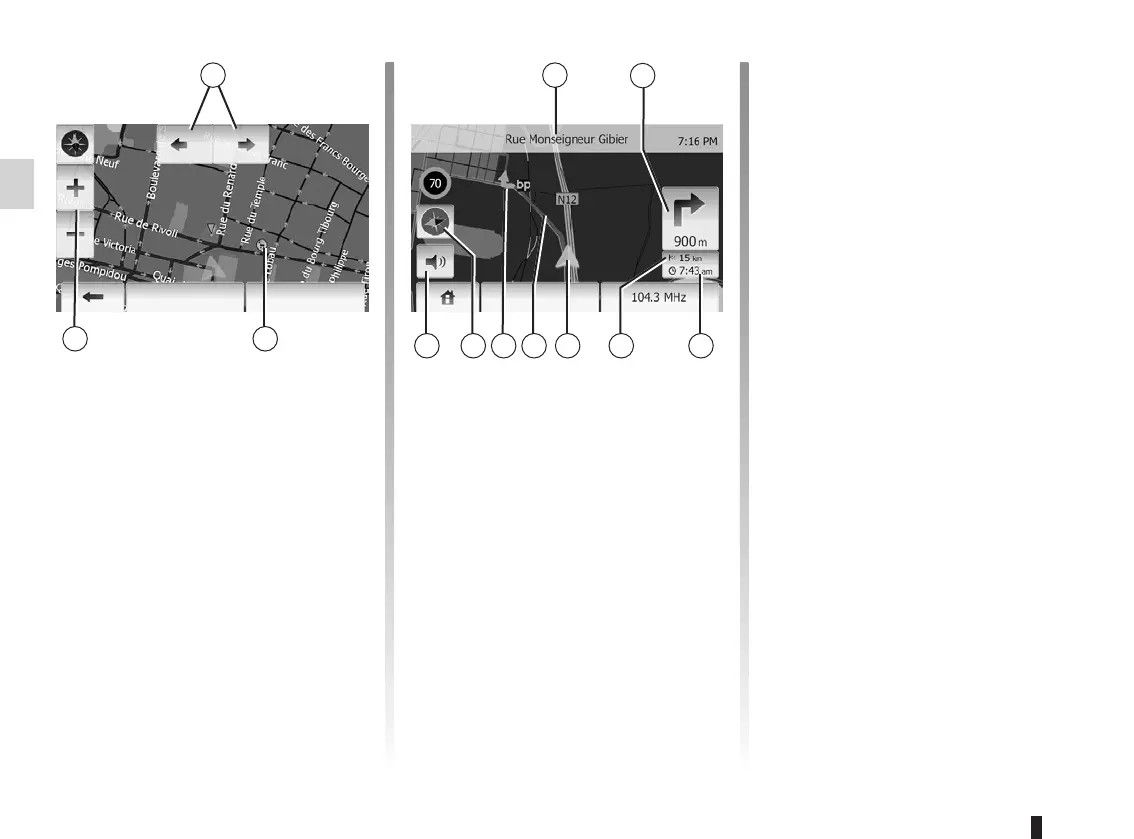
map
display ..............................................................(current page)
map
scale ................................................................(current page)
GB.22
ENG_UD29547_3
ULC/Lire une carte (ULC - Renault)ENG_NX_1023-3_NX_Dacia_0
To display the map around the current
vehicle position, press “Home” > “Show
map”.
Touch the map screen.
To move around the navigation map,
drag the desired direction on the
screen.
Press 3 to change the scale.
Rotate the map by pressing 1.
4 Name of the next major road or road
sign information, if applicable.
5 Distance to and direction of next
change of direction.
6 Estimated time of arrival.
7 Distance remaining to the destina-
tion.
8 Location of the vehicle on the navi-
gation map.
9 Route calculated by the navigation
system.
10 Indicates the direction change.
11 2D/3D mode.
12 Mute/unmute the voice guidance.
This function makes it possible to find
out the geographical location of the se-
lected position (Address/latitude/longi-
tude).
Touch desired position on the screen.
Press “Options” and then press “News”
to find out the exact location of the se-
lected position.
Press 11 to change the map view be-
tween 2D and 3D.
The navigation system uses icons 2 to
display points of interest (POI). Refer to
the information on “Display points of in-
terest” in the section on “Map settings”.
OKOptions Options



 To Next Page