GB.12
INTRODUCTION TO THE CONTROLS (8/8)
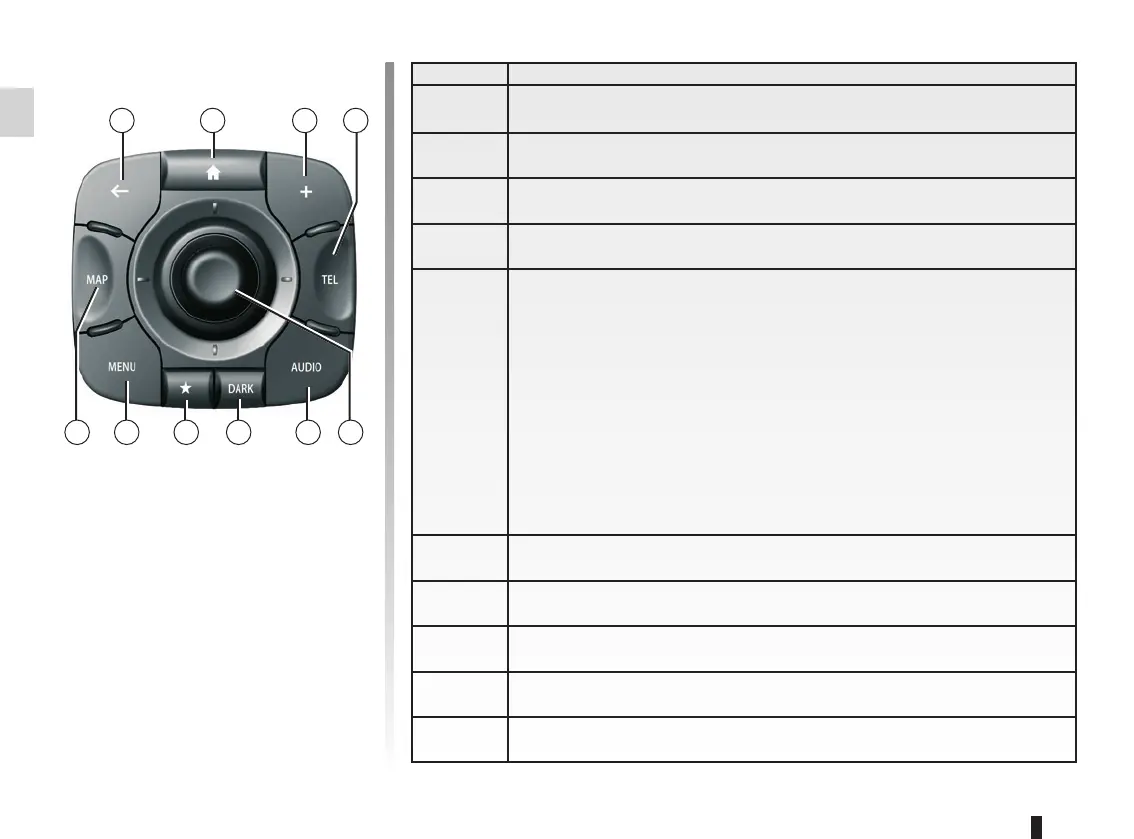
Central control
39 41 42
434445464748
Function
39 Go back to the previous menu.
40 Go to the welcome screen.
41 Open the pop-up menu.
42 Access the telephone menu
43
Switching:
– move around the map or in a menu/page;
– up/down: move around the various areas of a menu (upper bar, cen-
tral zone, lower bar);
Rotate:
– move around the various elements of a zone;
– move around a list;
– modify the scale (ZOOM mode).
Press:
– confirm.
44 Open the source screen while listening (radio, audio CD, etc).
45 Activate the standby screen to hide the map.
46 Access favourites
47 Go to the main menu.
48 Access the navigation page.
40



 To Next Page