GB.36
TRAFFIC INFORMATION (2/3)
Traffic display
The navigation system indicates traffic
incidents:
– by displaying symbols on the map
(list of icons at the end of the sec-
tion);
– with voice messages if the route is
recalculated.
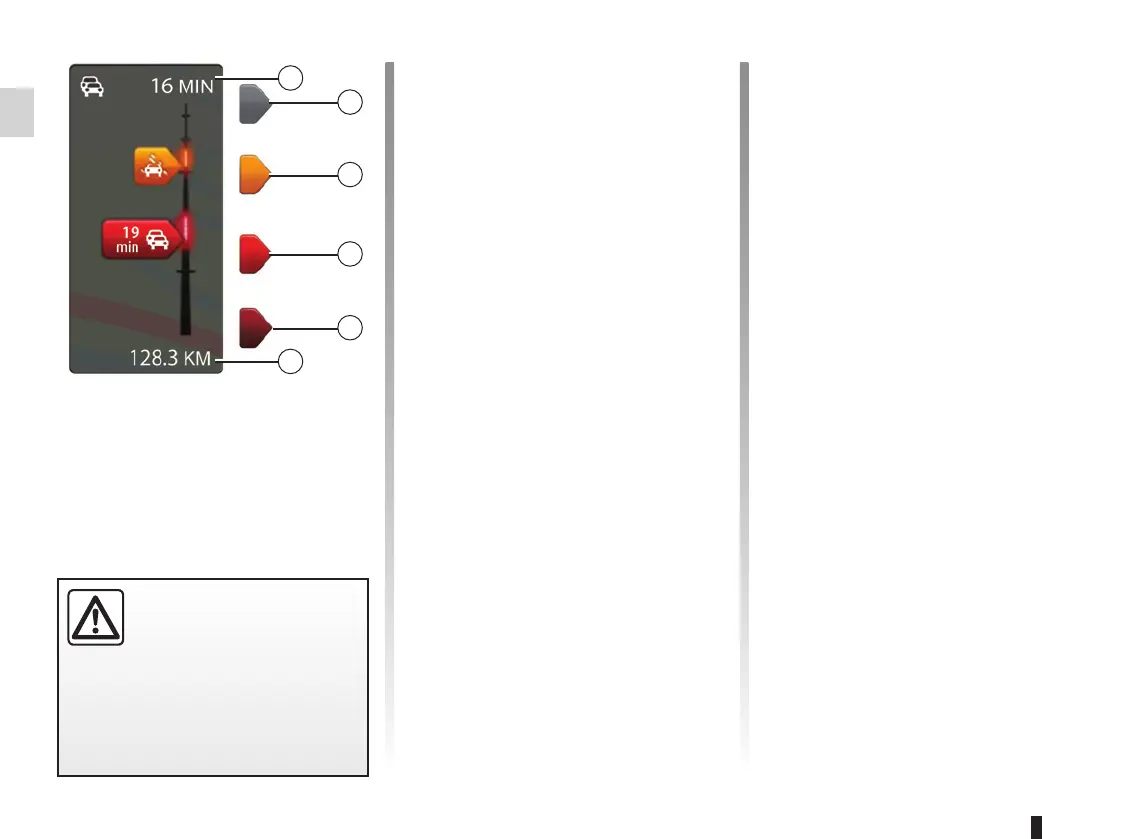
Depending on the operating status of
the Traffic Information service, the fol-
lowing icons are displayed on the traf-
fic sidebar:
A Heavy delays on the route;
B Unknown or indeterminate situation;
C Slowdown;
D Traffic jam;
E Stationary traffic or road closed;
F Distance before next incident.
Traffic bar
The traffic bar is available for the Traffic
Information services.
The side traffic bar displayed in guid-
ance mode, shows the latest traffic in-
formation for your route.
B
C
D
E
F
A
Precautions regarding
navigation
Use of the navigation
system does not in any way
replace the responsibility or vigi-
lance of the driver when driving the
vehicle.
“HD Traffic™” service
options.
Available on subscription, the “HD
Traffic™” service offers more frequent
updates (every 3 minutes), covering
main and secondary roads.



 To Next Page