27
en
Note
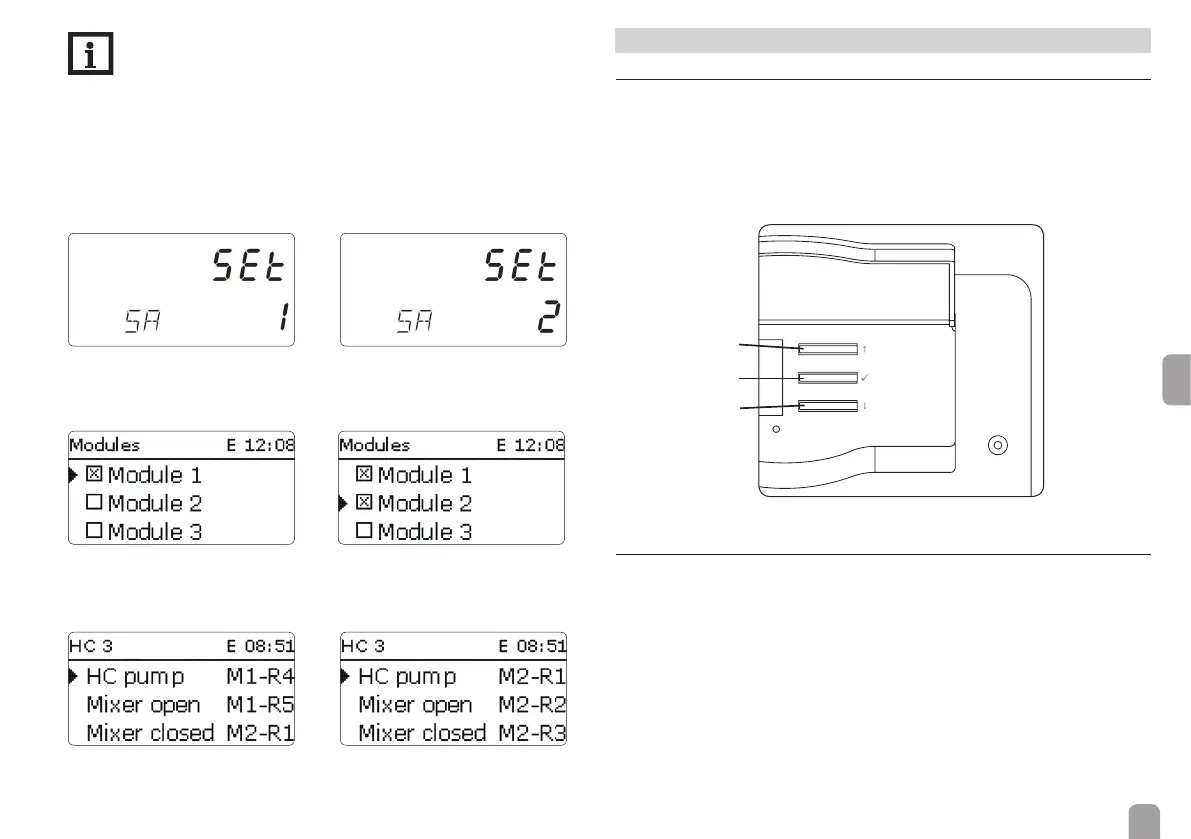
If further modules are to be connected to the controller, the sub-address
(SA) has to be entered rst.
To register the module in the controller, use the same number that has
been selected as sub-address!
Example: If SA = 2, register the EM as module 2 in the controller.
Adjustments on the second module:
Î Assign the sub-address (SA = 2).
ACTUAL state TARGET state
Adjustments on the controller:
Î Select module 2.
ACTUAL state TARGET state
Î Activate a further heating circuit (heating circuit 3).
Î Carry out the adjustments as described above.
ACTUAL state TARGET state
!
!
!
4 Operation
4.1 Buttons
The device is operated via the 3 buttons next to the display.
Button : scrolling backwards through the menu or increasing adjustment values
Button : scrolling forwards through the menu or decreasing adjustment values
Button : changing to the adjustment mode or con rming
If an adjustment value is shown on the display, Ⓢ is displayed. Brie y press button
in order to access the adjustment mode.
4.2 Selecting channels and adjusting values
Î Select the requested channel using buttons and
Î Brie y press button , Ⓢ ashes (adjustment mode)
Î Adjust the value by pressing buttons and
Î Brie y press button
Ⓢ permanently appears, the adjusted value is stored.


 To Next Page