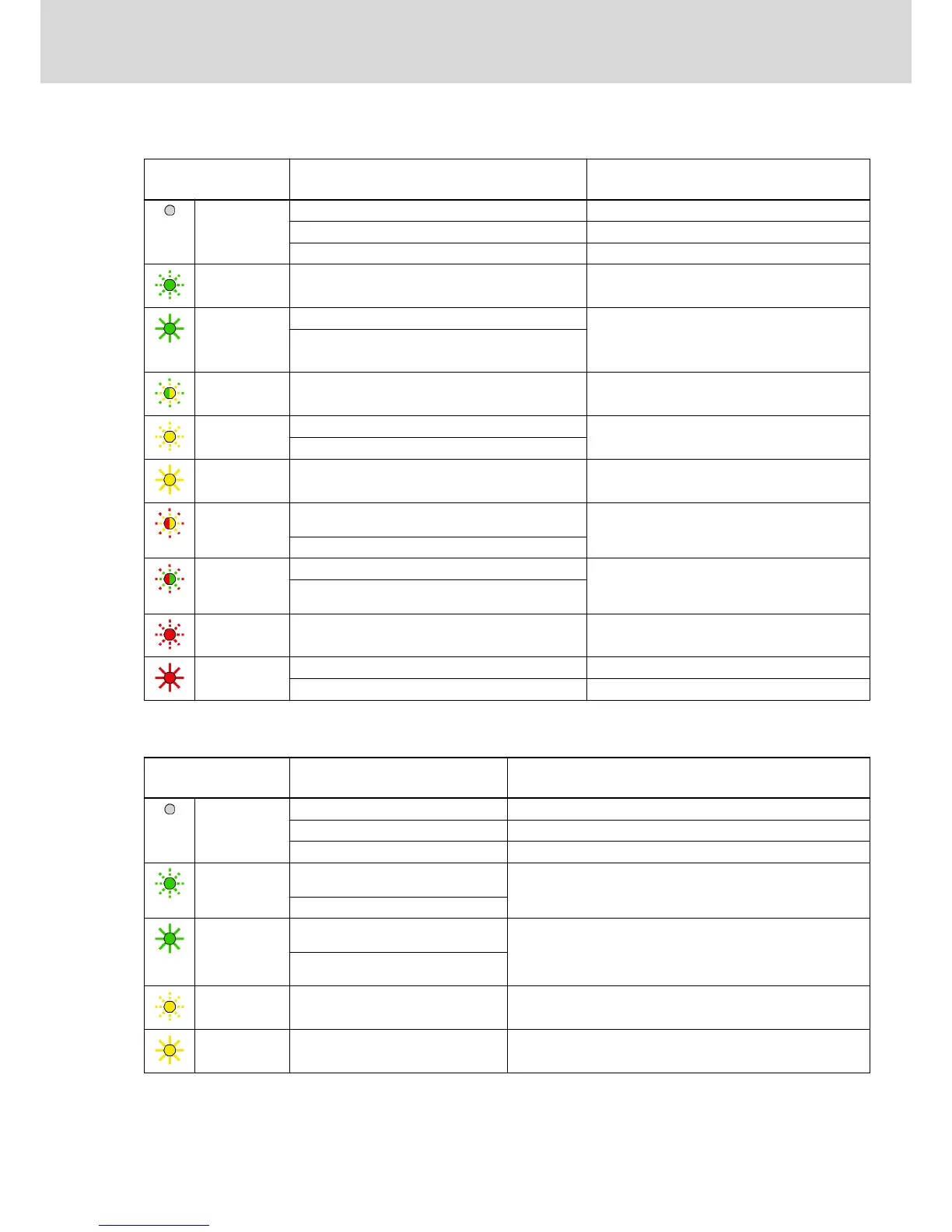
Diagnostic Display as of MPB-07V12 / MPx-08VRS
LED H14
Color / status
Significance Measures
Off Supply unit not switched on Check supply unit and, if necessary, switch it on
Cable interrupted Check cable and connector
Hardware defective Replace hardware
Flashing green Drive is error-free (phases 2, 3 and 4); in phase 4, drive
is ready for drive enable ("Bb")
If necessary, read exact status via "S‑0‑0095, Diag‐
nostic message"
Green Power on and DC bus voltage available ("Ab") Drive is error-free in operation and runs according to
inputs
NOTE! If you remove the connectors from the device
in this status, this might damage the device!
Drive in control ("AF", "AH" or drive command active
(Cxxx))
Flashing green-
yellow
Transition command (C2xxx/C1xxx)
Transition command error (C2xxx/C1xxx)
If necessary, read exact status via "S‑0‑0095, Diag‐
nostic message"
Flashing yellow Warning (E2xxx … E8xxx) Read exact status via "S‑0‑0095, Diagnostic mes‐
sage" and carry out service function
Drive command error (Cxxx)
Yellow Firmware update running During the firmware update, do not interrupt the 24V
supply and do not unplug connectors
Flashing red-
yellow
Drive is error-free (phase 1), but not yet ready for drive
enable ("Bb")
If necessary, read exact status via "S‑0‑0095, Diag‐
nostic message"
Communication error (F4xxx)
Flashing red-
green
Baud rate scan (P‑1) If necessary, read exact status via "S‑0‑0095, Diag‐
nostic message"
Drive is error-free (phase 0), but not yet ready for drive
enable ("Bb")
Flashing red Error (F2xxx, F3xxx, F6xxx, F7xxx, F8xxx) Read exact status via "S‑0‑0095, Diagnostic mes‐
sage" and carry out service function
Red Booting phase Wait until booting phase is over (approx. 2 minutes)
System error (F9xxx, E0800) Switch off and on; replace hardware, if necessary
Fig.5-11: LED Displays KSM/KMS (as of MPB-07V12 / MPx-08VRS)
Diagnostic Display up to MPB-07V10
LED H14
Color / status
Significance Measures
Off Supply unit not switched on Check supply unit and, if necessary, switch it on
Cable interrupted Check cable and connector
Hardware defective Replace hardware
Flashing green Drive is error-free, but not yet ready for
drive enable ("Bb")
If necessary, read exact status via "S‑0‑0095, Diagnostic message"
Parameter Mode
Green Drive in control ("AF", "AH" or drive
command)
Drive is error-free in operation and runs according to inputs
NOTE! If you remove the connectors from the device in this status,
this might damage the device!
Power on and DC bus voltage available
("Ab")
Flashing yellow Warning Read exact status via "S‑0‑0095, Diagnostic message" and carry
out service function
Yellow Firmware update running During the firmware update, do not interrupt the 24V supply and do
not unplug connectors
DOK-INDRV*-KMS01******-IT01-EN-P
Rexroth IndraDrive Mi Distributed Drive Controller KMS01
Bosch Rexroth AG 39/67
Instructions for Use



 To Next Page