47
Bolero User Manual A20
3.4.1.2 Menu
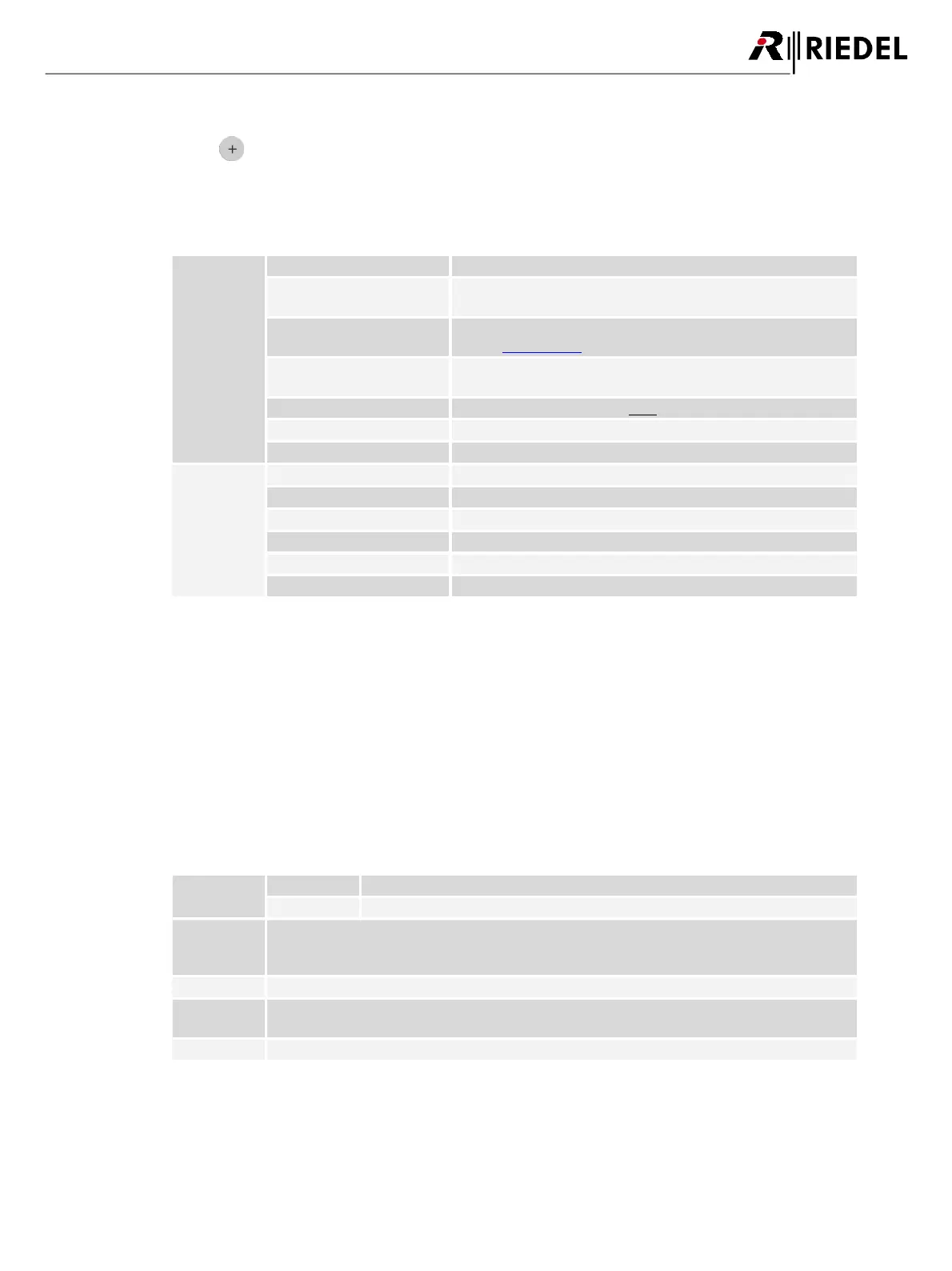
Clicking the symbol shows a menu with the following options. The dialog can be closed by pressing the ESC key or
by clicking on another region in the window.
Edit Network Space
IP address for the communication between the Bolero Net and the
Artist system.
Defines the admin PIN (is required to log into the system, see
chapter Login/Logout).
Defines if the Net is operated in stand-alone mode (AES67) or if the
Net is connected to an Artist system (Artist).
Selection of the radio power (High, Medium, Low, Ultralow).
Enabling/Disabling the radio of the Antenna.
Selection of the PTP domain (default: 0).
Selection of the date format (ddmmyyyy, mmddyyyy, yyyymmdd).
Selection of the time format (12h, 24h).
Selection of the system time source (Internal, PTP, NTP).
Field to enter time and date manually.
Field to enter the IP address of the NTP server.
Field to change the time zone.
*1
if Time-Source = Internal
*2
if Time-Source = NTP
Remove Selected Antennas
Removes all selected Nodes from the respective Net after confirmation.
Reboot Selected Antennas
Reboots all selected Nodes after confirmation.
Factory Reset Selected Antennas
Set all selected Nodes to factory default settings after confirmation.
Registration Mode
Enabling the Registration Mode of the Net.
If enabled, Beltpacks are allowed to register via DECT radio to this Net.
If enabled, Beltpacks are allowed to register via Antenna NFC to this Net.
Use Admin
PIN for OTA
Registration
If enabled, the Admin PIN must be entered in the Beltpack during the registration procedure. If
disabled, another field is visible to define an 'OTA Registration PIN' that must be entered in the
Beltpack during the registration procedure.
Selection of the profile, that will be assigned to a new registered Beltpack.
If enabled, the registration to this Net will be disabled after a defined timeout.
Timeout in minutes to disable the registration to this Net.




 To Next Page