56
Bolero User Manual A20
3.4.5.4 Upload Net Config
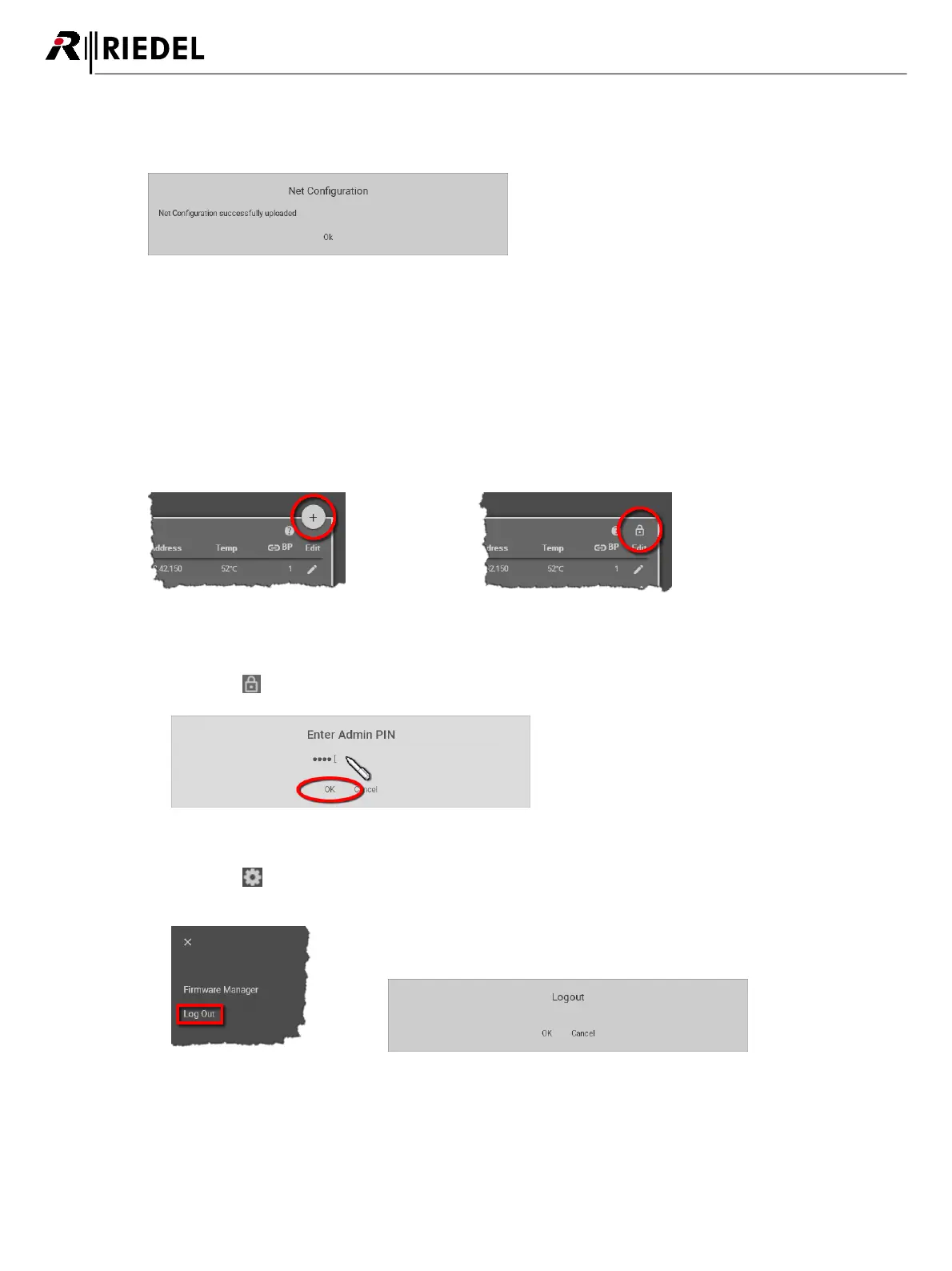
This function allows loading a previous stored Net configuration into the system.
Figure 48: Web-Interface – Upload Net Config
After executing this function a dialog is opened to select the desired ".bol" file.
The configuration is applied to the Net without confirmation.
3.4.5.5 Login/Logout
To be able to modify Net settings, the user must be logged into the respective Net.
A big plus symbol is displayed in the top right of a Net if the user is logged in.
If no user is logged in, a lock symbol is displayed instead.
Figure 49: User logged in
Figure 50: User logged out
Login
Click on the symbol to log into the Net. A dialog is opened to enter the Net's Admin PIN.
Figure 51: Dialog – Enter Admin PIN
Logout
Click on the symbol to open a window on the right side. Click on Logout to open the dialog for
confirmation. Click on OK to log out of the system.
Figure 52: Logout function
Figure 53: Logout confirmation




 To Next Page