64
Bolero User Manual A20
·
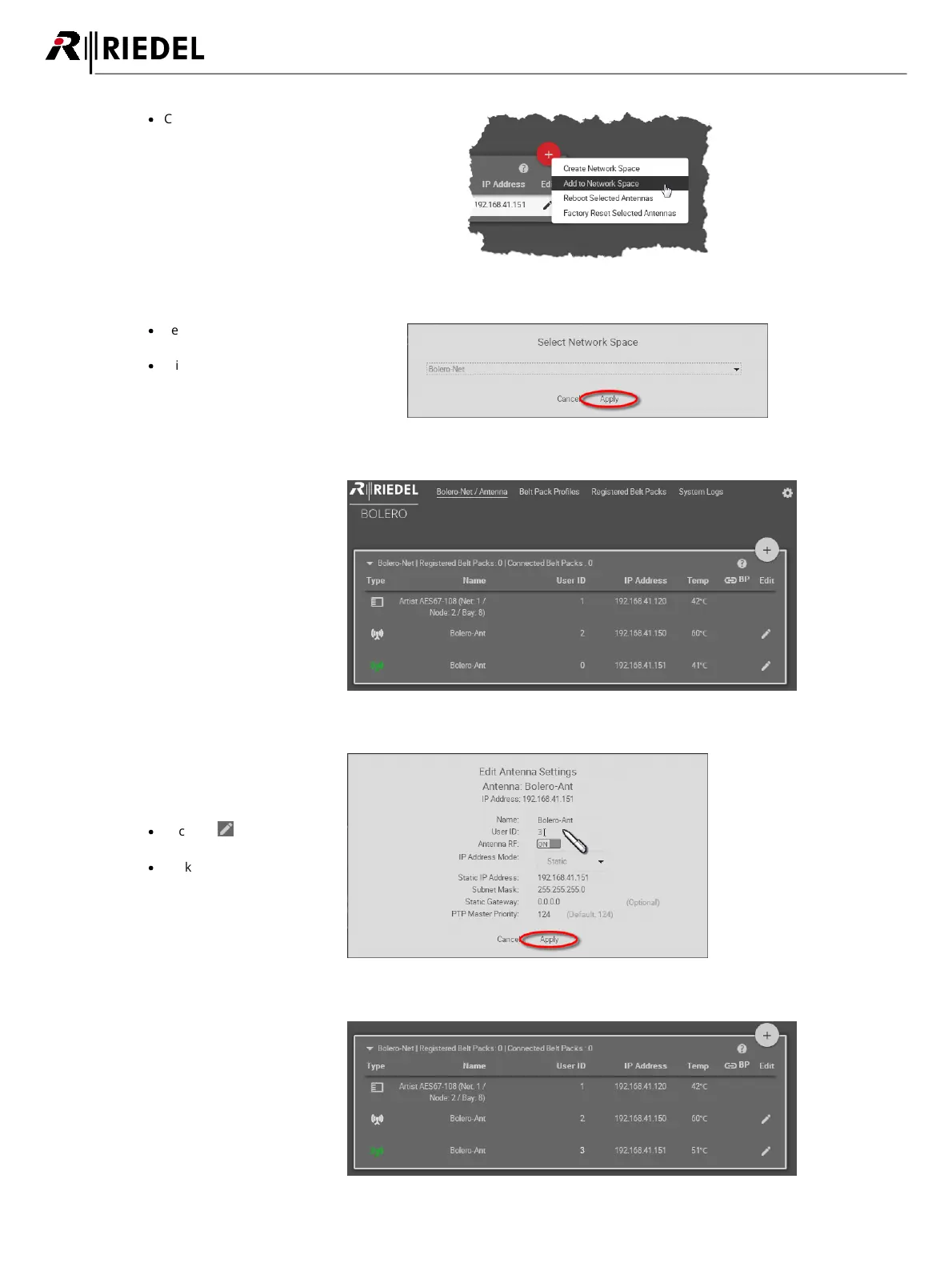
Click on the plus symbol off the unassigned
Antenna(s) and select the entry 'Add to
Network Space'.
A dialog is opened to select the Net.
Figure 73: Add to Network Space
·
Select in the drop-down menu an
existing Network Space.
·
Click the Apply button.
Figure 74: Dialog – Select Network Space
This example shows the new
added Antenna in the existing
Network Space Bolero-Net.
Figure 75: Added new Antenna in the Bolero-Net
Do not forget to assign a
unique User ID to the new
Antenna.
·
Click the Edit icon of the
new Antenna.
·
Click the Apply button.
Figure 76: Apply unique User ID
Now the Network Space
consists of two Antennas and
one AES67 card.
Figure 77: Nodes in the Bolero-Net




 To Next Page